
Dozel
Members
-
Joined
-
Last visited
Everything posted by Dozel
-
Try set Plugin timeout threshold to 60000 in RagePluginHook settings. Then add the game folder to the antivirus exclusion, and unblock LSPDFR and RPH files. And lastly clear your commandline.txt, it's text document too, into your GTA V main directory. You also can try run the game without mods folder, to disable it, just rename 'mods' folder to _mods, for example. And also try reinstall LSPDFR. Delete all files, especially Plugins folder. Then install LSPDFR using MANUAL install, then install RagePluginHook from official site.
-
Reason of this crash was Burglary Callout from one of your plugins. And I noticed that you have LSPDFR+, this plugin is out of date and can unstable the game. Ideally, I want to ask you to list all of your plugins that installed (in plugins and LSPDFR folders).
-
Please, attach your RagePluginHook.log. It's a text document into your GTA V Main directory.
-
Please, attach your RagePluginHook.log. It's a text document into your GTA V Main directory.
-
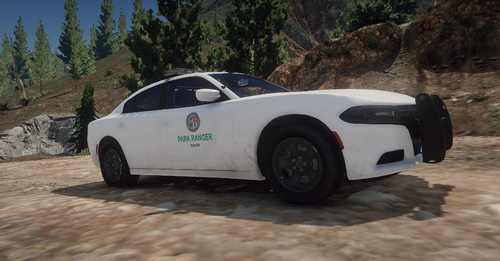 Looking great! ELS required.
 -
My idea is AmbientAICallouts, cool plugin, but unstable.
-
Uhm.... Press LALT(or Fn)+PrintScreen button to make screen. Try set Main.PreloadAllModels = false in lspdfr.ini into Grand Theft Auto V directory\lspdfr.
-
Increase your Plugin Timeout Threshold to 60000 into Rage Plugin Hook settings.
-
It's GTA V support Topic. Sorry, but I can't help you.
-
Set 'Plugin Timeout Threshold' to 60000 in your RagePluginHook settings.
-
Удали Regular Callouts и попробуй поиграть без него какое-то время.
-
Attach your RagePluginHook.log, it's a text document into your GTA V directory.
-
Can you attach a screen?
-
Judging by the log, problem probably in your game. You tried play in GTA V without Rage for a while?
-
remove all RPH files from the GTA V Directory.
-
Maybe you incorrectly install RPH. Game is working without Rage?
-
Try verify your game files, and launch the Rage.
-
Rename your mods folder to _mods, for example, and try start the game with Rage again.
-
Did you install cars to your GTA? If yes, make sure you have this installed too:
-
Attach your RagePluginHook.log - it's a text document into your GTA Main directory.
-
GTA V doesn't have vehicle.img file.
-
If LSPDFR stuck on loading, try increase Plugin Timeout Threshold to 60000
-
I think problem with LP Callouts, try play temporary without that.
-
You need install this cars on CLEAR mods folder. Or maybe you somehow installed the machines incorrectly.
-
You're welcome, Enjoy. Oh by the way, make sure you have latest Windows update, because this method is only a temporary panacea. Ideally, you should run RagePluginHook.exe, and the game should launch itself, even with EGS