



ericcelrosu
Members
-
Joined
-
Last visited
Everything posted by ericcelrosu
-
-
 a very easy fix actually, adjust the offsets in the in-game editor until the light source isn't blocked by anything in your desired direction, then save it for that specified veh
- 477 comments
- 73 reviews
-
You are still right but the script only detects the vanilla interceptor and some other car models which are made specifically compatible with it. You should be able to find it by using the site filters.
- 477 comments
- 73 reviews
-
-
 A bit of backstory to the characters is always a nice touch. Maybe give a thought about a mod that lets you see the others which aren't active like we have with the original protagonists. @Sam this worth in my opinion your attention about a future project, having 3 main characters working in the force but in different departments 😉
- 24 comments
- 3 reviews
-
-

- 1
-
-
Well after some time it's pretty normal for a crash to occur since LSPDFR itself isn't as stable as the original game. Plus some other mods you're running.
- 477 comments
- 73 reviews
-
It's been a little change to the tracking system since the last update: Now tracking chooses the pedestrian or vehicle closest to where the spotlight is aiming.
- 477 comments
- 73 reviews
-
Well that's because the light source does not exist in the game universe, it's more like let's say a sticker on a painting. You can however enable the spotlight on the heli by a trainer simultaneously with the spotlight mod, so when the turret moves the light source will follow
- 477 comments
- 73 reviews
-
Make sure the numpads aren't locked by NumLock. Either way, it's way more convenient to move it by holding Ctrl and rotating the view angle so the spotlight can follow 😉
- 477 comments
- 73 reviews
-
You can add a new category of vehicle in the same section where you select the vehicle model
- 477 comments
- 73 reviews
-
So with the new update, seems like cops can investigate an area and arrest in a more peaceful way the suspects. But afaik suspects either in pursuit or recently discovered(like a suspect vehicle event) will try to flee everytime you are close to them. So that video showing how npc cops can arrest in that way can be possible only manually(like a console command) and never naturally since there are no callouts or random events regarding it. Also I noticed while in search mode some npc cones turning white instead of blue, maybe it's related to the investigation approach thing. I kinda wanna know more how to let's say actually encounter some situation where investigation mode comes in handy or automatically initiate itself. @LMSseems like it's your domain for a more detailed explanation in a gameplay perspective rather than in an developer one.So let's begin. I know there are a lot of visual settings like ELS and RadianceV which makes policing a lot realistic. But I'm suggesting something new, which even if it's probably gonna look a more game-ish, it will be more convenient in terms of lightning. Let's take a look at a picture of an attempt to make siren lights more realistic I understand that lights during nighttime can shine pretty far, but I think that's a bit too much: Instead I'm proposing something more basic and also more pleasant to look at: The way this light works it's pretty simple, just shines more strong in a close range. If anyone is up for doing this for vanilla cars at least, please do let me know.
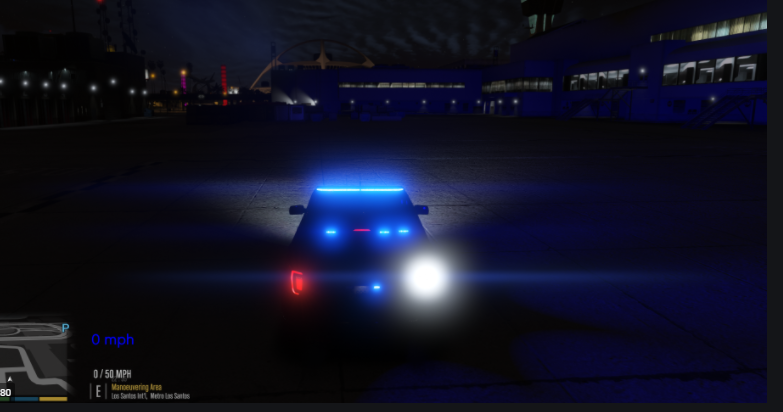
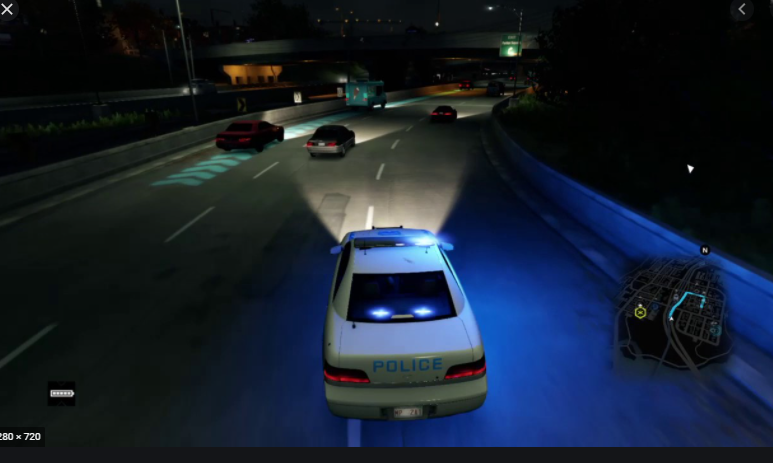 Well I guess you gotta get along better with the manual movement by pressing the Ctrl buton and moving the mouse on it for more realism :))
- 477 comments
- 73 reviews
It's not glitched and I bet you're using either a replacement or an addon. Be sure to adjust the light source coordinates from the in-game menu till you're satisfied.- 477 comments
- 73 reviews
Might be a mistake in the installation process of yours, be sure to follow the instructions- 477 comments
- 73 reviews
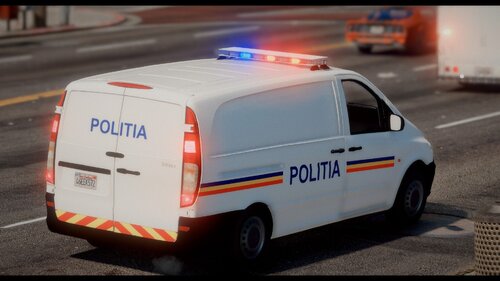 Este replace de la burrito, doar inlocuiesti fisierele si spawnezi duba respectiva. Hai sa ne limitam la engleza pt viitor :))
The menu is a bit unstable, try to adjust the settings once for good. Tough if you need to adjust it for more vehicles, which can imply opening it more times, make sure that you have unloaded all other plugins when making changes to avoid any crash.
Este replace de la burrito, doar inlocuiesti fisierele si spawnezi duba respectiva. Hai sa ne limitam la engleza pt viitor :))
The menu is a bit unstable, try to adjust the settings once for good. Tough if you need to adjust it for more vehicles, which can imply opening it more times, make sure that you have unloaded all other plugins when making changes to avoid any crash.- 477 comments
- 73 reviews
Yes but you will need to adjust the light to proper shine from your desired spot.- 477 comments
- 73 reviews
-
-

- 1
-
 I encountered a small issue while playing: I've noticed for MVA callouts if the npc vehicle dispatched cannot park properly, it will be automatically teleported in the proper position. But if the ai navigation path is too chaotic (because Rockstar) the car have a slight chance to flip over as my issue happened. Of course nothing will happen to that callout which will be stuck forever. Maybe add a decent timer to teleport the car there like stop the ped does when calling an ambulance 😉
- 346 comments
- 43 reviews
So everything in LSPDFR works perfectly fine, except for one thing: when I first start the game it runs smoothly about 60-65 fps which is perfect. But sometimes drops suddenly at 40-45 fps, and there's a slight chance to revert back to 60. But I figured out a way to fix this thing more quickly instead of waiting. I press the windows tab for the desktop to show up, open task manager and close it, and to a desktop refresh a few times. This for some reason will boost my game performance, but unfortunately only for 2 or 3 min or less. I have tested if driving fast with a lot of population and trees will affect it, it won't. Any ideas how to fix that for good?
Try this if you want to know how a button is named to be read by an .ini file : https://keycode.info/ The event.code category should be what you're looking for.- 477 comments
- 73 reviews
You can disable it or, better, change the key assigned to it. Go to plugins folder/spotlight resources and open the general.ini file. From there the first line should be the editor key, change it to whatever suits you best 😉- 477 comments
- 73 reviews

