




AlconH
Members
-
Joined
-
Last visited
Everything posted by AlconH
-
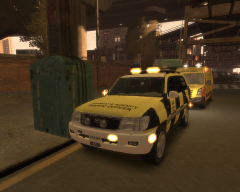 Yep! And the van behind it.
 -
-
Press F3 to open the menu and F4 to hide it.
-
Just refreshing my Photoshop skills with some new highway agency skins. These aren't exactly the best, but I didn't spend a long time on them.
-
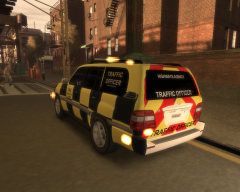
From the album: UK Highway Agency Skins
Highway Agency Traffic Officer Skin, made by me! (Tom H) Constructive feedback is always appreciated. Thanks! -
From the album: UK Highway Agency Skins
Highway Agency Traffic Officer Skin, made by me! (Tom H) Constructive feedback is always appreciated. Thanks! -
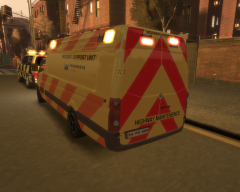
From the album: UK Highway Agency Skins
Highway Agency Support Unit Skin, made by me! (Tom H) Constructive feedback is always appreciated. Thanks! -
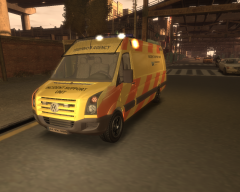
From the album: UK Highway Agency Skins
Highway Agency Support Unit Skin, made by me! (Tom H) This isn't quite finished, notice the light textures are blue when they should be orange. Constructive feedback is always appreciated. Thanks! -
No problem, enjoy.
-
Yes this is a issue that is sometimes caused when LCPDFR is installed. It is because the mouse sensitivity is set to zero. Try changing it.
-
There is a setting for the light intensity of the traffic lights in the visual settings.dat. Have a tweak with that but remember to backup first.
-
Belongs in "GTA IV" > "content modifications" ---------------------------------------------------------------- Just use SparkIV / OpenIV to open the .wtd file in the vehicles.img in edit mode. Go to the skin that you want to replace, click replace and then navigate to the skin you wish to replace it with.
-
Of course he doesn't mean in real life lol, he's joking. :)
-
No, pressing ALT+T whilst unarmed is fine.
-
What GTA patch?
-
R.I.P, my heart goes out to his family, friends and fellow officers.
-
What version of GTA are you using? Are you using a cracked copy?
-
Who was that comment directed at?
-
Hi everyone, I've made a new skin for Corleone's Toyota Land Cruiser, but the lights are blue and I'm having a hard time getting them the right shade of orange. I can easily change them to red or any other colour but orange is just proving to be a pain. I've attached both the files, would somebody kindly help me out here? Thanks -Tom H
-
Add this after the last part similar to this: [ BIFF ] Active = 1 Halogen_Only = 0 Color_Light1L = 1 Color_Light2L = 1 Color_Light3R = 0 Color_Light4R = 0 Color_Light7L = 3 Color_Light8C = 3 Color_Light9R = 0 Offst_SLights = 0
-
Please do as I asked in the post above. It will allow us to help you much quicker.
-
Download ELS from my signature and place the files into your GTA Directory. Then press "J" or "K" whilst in game to use the lights.
-
There are proper programs made... http://www.youtube.com/watch?v=INfLICJ_9i0
-
An emaulator is basically software that makes the computer think that the Controller/Steering wheel is a keyboard. You can link keyboard commands (e.g: E or CTRL+F) to a button on your hardware and it works like a keyboard.
-
Have you tried using a emulator?

