




PieRGud
Members
-
Joined
-
Last visited
Everything posted by PieRGud
-
-
There's no error. That's how it's supposed to be. EUP has a different install location in order to get around the 48 DLC limit. You should not be editing your dlclist.xml. If you're manually installing, please read the included readme.
-
 @MURFMANJR2416 The update didn't change much, other than tell you when a callout fails to start (a mere notification). So perhaps that specific callout pack updated and it no longer can be manually started. @Television78 It seems the log link is broken. @policegirl401 Some callouts do not work with callout manager -- i.e. they cannot be manually triggered. You'd have to bring this to the attention of the callout pack creator. @aidanipod123 Have you placed it in the Plugins\LSPDFR\ folder and went on duty? @SimmingFTW I have those plugins installed and there should be no conflicts. Are you sure it's in the Plugins\LSPDFR\ folder and you're on duty? @Narobic This may be possible. I'll look into it.
- 138 comments
- 34 reviews
-
 I don't believe that can be done. As of now the black and white filter is your best bet.
- 113 comments
- 27 reviews
-
-

- 1
-
-
Yep, the 21-foot rule is pretty well known. Like the video said, you likely won't have time to pull out your sidearm and neutralize the threat at any closer than 20-21 feet. https://en.wikipedia.org/wiki/Tueller_Drill
-
 LSPDFR uses the Caps Lock key to do some idle animation stuff that changes your walkstyle. Switching the intimidation key to something other than Caps Lock (like Tab, for example) will resolve this conflict.
- 560 comments
- 97 reviews
-
-
- 1
-
-
-
@josap11 EUP peds don't work entirely the same as NPC peds. Their clothing is not easily interchangeable. @victoriousV11 Yep, the weapon gets removed from the holster now. Refer to the main post for the Cop Holster config. @Ghnty5 This is caused by another mod you have installed, likely the Injured Player Movement script that comes with Raider's Blood Overhaul.
-
If the automatic install doesn't work, you'll have to manually install it. You can find the manual install link in the EUP download. The readme within the download also includes installation instructions. Also, just to let you know, there's an EUP support topic. It includes an FAQ and all kinds of useful information.
-
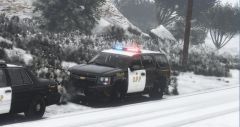 You thinking of doing their new Tahoes? They look pretty slick.
 -
@VinceKaufman Keep the game maximized when you're loading it. If you minimize it, it will cause this infinite loop of plugin crashes.
-
 I think a better option would be for the computer to just remember your toggles. Don't want to make the config too messy. No but that shouldn't be too hard to implement.
- 1,743 comments
- 172 reviews
-
-
-
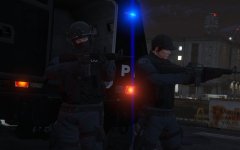 (from the EUP discord)
 -
-
Requesting backup can take a while, but it should work. If it doesn't, I'm really not too sure -- I'm simply using LSPDFR's functions. As for the call's list screen, it will appear blank if you don't have any Computer+ supported callouts. You can generally tell if a callout pack supports Computer+ by reading its description.
-
Could you be a little more specific? Does the backup and call list screen just not show up?
-
-
-
That happened before too. It's just an issue with Gwen forms, unfortunately.
- 1,743 comments
- 172 reviews
-
-
- 1
-
-
-
@rewhymo @TugraKHAN Can you guys provide a crash log?
-
Yeah, keep the key as F12 for now. According to a couple of people, switching keys doesn't work. I'll look into this and release an update soon.
- 138 comments
- 34 reviews
-
Remove your outdated update.rpf in your mods folder and copy the unmodded update.rpf into there. Then, run the EUP package installer and install it into your mods folder.


