GunnDawg
Members
-
Joined
-
Last visited
Everything posted by GunnDawg
-
 No need to apologize bud. This is a hobby for you and the rest of us. I'm just thankful that you're putting in the time to make this thing we call LSPDFR a better experience for us all, when you have it. Good luck in school and I look forward to your next release! Cheers
- 46 comments
- 7 reviews
-
-

- 2
-
-
Very well. Thanks again Kallus. You're the real MVP here ;)
-
I think I've managed to manage to merge the 4 meta files together correctly by just copy/pasting the entire <Item> block for the given slot name (POLICE, POLICE2, etc, etc.). However I'm not really sure how to test that it actually worked. I can spawn all 4 of the cars I modified and all of their ELS features seem to work, but does that mean I did it correctly? I assume even if you messed the vehicles.meta file up that you would still be able to spawn the vehicles, so that might not be the best way to test that I did this correctly.
-
Man this is frustrating. I only have 4 addon cars so I didn't expect this to be as much of a pain as it is but these cars are not including ONLY the part of the .meta you need to replace, they're including the entire vehicles.meta file, I have no clue which part I should be copying out of it into the actual .meta file.
-
Nowhere did I ask anyone to do this for me. I simply asked if it had been done yet or not so that in the event that I do decide to attempt such a thing, I'm not wasting my time. Appreciate your reply though.....
-
 Says to replace graphics.ytd in /update/update.rpf/x64/texturs/ however I don't have a graphics.ytd in that directory. I have frontend.ytd, fxdecal.ytd, and script_txds.rpf
- 246 comments
- 40 reviews
-
I'm curious why those 3 cars work without fault then, as far as I can tell anyways, installing one, pasting over .meta, installing the next, pasting over the meta, by car 3 the first 2 should be invalid, no?
-
What exactly does that particular meta file do for the vehicles anyways? I have 4 addon cars at the moment and 3 of them had .meta files that I just copied over. Of course I have an original backup of that file, but all 3 cars seem to work fine.
-
Is there anyway to configure the game with or without a plugin so that when empty handed if you right click you auto select(draw) a pistol and aim? Really trying to fine tune my experience at this point. Now that I have the "big" things like cars, uniforms, callouts, etc, etc I'm working on fixing or adding smaller details that just make it an even more enjoyable experience, and having to use the weapon wheel on foot empty handed to draw a pistol seems like it could be simplified.
-
Ah ok, good to know. So I'm supposed to be manually adding to or editing that file, rather than just copying over it, oops! I'll need to pull a backup one now and go through and make corrections, though all my cars seem to work fine, and all I've been doing is replacing that meta, lord knows what's in it at this point. If it's just a single few lines then probably not much.
-
With the cars that have a vehicles.meta file that you're to replace, what is actually happening? Let's say I have two cars and I install Car A, install Car A's vehicles.meta file, then go install Car B, and install Car B's meta file. Does it replace the actual file or is it just appending it's own data to it? If it replaces it then I don't see the point. That would mean you can only use 1 car that utilizes a custom vehicles.meta file.
-
Well I'm not asking them to think for themselves, as they're video game AI, heh. But like everything else (I think), there is a "chance" parameter in the available API isn't there? in pseudo code (not actual syntax) <ped chance="10" getOutAndShoot> kind of thing. I don't know, just brainstorming and thinking of ways that we as a community could make pursuits more dynamic and less predictable. Believe it or not I'm a programmer of 12 years, but have 0 modding skill, so I'm not sure of the limitations here.
-
Are there any mods out there that give the ped/ai a chance(even if it's a small chance) that they'll decide enough is enough and surrender them self in the pursuit? Or even decide to stop and maybe not give up, but even worse, decide to stop and open fire on you? I feel like pursuits would be more interesting and diverse if the AI could decide "I'm not getting away, may as well surrender" or "I can't get away, but they won't take me alive!" kind of thing. Right now it's kind of like "well we're in pursuit, I either chaotically use whatever is around me (light posts, buildings, innocent vehicles) to get him to stop, or hope he flips his car somehow" I know there are things like the spike strip and roadblock plugins, but what about the behavior I mentioned above? Anything like that?
-
 Anyway to select their vest and accessories? I've added this line to my custom entry but doesn't seem to be working. <Ped accessories="2" gear="2">s_m_y_sheriff_01</Ped> I"m using this ped model and would like their hip holster and vest to be on when arriving. I can select those options from the default "on duty" character selection, so I imagine I'd be able to specify that here?
- 378 comments
- 23 reviews
-
-
 If only we could combine this mod's menu with Traffic Backup mod because the backup vehicle placement is a LOT better and more realistic in the other mod. Though I like the command menu that this mod gives.
- 241 comments
- 18 reviews
-
 Mod functions the way it should, and does a good job of it. Though I dip from 60 to 45fps when it's activated. I've read your previous replies to the same issue and there really is no other way to put it, it's the mod. Unload or deactivate it and right back up to 60fps without a single dip anywhere else, using any of my other installed mods, which isn't very many. So rather than get defensive, let's work together and fix it, what debug info can I provide you? need any special test case info?
- 153 comments
- 32 reviews
-
So using this mod (or any addon physics mod) only really applies if you don't use custom cars downloaded on this site, right? I typically replace my POLICE1 and 2 slots with nicer looking CVPI or dodge charger models (don't care for the default cop cars, and I need ELS lights)
-
-
Without using the batch file method that's floating around can I achieve the same result? I have two GTA V installs in my steam directory that I've named "Grand Theft Auto - Online" and "Grand Theft Auto - Modded". When I want to play online I just rename the online directory to just "Grand Theft Auto" so that steam links correctly, and when I want to play modded(LSPDFR) I changed the online install back to "Grand Theft Auto - Online" and changed the modded folder to "Grand Theft Auto" (again so steam reads it correctly). Is this the proper method? If the batch file method does this same thing then that's fine, I just rather manually do it, for piece of mind. But if this method isn't full proof or at least suggested, then I'll try whatever you guys suggest
-
Is that one supposed to be better than the one I mentioned? I'm having a hard time finding the differences between the two.
-
Looking for a good car physics/handling mod. I've heard of the "Semi-Realistic Vehicle Physics" but I'm not sure if there is something better out there. If I use that mod will it apply to the cars I've downloaded here on this site, when placed in the default/vanilla slots (POLICE1, POLICE2, etc, etc..)? Open to any suggestions!
-
I'm trying to add some extra vests for sheriff through a mod, but it says to install in /update/x64/dlcpacks/EUP/... However I don't have a EUP folder in my dlcpacks folder. It's not just this mod either. Any add on stuff for EUP I find always says to install this way. How did they get an EUP folder there? what mod put it there? Is my install of EUP 7.5 corrupt? yes I'm using a mods folder.
-
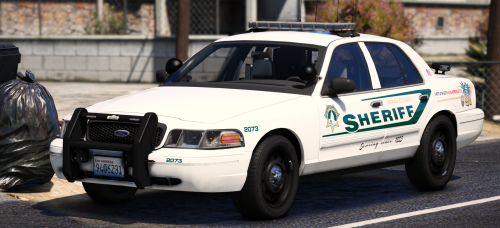 I'm somewhat new to modding LSPDFR so pardon my ignorance, but can I simply rename your files to sheriff.ytd, sheriff.ytf, etc, etc? I want to replace my sheriff cars and not the custom police cars I already have. This model looks fantastic and can't wait to try it out, provided I don't have to replace my police slots!
- 7 comments
- 10 reviews
-
I've gone ahead and removed Custom Backup to see if that was actually the issue and I'm still getting spawns like this about 50% of the time.
- 46 comments
- 7 reviews