


GunnDawg
Members
-
Joined
-
Last visited
Everything posted by GunnDawg
-
 Anyway to speed up the stage 3 flash pattern of the 2015 Dodge Charger? It seems a bit slower than what they actually use. I was using this video to compare.
- 955 comments
- 158 reviews
-
Does that mod interfere with the StopShittingBricks mod? I use it instead of Keep Calm because of the FPS hit that Keep Calm gives. I installed the physics mod you suggested and it seems like my A.I. is back to freaking out and going crazy when a gun is drawn or fired.
-
When you say you use Euphoria do you mean you're using the Euphoria Overhaul mod I linked? Because we all use Euphoria, it's the physics engine that the game uses. Don't really have a choice, heh.
-
I've seen that Euphoria Physics Overhaul mod floating around and been wondering what people think of it. Seems promising, but at what cost? Does it hurt frames? Does it work well for LSPDFR? Let me know what you guys think. If you want to suggest a different physics mod then feel free. Otherwise this is the mod I am referring to. https://www.gta5-mods.com/misc/euphoria-ragdoll-overhaul-ero
-
Ah very well. Thank you for the explanation. I'll continue my U/C and Gang Unit RP with a baby beard. Thanks again.
-
So how did the LSSD Gang unit skin achieve this?
-
Yeah it's off one of the Gang Unit peds. So is there no way to get beards like this in EUP? Still somewhat new to the modding scene and not really sure what's capable and what's not. But the beards available in EUP are somewhat lackluster, heh.
-
I have lots of options, sure, but when the biggest beard I can get is little to nothing, when there are beards (illustrated in the screenshot) like that. Then I question how they got them.
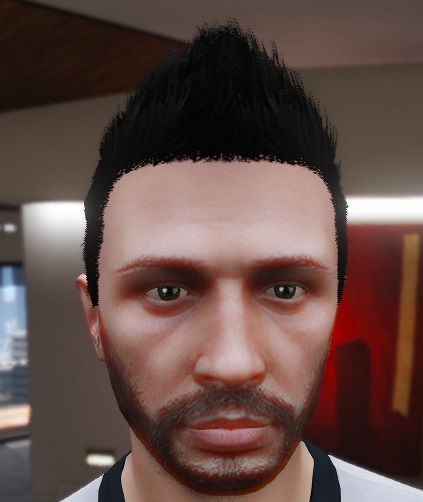
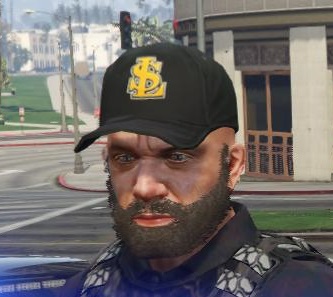
-
Looking through some LSPDFR videos of people RP'ing as gang units or undercover, they all have these beards that are not in the game. I've found the "Franklin, Trevor, Michael 'New Hairstyles'" mod, but will this work for LSPDFR, will I still have those options when using say, EUP to create a character?
-
.thumb.png.e2108197eebd2a115a71434e78afdd67.png) Thanks! As to why? Because I had no idea such a mod existed. Still pretty new to LSPDFR. Thanks again boss.
Thanks! As to why? Because I had no idea such a mod existed. Still pretty new to LSPDFR. Thanks again boss.- 31 comments
- 15 reviews
-
 Yeah I'll take that item list as well. Always looking for more EUP items. I really want a thigh/leg holster that doesn't clip through pants.
- 136 comments
- 42 reviews
-
-
 Anyone know where I can get that leg holster that has a strap that leads up and connects to their belt? look at the MARSOC ped (on this site) if you're not sure what I'm talking about. I've seen it in lots of LSPDFR youtube videos and would love to have that option. The current EUP leg holsters clip with everything other than skinny jeans.
- 2,346 comments
- 236 reviews
-
 How do I use this with RadianceV so my police lights in LSPDFR are not so dim, especially during the day? Do I install this and then radiance, and then the radiance compatibility file that is part of VisualV? Or do I just install VisualV and then the Radiance Compatibility file?
- 336 comments
- 70 reviews
-
I installed VisualV and also wanted some brighter ELS lights. i wasn't happy with Radiance and found I could modify these two little values myself. I'm still trying to find a good balance between not too blinding, but still pretty to look at and still plenty radiant! This is what I've come up with so far. car.defaultlight.day.emissive.on 800.50 car.defaultlight.night.emissive.on 350.50 So now I'm curious what everyone else uses, assuming you have modified these values.
-
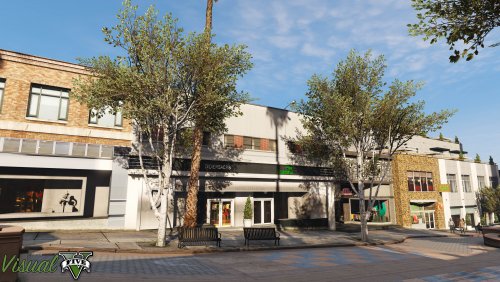 I installed this via the .OIV, then I isntalled the RadianceV compatibility via it's .OIV and these are my results. The ELS lights during the day just seem almost non existent, and just flat color textures, but the night time lights seem pretty decent. Here are some screens. Daytime set at noon (SetDayTime 12) Nighttime set at midnight (SetDayTime 24)
- 42 comments
- 19 reviews
-
-

- 1
-
-
Looking over this mods features it seems like it could be decent. Does anyone here have any experience with this mod? Are there better Euphoria overhaul mods out there instead? Let me know what you think! https://www.gta5-mods.com/misc/euphoria-ragdoll-overhaul-ero
-
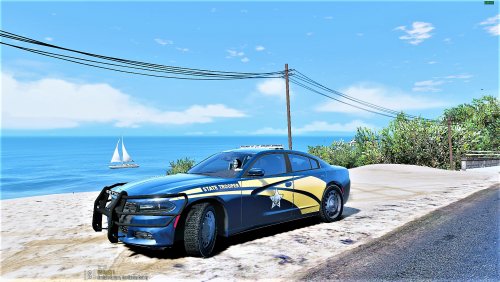 I've been looking for a high quality ELS compatible OSP model for a while and this one is great. Still looking for a solid looking FPIU model as well. Anyways, I don't want to be nit picky but the front plate is an Oregon plate while the back plate is the default GTA plate (CA), which is weird to me because when browsing through the .ytd I never saw the CA plate, not sure why it's there. Also the wheels seem off, though maybe that's just me and I've never seen them use that wheel.
- 12 comments
- 6 reviews
-
 Hey my frames are back! Wish i would have found this a lot sooner. Now if only they could reduce the performance hit from ALPR+ and LoJack
- 29 comments
- 21 reviews
-
Well when I downgraded my ScriptHookVDotNet version to 2.9.4 and put the same files (older version) in the SDK, the radar mod fired right up. I guess I can try the first files (newer) I had and take them out of SDK and see what happens. But v2.9.4 of ScriptHookVDotNet in the SDK folder made it work. EDIT: Alright. I reinstalled the new version and put them in the root directory instead of SDK and all is good now. Weird that v2.9.4 works inside the SDK but not V 2.10.3. Anyways, I'm code 4 on this ;)
-
I suppose anything is possible. Though the installation instructions in several sources show them putting those files into the SDK folder. As I suspected it was the ScriptHookVDotNet version. The newest version will not work with that mod. I downgraded to 2.9.4 which was what they used in the installation tutorial videos and sure enough, loaded right up.
-
 For anyone having issues, you probably watched the same tutorial that I did on Youtube and put your ScriptHookVDotNet.dll and .xml files in the SDK folder. Pull them out of the SDK folder and put them in your main/root GTAV directory and all should be good!
- 168 comments
- 29 reviews
-
Which would you suggest? I'm not aware of any other scripts/plugins that utilize ScriptHookVDotNet. This is the first one that I've found.
-
Yeah I've reloaded a few times now. Feels like a problem with ScriptHookVDotNet and less of a problem with the Speed Radar mod. The console isn't recognizing the command "install" which is a ScriptHookDotNet command if I'm not mistaken. That tells me DotNet isn't loading.
-
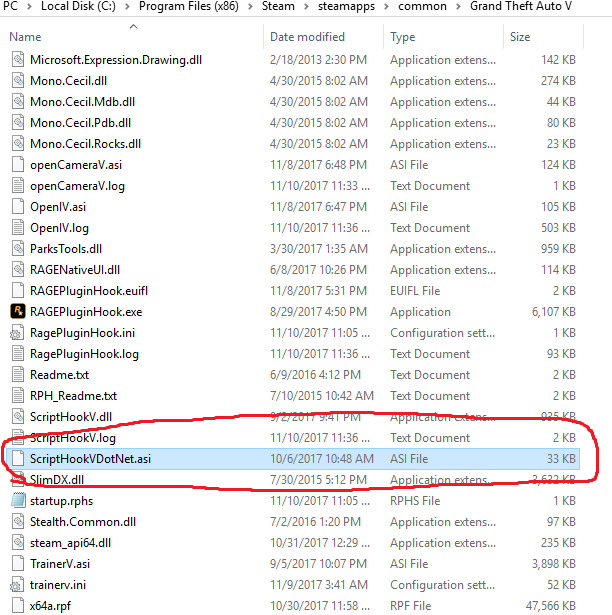
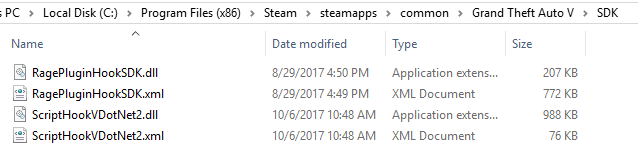
Followed the install guide, had the C++ redist and .net framework already. Tried rebinding the keys for the mod itself, no luck. When pressing the Insert key to reload the changes in the .ini while the game is still running (per the mod page) I get a "Command 'install' is not recognized as a command" or something to that extent, basically saying that command doesn't exist, assuming the "install" command is a ScriptHookVDotNet command, I have to assume ScriptHookVDotNet isn't even loading, which would answer why the speed radar mod isn't working, as to why? I'm not sure. The only thing I can think of is that I need to downgrade my ScriptHookVDotNet version to work with this mod because the new ScriptHookVDotNet files append "2" to the end of it. I'm not sure if that's a problem or not, but simply removing that 2 from the filename obviously isn't the answer. Yes all files have been marked as "Unblocked" Mod in question: Proof of downloaded file locations:


.thumb.png.e2108197eebd2a115a71434e78afdd67.png)
