
MattBravo
Members
-
Joined
-
Last visited
Everything posted by MattBravo
-
Ya it has all those things. I just copied over what I had in the old vehicles.meta into the new one. Ill probably just reinstall those vehicles. Its only like 5 of the 20 added vehicles doing it that I added. The rest of the added vehicles and the ones I replaced work fine. BxBugs unmarked CVPI doesn't work im guessing because they changed the carcols in the new update so ill probably just remove that.
-
Thank you it worked! Now I have to figure out why some of my added cars do not have a siren or lights anymore. Update problems
-
So i understand that the old gameconfig file does not work with the new update. Does anyone have an updated gameconfig file that can hold up to the 25 or so added vehicles I have installed? I'm guessing that is the main reason i'm getting a game memory error but i'm not too sure. Thanks.
-
what about the new dlc vehicles, would those be added into the vehicles.meta and handling.meta ? i ask because i have many added vehicles in the vehicles.meta and certain stuff changed in the handling.meta.
-
So I updated the mods/update/updaterpf in Open IV for the new update. I saved all the old files that I modified to the desktop just in case. Is there a way to put my modified files back in without over righting the new GTAV update files? Such as I have a modified dlclist file, but the updated one has mpbiker and patchday12ng included and my modified one does not. Same goes for the handling.meta, vehicles.meta, etc. I know I will have to wait for the new rage plugin hook update but I just want my files to be ready. I'm kinda new to GTAV updates messing up Open IV since I've had LSPDFR since the last game update. I'm just confused, thanks in advance for any help.
-
-
-
 Could you possibly add TheHurks 2016 Explorer? http://www.lcpdfr.com/files/file/11044-2016-lspd-fpiu/ Amazing skins btw.
- 64 comments
- 32 reviews
-
 So to my understanding all vehicles in this pack do NOT over right any vehicles i have installed? So the FBI, ect in the pack wont over right my current FBI, ect i have installed? And does that go for the same with the carcols and vehicles files?
- 445 comments
- 108 reviews
-
-
.thumb.jpg.bfad1c193dd40b9d539eefd7c5187a5a.jpg) add this to the carvariations.meta in mods>update>x64>dlcpacks>mpchristmas2>dlcrpf>common>data under variation data line. <Item><modelName>police</modelName> <colors> <Item> <indices content="char_array"> 134 134 156 156 </indices> <liveries> <Item value="true" /> <Item value="false" /> <Item value="false" /> <Item value="false" /> <Item value="false" /> <Item value="false" /> <Item value="false" /> <Item value="false" /> </liveries> </Item> <Item> <indices content="char_array"> 134 134 156 156 </indices> <liveries> <Item value="false" /> <Item value="true" /> <Item value="false" /> <Item value="false" /> <Item value="false" /> <Item value="false" /> <Item value="false" /> <Item value="false" /> </liveries> </Item> <Item> <indices content="char_array"> 134 134 156 156 </indices> <liveries> <Item value="false" /> <Item value="false" /> <Item value="false" /> <Item value="false" /> <Item value="true" /> <Item value="false" /> <Item value="false" /> <Item value="false" /> </liveries> </Item> <Item> <indices content="char_array"> 134 134 156 156 </indices> <liveries> <Item value="false" /> <Item value="false" /> <Item value="true" /> <Item value="false" /> <Item value="false" /> <Item value="false" /> <Item value="false" /> <Item value="false" /> </liveries> </Item> <Item> <indices content="char_array"> 134 134 156 156 </indices> <liveries> <Item value="false" /> <Item value="false" /> <Item value="false" /> <Item value="true" /> <Item value="false" /> <Item value="false" /> <Item value="false" /> <Item value="false" /> </liveries> </Item> </colors> <kits> <Item>157_massacaro2_modkit</Item> </kits> <windowsWithExposedEdges /> <plateProbabilities> <Probabilities /> </plateProbabilities> <lightSettings value="0" /> <sirenSettings value="1" /></Item> This is what i did and it worked, courtesy of @fire2903rescue.
add this to the carvariations.meta in mods>update>x64>dlcpacks>mpchristmas2>dlcrpf>common>data under variation data line. <Item><modelName>police</modelName> <colors> <Item> <indices content="char_array"> 134 134 156 156 </indices> <liveries> <Item value="true" /> <Item value="false" /> <Item value="false" /> <Item value="false" /> <Item value="false" /> <Item value="false" /> <Item value="false" /> <Item value="false" /> </liveries> </Item> <Item> <indices content="char_array"> 134 134 156 156 </indices> <liveries> <Item value="false" /> <Item value="true" /> <Item value="false" /> <Item value="false" /> <Item value="false" /> <Item value="false" /> <Item value="false" /> <Item value="false" /> </liveries> </Item> <Item> <indices content="char_array"> 134 134 156 156 </indices> <liveries> <Item value="false" /> <Item value="false" /> <Item value="false" /> <Item value="false" /> <Item value="true" /> <Item value="false" /> <Item value="false" /> <Item value="false" /> </liveries> </Item> <Item> <indices content="char_array"> 134 134 156 156 </indices> <liveries> <Item value="false" /> <Item value="false" /> <Item value="true" /> <Item value="false" /> <Item value="false" /> <Item value="false" /> <Item value="false" /> <Item value="false" /> </liveries> </Item> <Item> <indices content="char_array"> 134 134 156 156 </indices> <liveries> <Item value="false" /> <Item value="false" /> <Item value="false" /> <Item value="true" /> <Item value="false" /> <Item value="false" /> <Item value="false" /> <Item value="false" /> </liveries> </Item> </colors> <kits> <Item>157_massacaro2_modkit</Item> </kits> <windowsWithExposedEdges /> <plateProbabilities> <Probabilities /> </plateProbabilities> <lightSettings value="0" /> <sirenSettings value="1" /></Item> This is what i did and it worked, courtesy of @fire2903rescue.- 157 comments
- 46 reviews
-
.thumb.jpg.30de2cdd6bdce371d029c527c67ad196.jpg) it did work! at least with Bugs' new Liberty lightbar model. Havnt tested it with the arjent yet. Thanks!
it did work! at least with Bugs' new Liberty lightbar model. Havnt tested it with the arjent yet. Thanks!- 101 comments
- 33 reviews
-
.thumb.jpg.a4a34b706ab065eb1cdc7c8e75034ea3.jpg) do you know why he had no intent? Or was he going to release it at a later date?
do you know why he had no intent? Or was he going to release it at a later date?- 30 comments
- 28 reviews
-
The only police files in the carvariations in mpchristmas2 are police3 and police4 for me
- 101 comments
- 33 reviews
-
Does anyone know where the carvariations is for police1? The lights are all messed up. Also does it seem to anyone else that the lightbar rarely spawns om both the CVPI and the Charger? I spawned about 50 of each and only about 2 or 3 of each spawned with a lightbar. Alot of them spawn with barely any extras at all.
- 101 comments
- 33 reviews
-
-

- 2
-
-
-
Could you add these new Bugs vehicles please? http://www.lcpdfr.com/files/file/12910-2011-lapdlspd-crown-victoria-cvpi-17a/ http://www.lcpdfr.com/files/file/12911-2014-lspdlapd-dodge-charger-pursuit-13a/
-
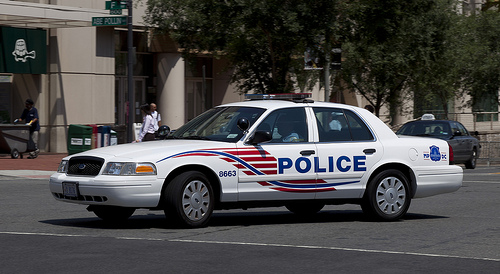
 could you possibly do a skin for these CVPIs by Gump? Never mind, didn't realize they used F5544 skins.
- 20 comments
- 10 reviews
-
.thumb.jpg.1db0be3e377ccefdd47e57a95ec56762.jpg) hey Bugs, i had to uninstall and reinstall and put this CVPI as an added vehicle again. Problem is that the .png file for the blue lights expired. Could you kindly link me the emerglights_emis_arjent_blue.png for the blue lights again? Thanks in advance. Its just weird seeing the red and blue combined into one light source lol.
hey Bugs, i had to uninstall and reinstall and put this CVPI as an added vehicle again. Problem is that the .png file for the blue lights expired. Could you kindly link me the emerglights_emis_arjent_blue.png for the blue lights again? Thanks in advance. Its just weird seeing the red and blue combined into one light source lol.- 239 comments
- 70 reviews
-
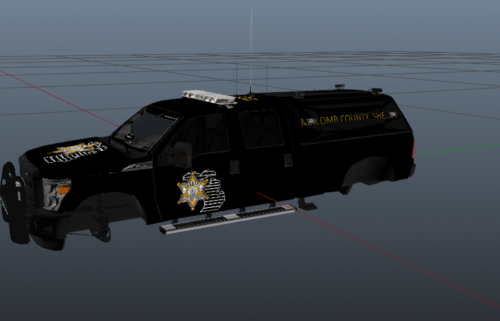 I think you could've put a little more time into the placement of the logos. Looks really sloppy.
 -
PLEASE HELP! When i launch Ragehook it loads up to "loading and populating game world" then GTA/RPH crashes. I also tested loading just GTAV and it also crashes after i select story mode. I have run Albos Troubleshooter and still no luck. Any help would be much much much appreciated. THANK YOU.
-
-
-
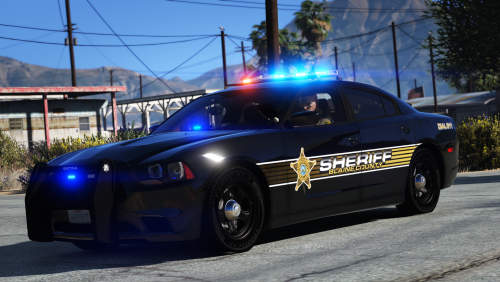

.thumb.jpg.bfad1c193dd40b9d539eefd7c5187a5a.jpg)
.thumb.jpg.30de2cdd6bdce371d029c527c67ad196.jpg)
.thumb.jpg.a4a34b706ab065eb1cdc7c8e75034ea3.jpg)
.thumb.jpg.1db0be3e377ccefdd47e57a95ec56762.jpg)