


Delco24
Members
-
Joined
-
Last visited
Everything posted by Delco24
-
This is a great idea. I was bored tonight and got through the weapons and clothing files.
-
-
 Loving this model so far. The only complaint/suggestion I have is that the yellow on the rear traffic advisor is very bright compared to the red/blue lights. I also find it a bit too neon yellow (prefer more of an amber color myself), but that's more personal preference. I don't mind modifying the texture myself for my own use if you could point me to the correct file? There's so many lightbars included that there's a lot of emerg light textures.
- 148 comments
- 34 reviews
-
 @Albo1125 I think you might have left a debug key active in 6.9.8.0. When I was doing your Pacific Bank Heist callout, pressing F11 to toggle the alarm causes the callout to end and RPH shows this: Tested again, and the same DriverUnderTheInfluence callout is triggered by hitting F11.
- 3,646 comments
- 306 reviews
-
-
 Ran into a minor issue - I called EMS for a minor accident which, thanks to impatient GTA drivers, quickly turned into a major scene with many injured peds and fire everywhere. EMS treated everyone who got injured while they were on scene (love this feature), but they just stood around with their arms folded when they were done. I didn't get the incident report, and they didn't leave the scene.
- 781 comments
- 85 reviews
-
-
Not a dev, but would love to contribute to this project in some way. One of my job functions IRL is reproducing issues, looking at the code to see where it might be failing, and then submitting a bug for our devs to investigate further. It's sort of QA, but not really. If you guys think someone like this might be useful (or have something else for a non-coder), let me know!
-
 Excellent work. Love that you are including an API so that developers can hook into it. This mod actually makes me want to use the police computer now instead of the radio via the N key.
- 1,742 comments
- 172 reviews
-
-

- 1
-
-
 No offense was intended by my comment. My point was mainly that, in general, you can't be too trusting of random links these days. I see the mod has been uploaded to LSPDFR now - thanks! Love the new update by the way - glad we can finally be done with Skin Control.
- 2,341 comments
- 236 reviews
-
-
- 1
-
-
Will this be uploaded to LSPDFR at some point? I know you were having issues uploading it originally. Nothing against the author personally, but it's just super sketchy to download a text file with a URL.
- 2,341 comments
- 236 reviews
-
Hey all, So another GTA V update is upon us and that means a new update.rpf file. The last few times I've gone through my modded copy of update.rpf in OpenIV to find the files that I've modified or added. This process is tedious and seems to take forever, especially if you install a lot of mods. Honestly, I put off jumping to the updated game version as long as possible just because I don't want to re-do my update.rpf. Has anyone found a better way to do this? I'm really surprised that OpenIV doesn't have an option to compare the update.rpf in the mods folder with the original update.rpf and export a list of modified files (or ideally the modified files themselves). The only other thing I can think of is to keep a list of files that I replace/edit as I go between updates. Thanks
-
 So this happened when I arrived on scene for the panic button callout. All of the vehicles spawned on top of each other.
- 329 comments
- 53 reviews
-
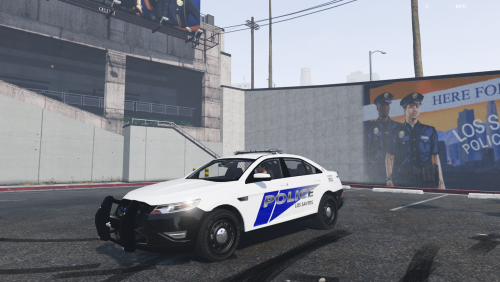 LSPD Texture Pack v1.1 Created by Delco24 Supported vehicles 2011 Crown Victoria LASD/LSSD by BxBugs123 (regular and slicktop) 2014 Chevrolet Impala LSPD/LSSD by BxBugs123 Ford Police Interceptor 2012 by F5544 GMC Savana Police Transport by nicks0112 LSPD/LSSD 2014 Dodge Charger Pursuit by BxBugs123 (also compatible with the Charger by Carper/Fartknockr) 2013 Los Santos Police FPI by Thehurk Lenco Bearcat by Cosmo Mapped Police Maverick by Yard1 Open the spoiler for links to each vehicle Installation Copy PNGs into the respective model's ytd file using OpenIV. Please refer to the readme/installation instructions included with each model for the location of the ytd file. Make sure you use the right FPI skin. The skin for Thehurk's FPI will not work correctly on F5544's FPI and vice versa. Credits Models by BxBugs123, F5544, nicks0112, Thehurk, Fartknockr, and Cosmo. Police Maverick model by Rockstar and UV mapping by Yard1. EXCLUSIVE TO LCPDFR. DO NOT UPLOAD ELSEWHERE.
 -
-
 There's two FBI2s in the carvariations.meta file. Which one is correct? I already have customized my carvariations with other vehicles so I need to copy the appropriate lines, but can't tell which one to use.
- 51 comments
- 21 reviews
-
-
 Excellent model. Love all of the lighting and customization options. As for the scale, honestly I wouldn't have noticed if someone hadn't pointed it out in the comments. Regardless, it's still a great car even though its a bit smaller than it should be.
- 269 comments
- 67 reviews
-
 Crashing issues here too with the latest RAGE hook and 678 game update. RPH log shows: [4/9/2016 8:33:34 PM.894] Emergency Strobes: WARNING! Plugin "Emergency Strobes" was terminated because it caused the game to freeze (Freeze was caused by game fiber: StrobedVehiclesPool::Controller() Fiber). [4/9/2016 8:33:34 PM.895] Emergency Strobes: Stack trace of game fiber "StrobedVehiclesPool::Controller() Fiber" in plugin "Emergency Strobes" at the time of termination: [4/9/2016 8:33:34 PM.904] Emergency Strobes: Could not be retrieved. [4/9/2016 8:33:45 PM.115] Could not unload plugin. Error while unloading appdomain. (Exception from HRESULT: 0x80131015) Realize its probably an issue with RPH, but thought I'd post the log snippet anyway.
- 246 comments
- 45 reviews
-
 When I first saw this, my first thought was "meh, seems kinda silly" and I'd try it out once before going back to the keyboard. I was wrong - after playing with vocal dispatch, I would never go back to using the keyboard. Not only is it easier, but it really adds to the immersion. Can't wait to see how this develops!
- 587 comments
- 106 reviews
-
-
- 1
-
-
Thanks - this works a lot better!
-
Unfortunately, IsPlayerPerformingPullover appears to keep returning true even once the vehicle stops. I was playing around with trying to check the vehicle's speed, but I'm not getting ANY value for the vehicle speed once it stops. For testing, I had the speed getting logged repeatedly, but once it stopped, there were no further speed values reported. Even if I had the vehicle move elsewhere to find a better spot to pullover, the speed was no longer reported. I am completely new to coding with the Rage plugin and LSPDFR API so may have been doing something wrong, though. EDIT: OK, I got the checking vehicle speed method to work. But, like you said, its not ideal because the vehicle may not be in its final location (such as if you initiated the pull over at a stop light). Any other suggestions?
-
I want to be able to detect if a vehicle is currently stopped after the player initiates a pullover. I know you can use IsPlayerPerformingPullover(), but that returns true even if the suspect's vehicle hasn't stopped yet. I tried detecting the suspect ped and checking if they are stopped using: LHandle pullover = Functions.GetCurrentPullover(); Ped suspect = Functions.GetPulloverSuspect(pullover); if (Functions.IsPedStoppedByPlayer(suspect)) But, this only seems to return true if you pull the suspect out of the vehicle. How can you check if the vehicle has stopped? Thanks
-
 Would it be possible to add an option for the size of the blip to the menu? There are a lot of times where I want to make it smaller or larger depending on the situation. It would be awesome to do this on the fly.
- 338 comments
- 46 reviews
-
Another essential mod - provides more flexibility with closing roads than the built-in LSPDFR function. Love the new menu too!
- 338 comments
- 46 reviews



