


Delco24
Members
-
Joined
-
Last visited
Everything posted by Delco24
-
 He had crashed his vehicle and was on foot when I pulled up. I'll give it another try and report back.
- 423 comments
- 73 reviews
-
Road rage callout caused LSPDFR to crash as soon as I got near the suspect. Here's my ragehook log: Gotta say, though, the CAD window was pretty cool.
- 423 comments
- 73 reviews
-
Long overdue review. Been using Code 3 Callouts for a while, and they are all very well done. Just updated to the newest version and got the new backup domestic callout. Felt very realistic/immersive as a backup unit. Can't wait to see how the assault callout has been re-done. Also, glad to see that the impaired driver ties into the breathalyzer mod now. This is definitely one of the must-have callout plugins.
- 423 comments
- 73 reviews
-
-

- 1
-
-
 Has anyone managed to end the demonstration callout without it turning into a giant brawl?
- 303 comments
- 66 reviews
-
I finally got the demonstration callout today, and while it was fun, I think you really need to be able to get backup units in there. Mine got out of hand and I died :) I wonder if you can use the open/close roads feature of LSPDFR?
- 303 comments
- 66 reviews
-
-
-
 Finally got around to installing this, and now I wish I would've done it sooner. Can't wait to see how the EUP menu plugin evolves.
- 2,346 comments
- 236 reviews
-
-
- 1
-
-
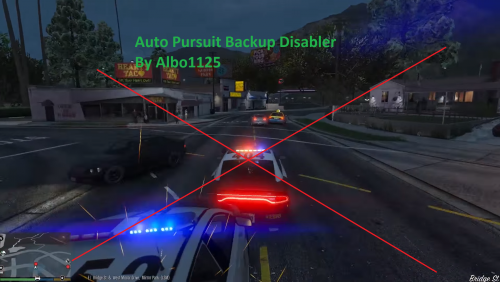 So, I did some testing tonight. Its definitely some kind of conflict between this plugin and another callout plugin. I removed everything from my Plugins/LSPDFR folder except for this, and pursuit backup worked exactly as it was supposed to. Now I just need to figure out which callout plugin is interfering with it. I'll report back when I find it.
- 57 comments
- 15 reviews
-
Sorry to report that I am also having the same issue reported above. Code 3 and Code 2 backup doesn't seem to be affected, but pursuit backup does appear to be spawning and then sitting there (they don't even turn their lights on). Here is my RPH log as well in case it helps.
- 57 comments
- 15 reviews
-
-
- 2
-
-
Tried this out last night. Backup appeared to be working as expected for me, but I'll have to use it more to confirm.
- 57 comments
- 15 reviews
-
Awesome! I much preferred the old backup system. I'll have to give this a try, but it looks like you might have created another essential mod.
- 57 comments
- 15 reviews
-
Just discovered that @Albo1125 has released a mod for those of us who prefer the old backup system:
-
Is there any way to get the NPC cops to use the textures from EUP? The description makes a reference to using RDE, but I can't figure out what you're supposed to do.
- 2,346 comments
- 236 reviews
-
-
For me, I think this is what is causing too many units to join a pursuit. I installed a popcycle mod that added cops to traffic. Not sure if this the case with DLM3 too, but I know in my case my pursuits are ending up with a small army because of all the additional units spawning in traffic joining in as well. With the default popcycle, the number of units in a pursuit would probably be less. However, I do agree with DLM3 and others in this thread that there should be a configuration flag in an ini file eventually to control how many units join a pursuit and/or if roaming units join as well. Personally, I liked how it was done in 0.2 where you had to call for backup manually for two reasons: 1) it felt more realistic to me as I had to notify other units that a pursuit was in progress (now they just know automagically) and 2) I could control how many units joined the pursuit.
-
 Seems to be working - thanks for looking at this quickly! Code 3 Callouts is still crashing LSPDFR from time to time with the HTTP request, can you port the fix over there as well? EDIT: Never mind, I see you already did. I'll grab the newest version of that as well. Thanks again!
- 268 comments
- 44 reviews
-
 Noticing a couple bugs around the prisoner transport: 1. When I have two suspects arrested, I rarely see the pop-up to press 7 to pick up both suspects. Pressing 7 anyway doesn't spawn the transport (not that I figured it would with the message not popping up). 2. When I arrest a suspect, I will often get two pop-ups - one to press 8 to pick up some random ped name, and then another to press 8 to pick up my suspect's name. Pressing 8 does spawn a transport successfully which picks up the suspect. 3. When the transport arrives, there is occasionally an issue where the suspect continues following me around while the transport officers just stand there. Eventually, the suspect does stop following me and the transport officers "take over" for lack of a better term.
- 1,915 comments
- 242 reviews
-
Just confirmed the fix worked. LSPDFR doesn't crash anymore when going on duty. Thanks for the quick response!
- 423 comments
- 73 reviews
-
Looks like I've got the same issue with Keep Calm as I do with your callout plugin. It crashes upon startup with the same error: Is your fix from the callout plugin going to be added to Keep Calm as well? Thanks!
- 268 comments
- 44 reviews
-
-
- 1
-
-
-
Cool - np, glad to hear you got it fixed at least. If you don't mind, what was the issue?
- 423 comments
- 73 reviews
-
Looks like its causing LSPDFR to crash as soon as I go on duty. I ran it without any other callout plugin, and it appears to crash while trying to do an HTTP request. Here is the RPH log. Note that I unloaded/reloaded LSPDFR with different callout plugins. The final time at 12:28 was just with Code 3 callouts in the plugins/LSPDFR folder.
- 423 comments
- 73 reviews
-
-
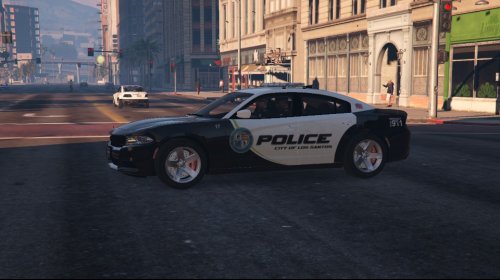 Ah no worries - not a fan of the lightbar on F5544's Charger which is why I use the other one. Not a big deal though - LSPD just ran out of money to repaint their Chargers :D How about the GMC Savana transport?
- 18 comments
- 6 reviews

.thumb.jpg.4066677156985e22489bfecddc2f6c45.jpg)
