




PNWParksFan
Insiders
-
Joined
-
Last visited
Everything posted by PNWParksFan
-
 You don't need natives (or any GTA API at all) to read config files. There's plenty of ways to do that with plain old C#. And yes, RPH has the InitializationFile class which is very easy to work with.
- 1,005 comments
- 68 reviews
-
-

- 1
-
-
Why are you using SHVDN in an RPH plugin? There is no reason to do that, and it makes it impossible to use the plugin when SHV hasn't been updated. Anything that can be done in SHVDN, can be done in RPH. If you don't know how to do something in RPH that you're using SHVDN for, ask on the developers discord or in the API forums and we can help you fix it.
- 1,005 comments
- 68 reviews
-
-
 ELS breaks sometimes when vehicles are far away from the player. You can increase the ELS distance limit, but any vehicle that goes beyond that distance gets permanently broken. Nothing I can do about it, complain to the makers of ELS (but good luck, they're never gonna update it). I just use non-ELS vehicles.
- 781 comments
- 85 reviews
-
-
- 1
-
-
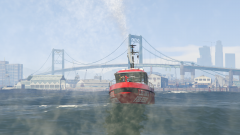 We've got a lot of great boats coming up with Coastal Callouts 🙂
 -
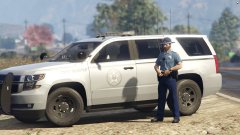 Well I truly hate the new OSP livery in real life, but you've recreated it accurately here so good job for that. Are the lights set up like the real OSP lights too?
 -
It is your water cannon, I even mentioned you in the credits of the image already. You'll be listed in the credits for the eventual file too. I got it from your Pierce Arrow dev model fire truck.
-
You probably didn't install a gameconfig.xml.
-
Yes, SkylineGTRFreak has made an excellent UV map for for the boat. He is still tweaking the template, but the hull, cabin, and roof are all mapped, and it is multi-livery. I have even mapped the water cannons onto the template so that you can adjust their colors. Still lots of work to do though with improving the handling line, adding emergency lighting, full LODs, improving the collisions, custom seating layout, and more.
-
From the album: PNWParksFan WIP and screenshots
Testing out the LS County Fire Department's new fire boat© PNWParksFan 2018
-
The danish/belgium/whatever versions are just textures which can be used with this mod. Glad to hear you found the main mod download elsewhere.
-
Better EMS doesn't touch any files which would prevent the game from loading. Perhaps try disabling automatically loading plugins, and load LSPDFR manually after RPH starts up. But it's more likely you installed some vehicle or something incorrectly which could cause the game to not actually start. Plugins can't do anything (including cause crashes) until the plugin is actually running. Post a log file if you want support.
-
The site staff temporarily removed my file because of some concerns about some of the included files. I won't have time to address their issue for at least 2-3 weeks as I will be away from the computer. It is available on other sites currently, although they'll probably get mad at me if I say where, so I'll leave that up to any interested individuals to locate.
-
Gee that sounds a lot like the new Fireworks Show callout I made for 4th of July 😉
-
 It does actually say that. Read the message more closely and you will see. Has it ever worked for you? By any chance have you recently updated your game to a new version? If so you should run the installer again, or just go add the line back to dlclist.xml manually and make sure you install a proper gameconfig for the latest game version.
- 299 comments
- 25 reviews
-
I don't know yet. It depends entirely on how much time I get to work on it and how long it takes to figure out how to do things. I expect to release it sometime this year but I don't know when yet. Ehh sort of. I have a model in game but it has a lot of issues and is incomplete. It's cool to look at but doesn't do anything.
-
Wrong mod. But it looks like there's something wrong with your update.rpf, specifically in the dlclist.xml file. Try copying over the original dlclist.xml from outside your mods folder and then try reinstalling. Your dlclist.xml has something entered incorrectly in it. [8/11/2018 5:07:36 PM] [10788] ERROR -> Unable to read XML DOCUMENT with path "common\data\dlclist.xml" in archive "C:\Program Files (x86)\Steam\steamapps\common\Grand Theft Auto V\mods\update\update.rpf"
- 781 comments
- 85 reviews
-
-
-
None of the models are for sale in that manner, and none are currently available for FiveM. When Coastal Callouts is publicly released later this year we will make the DLC available for use with FiveM, but they are currently not fully configured for it and are not available for that use during the beta.
-
Works totally fine for me as well 🙂
-
Changing the speed of the engine startup isn't something that I could really do with a script. That's built into the game engine. I agree that a longer startup would be more realistic! I could possibly add a weather report. I'll think about it.
-
Chances are that you did not install a gameconfig file as required. It certainly has nothing to do with the INI whatsoever; if your game is crashing that happens before the plugin even gets a chance to load and read the INI. There is not a manual installer currently. You could unzip the OIV to manually install things but that would take some advanced knowledge and I do not have time to provide support if you choose to do that.
- 299 comments
- 25 reviews
-
If you want an easier way to use scenarios, I made a class for them. Please just make sure to give credit if you use this. https://bitbucket.org/snippets/gtaparks/y4a8M
-
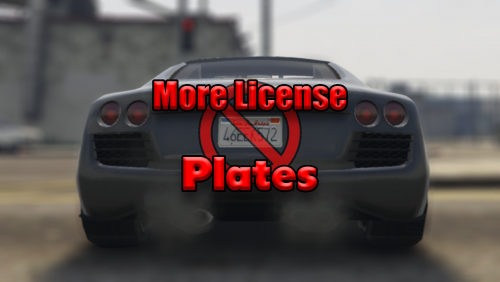 Those rumors are frankly bullshit, spread by people who run a million mods at once, and then choose one at random to blame when their game lags. Now to be honest I haven't updated my license plate randomizer in a long time and I don't use it much myself because I mostly only go in game to test/develop my mods, not to play. But it's always worked fine for me and not caused any performance impacts. And for what it's worth, my mod doesn't have kind of bug where it "might crash if there are not enough cars around you". Just to be clear, I haven't downloaded this new license plate mod and it may work just fine. If it does have better performance than mine that's awesome and you should use it. But I'm really tired of hearing this "License Plate Randomizer causes crashes/lag" crap years later because one person jumped to conclusions in a video once.

