
Azteco
Members
-
Joined
-
Last visited
Everything posted by Azteco
-
Did you fix or solve it? I'm adding this vehicle in a add slot so I figured once I did that later if you haven't found your data for it I could post the lines for you to copy.
-
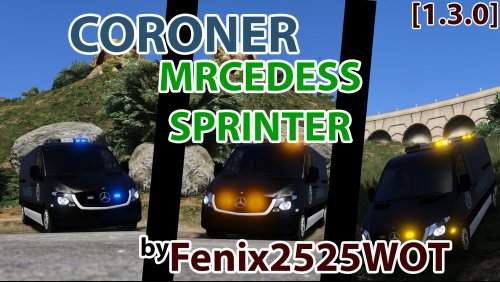 I got thinking after actually deciding to test drive myself these over letting coroner always using. Driving by Sandy shores a mountain lion ran by. Not only is it a ideal coroner van or utility vehicle but could be a game warden recovery unit or animal control unit for larger animals in wild. I don't think gta has any animations itself for someone picking up a dead mountain lion or pig but if a script was possible for the game warden ranger players the van wold be ideal for those folks with the amber or yellow lighting or blue same as this with game warden or ACO skins. The van has allot of possibilities. I also noticed after driving people slow or move over for it never noticed that until I actually drove it myself. This van is 10/10 I say. Very good work you have done and others putting into it. It's staying in my game and may end up in other area uses also. I may rename the other 2 and adjust the metas so I have all 3 in when I get time.
- 39 comments
- 12 reviews
-
-

- 1
-
-
Lol I have seen some pretty decked out slick tops around off interstate 10 that made the Disney shows a joke. You get blinded just approaching them. I guess I'm in middle in reality of it. It depends on car and how it's all setup. But overkill can exist. I recall many many years ago cali stuck with one burning red in front and one yellow one red in rear because it was found a drunk was less likely to hit it from behind and more people would notice one solid burning red in front pulling over then the Pasadena light show coming up from behind. Not sure how those statistics stand currently but I recall several agencies had looked into that and why they kept simple for longest time. But many departments changed requiring the 360 coverage visibility.
-
You mean it appears the lights are on even if they are off but dim? I think its just the way it is and it I never thought about it because it looks like it's in park and idling with parking lights on. When you actually have the lights on it they are normal or the lights stick out more. Never thought about it and thought it was way it was made to give it idling look. Still like it myself. Prob the coloring. Did you use original setup or this method here? I know if you using a enhancer for the lights they will appear on fully. I never liked the enhancement mods for lighting hardly use those. But it was way model was made I think. In the second picture I am not using any visual enhancing mod in lighting and you can see it sort of appears they are on but I think it's just the coloring etc of the lights. It never has bothered me. If I had the visual enhancing mods in they would appear to be brighter. I never stuck with visual light enhancers because at night they are lovely but in the day to me it was too odd. But everyone thinks different of that. If I'm correct they were quick conversions and are in beginning stages put out so anyone wanting a older patrol car had them. I think they are great. To me under certain light it gives the caprice the look of lost gloss and anyone in mid and southwest knows how that goes on a car that's been around in sun for many years without proper wax and care lol.
-
You can never give me too many lights looks awesome.
-
Yes. When you add mods that require a carvariations or vehicles meta edit do not replace your files if you have ever edited them for other vehicles. You need to copy over from his supplied meta and carvariations items onto yours so you keep all your other modified items in those on your end. I have tried all 3 and they work fine. If you didn't back up then you'll have to go back and re add any other vehicle meta item and carvariations item you use for them to work proper. Always make backups with notes and what cross references what with dates in Readmes or a notepad if you change alloy of vehicles or add etc endlessly. I did notice the last version the amber showing the amber flashing but faint blue which he said he would address. Still looks good. Only problem I am having is the van lod the tires vanish too soon. Can't I extend the distance the van goes to low lod and doesn't look a mess in the metas? If so what's a reasonable distance to help that on a higher end graphics card. But hardly no bother since it's only spawned when there is a coroner call and hardly ever pay attention to it or focus on it. But i still say this is a good replacement. Good work on them. I guess I can live with the low lod it's reasonable before tires vanish. Here's a couple shots of the blue light on amber and other is rear only the two outer ambers flash. Not sure if that's normal. I recall reading somewhere the difficulty of yellow and amber colors and some are normal showing blue or red on models. I really need to get my screen recorder and snap shot going the pictures are horrible I know from a cam.
- 39 comments
- 12 reviews
-
-
- 1
-
-
I thought it was nice. But every one has different likings.
-
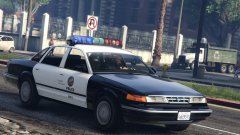 oooooo mid 90s CVPI I really like. Got to get one like this someday. Looks very good.
 -
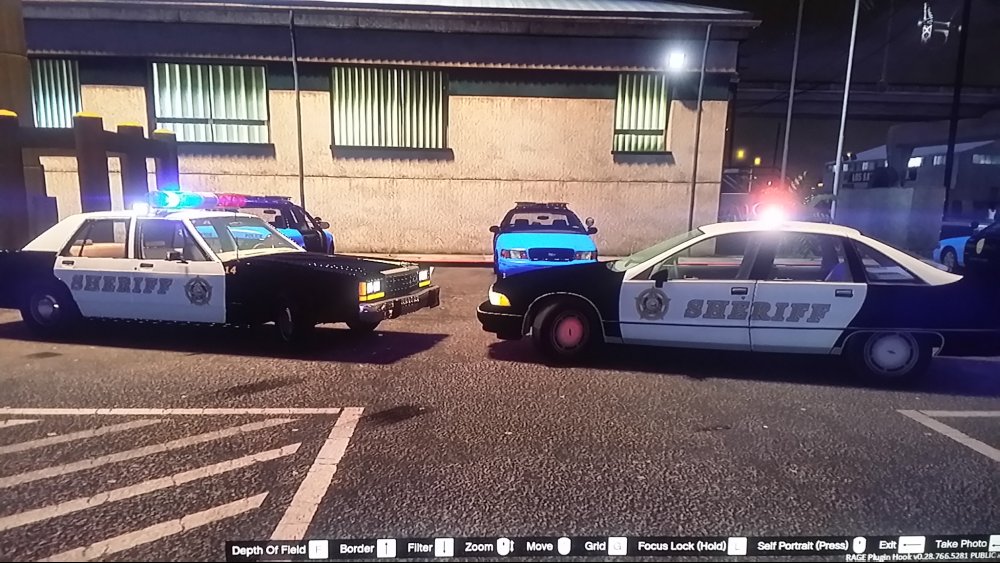
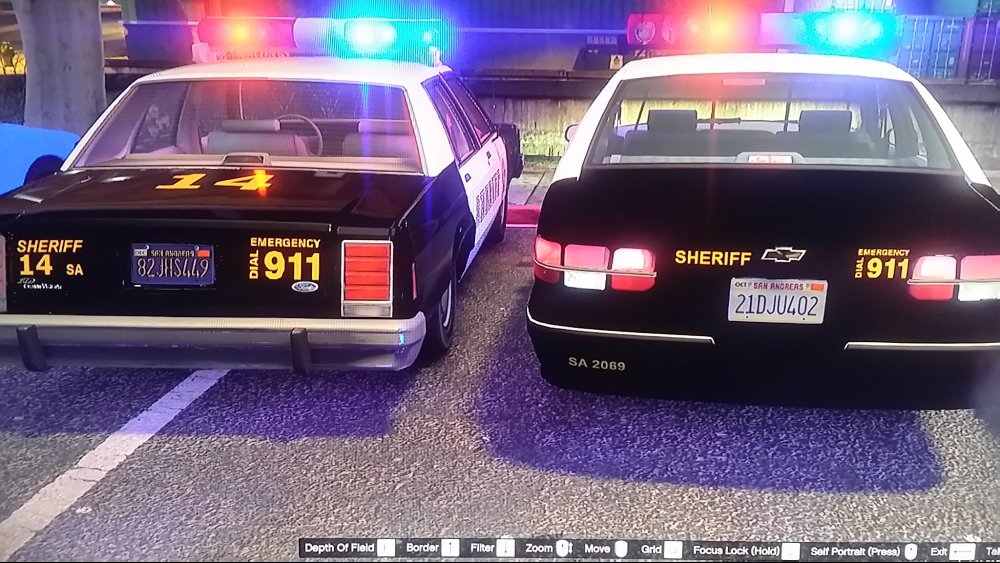
Hopefully Im putting this in proper location, if not I hope the Mods go easy on me I was asked about putting Lundy's converted 91 Caprice & 87 LTD in the police old slots where the yankton suv and patrol car is. Ill try to explain as good as I can for those who dont know how or want to use the policeold1 and policeold2 slot replacing the old snow covered yankton patrol cars and need a little help to get a idea. Im no pro but here goes. *I forgot to add when using your Notepad++ tool be sure you are running it as a administrator. Either set the program to run as administrator or right click Notepad++ and select Run as Administrator when editing* *Run OpenIV as a Administrator if it isnt set to run as one by right clicking selecting Run as Administrator.* Also before doing anything and you dont know how look into it before rushing in so you get a understanding prior to jumping in and messing your game up. So you like Lundy's 91 Caprice and 87 LTD but want it in the police old slots replacing the two old Yankton snow police cars that are stock GTA V for use when you want for Whatever reason? I did the following and it works for me. I use the retail dvd version of GTA V. original files here: www.lcpdfr.com/files/file/8843-lspd-1991-caprice-and-1987-crown-victoria-ltd/ Make it a good practice to always back up files you edit prior in event you have to revert or choose to revert. If not disregard or dont blame me. Im also not to blame if you use anything online and get caught or mess your game up. If you have backups and readme/notes on what you did you can always revert and try to figure out what went wrong and have a working game still. You will need the Caprice and LTD files, notepad++ or similiar tool, your or Lundys carvariations.meta, openiv. Please read all this fully prior to doing if you are new or dont know to understand. Then you can go change things and re read in steps as you alter things. -- The car files -- Extract Lundys LTD/Caprice police car files into a new folder on your desktop for easy access or spare hard disk you use for storage. Name the folder for example Policeold or something then maybe add the date. You can then create folders within it named policeold stock, policeold new in event you change cars allot or want to revert. Obviously using the folder within it named policeold stock to place the original policeold files in it and the original carvariations.meta if you choose to revert or however you go about backing things up your end. Since I have the capacity for endless backups I make it a habit to back anything I change up and leave self read mes which correspond to other modifications that changed or used the meta files. Everyone has a different method and some things arent necessary since original game files exist elsewhere if you can navigate properly. Rename the 87 LTD police car files to policeold1 doing this for all its files so you should have after renaming them this: policeold1.ytf, policeold1.ytd, policeold1+hi.ytd, policeold1_hi.ytf Rename the 91 Caprice files to policeold2 doing this for its files now having: policeold2.ytf, policeold2.ytd, policeold2+hi.ytd, policeold2_hi.ytf Using open IV, go to: C:\Program Files\Rockstar Games\Grand Theft Auto V\mods\x64e.rpf\levels\gta5\vehicles.rpf Now enable Edit Mode in Open IV the upper right corner next to the address bar. Click yes after reading the warning. Double click Vehicles.rpf to open it. From the location you put your renamed LTD policeold1 files & 91 Caprice policeold2 files add them by using Open IV clicking on the green + (plus) icon. Select your files and click open. Now you just placed the files into the mods\x64e.rpf\levels\gta5\vehicles.rpf\ You can check by double clicking the policeold.ytf & policeold2.ytf now seeing in openIV the LTD and Caprice. After confirming if you decided to check, close out of the ytf files going back into Open IV. -- Now you will need to alter the carvariations.meta -- This is where you use the Notepad++ tool or whatever tool you use. Using OpenIV go to: C:\Program Files\Rockstar Games\Grand Theft Auto V\mods\update\x64\dlcpacks\mpchristmas2\dlc.rpf\common\data Copy the carvariations.meta into that backup folder you made in the policeold stock folder on your desktop or where ever you placed it if you did. Remember if you have added or placed other items/lines in your carvariations.meta from other custom cars that use carvariations.meta in this location you will need to ADD the item/lines rather then replace the carvariations.meta supplied by Lundy or this method explained over or those other vehicles may/will not work. If you never altered the carvariations.meta you should be ok just using Lundys supplied carvariations.meta however will need to change couple of things. * So if using Lundys supplied carvariations.meta do this below: * Using Notepad++ tool open Lundys Carvariations.meta and in it search for the model name lines that contain <modelName>police2</modelName> and <modelName>police</modelName> Rename police2 to policeold2 Now go to the next one and rename police to policeold1 This should leave you with: for the Caprice <modelName>policeold2</modelName> for the LTD <modelName>policeold1</modelName> You only change those two model names. Now save Lundys carvariations.meta and save it in your new backup folder you made policeold new. close Notepad++ tool. You still should be in the openIV path in edit mode: C:\Program Files\Rockstar Games\Grand Theft Auto V\mods\update\x64\dlcpacks\mpchristmas2\dlc.rpf\common\data In openIV click the green + (plus) icon and select Lundys carvariations.meta that you just modified in its backup folder or where ever you place it. Click open. You just replaced the carvariations.meta and are done. Exit out of Openiv and play lspdfr. This should work in game now. **If using your carvariations.meta that has other modifications you done for other car models do this below.** Using Notepad++ open the backup you just made of your carvariations.meta in that backup folder of carvariatons.meta Now add this below in the carvariation meta if you do not have anything yet for policeold2 and policeold1: <Item> <modelName>policeold2</modelName> <colors> <Item> <indices content="char_array"> 134 134 156 156 </indices> <liveries> <Item value="true" /> <Item value="false" /> <Item value="false" /> <Item value="false" /> <Item value="false" /> <Item value="false" /> <Item value="false" /> <Item value="false" /> </liveries> </Item> <Item> <indices content="char_array"> 134 134 156 156 </indices> <liveries> <Item value="false" /> <Item value="true" /> <Item value="false" /> <Item value="false" /> <Item value="false" /> <Item value="false" /> <Item value="false" /> <Item value="false" /> </liveries> </Item> <Item> <indices content="char_array"> 134 134 156 156 </indices> <liveries> <Item value="false" /> <Item value="false" /> <Item value="false" /> <Item value="false" /> <Item value="true" /> <Item value="false" /> <Item value="false" /> <Item value="false" /> </liveries> </Item> <Item> <indices content="char_array"> 134 134 156 156 </indices> <liveries> <Item value="false" /> <Item value="false" /> <Item value="true" /> <Item value="false" /> <Item value="false" /> <Item value="false" /> <Item value="false" /> <Item value="false" /> </liveries> </Item> <Item> <indices content="char_array"> 134 134 156 156 </indices> <liveries> <Item value="false" /> <Item value="false" /> <Item value="false" /> <Item value="true" /> <Item value="false" /> <Item value="false" /> <Item value="false" /> <Item value="false" /> </liveries> </Item> </colors> <kits> <Item>157_massacaro2_modkit</Item> </kits> <windowsWithExposedEdges /> <plateProbabilities> <Probabilities> <Item> <Name>White Plate 2</Name> <Value value="25" /> </Item> </Probabilities> </plateProbabilities> <lightSettings value="2" /> <sirenSettings value="13" /> </Item> <Item> <modelName>policeold1</modelName> <colors> <Item> <indices content="char_array"> 134 134 156 156 </indices> <liveries> <Item value="true" /> <Item value="false" /> <Item value="false" /> <Item value="false" /> <Item value="false" /> <Item value="false" /> <Item value="false" /> <Item value="false" /> </liveries> </Item> <Item> <indices content="char_array"> 134 134 156 156 </indices> <liveries> <Item value="false" /> <Item value="true" /> <Item value="false" /> <Item value="false" /> <Item value="false" /> <Item value="false" /> <Item value="false" /> <Item value="false" /> </liveries> </Item> <Item> <indices content="char_array"> 134 134 156 156 </indices> <liveries> <Item value="false" /> <Item value="false" /> <Item value="false" /> <Item value="false" /> <Item value="true" /> <Item value="false" /> <Item value="false" /> <Item value="false" /> </liveries> </Item> <Item> <indices content="char_array"> 134 134 156 156 </indices> <liveries> <Item value="false" /> <Item value="false" /> <Item value="true" /> <Item value="false" /> <Item value="false" /> <Item value="false" /> <Item value="false" /> <Item value="false" /> </liveries> </Item> <Item> <indices content="char_array"> 134 134 156 156 </indices> <liveries> <Item value="false" /> <Item value="false" /> <Item value="false" /> <Item value="true" /> <Item value="false" /> <Item value="false" /> <Item value="false" /> <Item value="false" /> </liveries> </Item> </colors> <kits> <Item>157_massacaro2_modkit</Item> </kits> <windowsWithExposedEdges /> <plateProbabilities> <Probabilities> <Item> <Name>Blue Plate</Name> <Value value="10" /> </Item> </Probabilities> </plateProbabilities> <lightSettings value="2" /> <sirenSettings value="13" /> </Item> If you need help on how to change or add items in the meta just ask or search and take the time to look at the carvariations.meta to get idea and understanding how things are placed. Once you have added info into carvariations.meta, click save as keeping the file name as carvariations.meta and save it in your backup folder for policeold new not replacing the original backup you have. This way any changes in future you do and you want to revert again you have it saved. Now using openIV you should still be in: C:\Program Files\Rockstar Games\Grand Theft Auto V\mods\update\x64\dlcpacks\mpchristmas2\dlc.rpf\common\data In openIV click the green + (plus) icon and select carvariations.meta that you just modified in its backup folder or where ever you place it. Click open. You just replaced the carvariations.meta and are done. Exit out of Openiv and play lspdfr. The car and lights should work. Keep in mind since it is the old slots you are using you will need to use your trainer and spawn them when you want to use them or in lspdfr while suiting out your character select the LTD or Caprice. I liked them and didnt want to remove them while I had the other slots filled. You can do the add vehicle slots method found in the foums but I chose this as I also have those full with other things and didnt like the snow packed yankton old cars. I had the handlingid originally left alone in the vehicles.meta but changed it to POLICE3 down road feeling it was better. Hopefully it works for you if you want them in the old slot also. Hopefully I explained properly. Any changes or coments needed please let me know here so I can chage/add or add yours and others can read comments on it for better understanding. I just tried to explain it as good as I can so nobody messes up. The pictures below is the old policeold1 and policeold2 being used in old slots. I took a shot from my cell since I am or was in middle of changing programs for screen record/pictures. The graphics I added to the cars came from using the stock sheriff granger files altering it changing the size of the emblems to fit using the cars template, Some manual number changing or other words. I may have used one of the vehicles sheriff star from something else I dont recall but I dont think I did. This was just for a quick self play and test. Obviously the Sheriff is italic facing forward one side as some do this rather then both sides facing to rear or both facing foward. They are pretty even but due to the lettering size, italic facing and door jam edges it can appear to someone as it isnt even. Here we always had italic on sides facing lettering to rear on drivers side and passener side facing foward to front. Depends on where you go or what is chosen. The coloring was left same and couple other minor changes made to lettering or coloring as I use the old slot as 2 old sheriff cars. The 14 was added to the LTD as it was a former buddys number who passed on long ago who loved the LTD he had and held onto it until it was the last LTD in the fleet being replaced by a 93 or 95 caprice. Just added it to my game since it reminded me of him seeing Lundys LTD conversion. If you watch "the hitcher" from 80s that is how the old department was back then, western style uniform small Texas sheriffs agency except the LTD being full white. I did make one all white with the San Andreas Sheriff star on door leaving the Sheriff lettering off. I ended up just keeping mostly things San Andreas schemes. the SA on the LTD trunk was for San Andreas since I dont follow Blaine county thing sometimes.
-
It will be great when it comes. If it takes until December 16 I'd be happy. Plenty of mods and different scenerio exist in gta/lspdfr. I rather a good 0.3 that's been tested and held onto longer to make it great then something just thrown out. I still love 0.2b and it never gets old specially with the community sharing pictures videos and others creating for the game. It's a new game everyday!
-
Very nice in game. What graphics card you running and any enhance mods in screen shot? It's a pleasure to play something one worked very hard on. Makes the game new every day.
- 39 comments
- 12 reviews
-
-
- 1
-
-
Very nice. I wish others would incorporate ambers as light bar as extra or option. With variant bar color one could use this as anything in game. Really like it allot.
- 39 comments
- 12 reviews
-
-
- 1
-
-
-
-
 Also don't forget the read me and carvariations and vehicles meta changes if needed. Did you use the sheriff slot and add the car variation meta?
- 159 comments
- 53 reviews
-
 I would sit more to the left. In event a clown decides to wander into the shoulder backing over tracks and getting out is better then getting hit drivers side at freeway speed. The Pilar is perfect protection if parked right.
 -
Is the server down for maintenance or heavy traffic? I'd imagine that is what that is. Never had that message however. One thing I dislike about the validate thing is if they are down its wait. Never liked that in validation. They need to implement a 800 number for this kind of thing to validate offline. Everyone else has that option least in things I use.
-
-
Retail is pretty much same however it is important people read the read me files. Very good video.
-
Just imagine Just imagine, districts that spawn specific liveries or units. Dreams can be gold. :(=)
-
I wish they had more in gta lol as certain areas can become very hostile for a single lspdfr officer lol. The presence does make the ai avoid trouble ;)
-
Just my thought, testing scripts, plugins, mods, cars is going to happen. Like said it gives them feedback and not a mass amount of people running something buggy or possibly unstable or if adding will occur to the mod and if you have a large mass with it imagine the 20 questions added to the existing 20 questions more then half being common problems in the read me's and information. Nothing wrong with testers. Heck I would test a car or mod out any day as much as I play lspdfr and customizing gta v in my free time. I think ita good people like g17 and Jeff have videos. I first seen the lspdfr on Jeffs channel. It got me back into the mod gaming after many years. It also let's me know what's new what changes are to come. I'd like to record allot of my game play I thought about it putting it on youtube mostly just the game play itself minus voice since there is enough good channels with authors talking. Plus when they have the scripts or mods ahead of time many people who can't play lspdfr or just love watching gaming videos which is a large crowd it gives them the opportunity to see these mods and such. I don't see anything wrong with it. Is there mods I want sure we all do sich as wig wags. I don't mind waiting. I'm very particular in what I have such as police vehicles in current to 80s common models I prefer. If someone had a Chevy celebrity (not sure how many recall that hunk o junk small engine patrol car we use to have them in 80s out here) or older taures sure I'd test that sucker out in a heart beat. I've thought about asking someone if i could test a mod or two here and there not released they made but been busy in self game play and real life work I haven't bothered to ask. But you can always ask. Either you'll get told no or yes. Never hurts to ask. If told no it doesn't mean your being hated on or singled out. There could be valid reasons only few are chosen to test it or run it see how it goes and catches with everyone. It takes ones personal time to sit and create all of this. Everyone putting a part in. If you create something spend x amount time on it and the tester shows it on a channel and nobody likes it, it gives him idea to not invest much time into that and go into another direction or what to change prior to mass releasing it. It never hurts to ask though. If I had the proper items I would do some stuff myself but barely getting back into the game. I appreciate people like albo and jeff, lundy, etc. They keep the game alive.
-
-
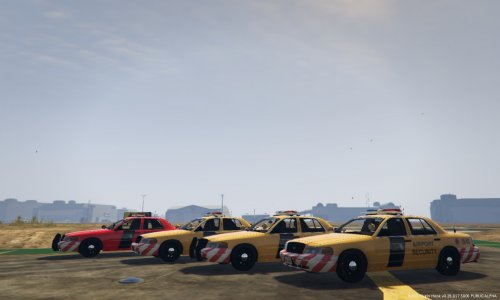 Just for thought I remember seeing this and found it again. It looks like a police car and one could mistaken it from distance but it is a security firm using blue on blue rotating halogens. https://en.m.wikipedia.org/wiki/9C1_(Chevrolet_Police_package)#
- 6 comments
- 2 reviews
-
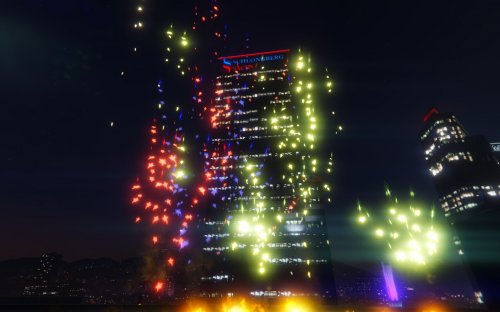 I was just thinking too it be nice to have this type of add on. What would be killer is a fireworks show that played once it turned night and continued or could be set or just keep going until daybreak that automatically starts above vine wood or downtown.


.thumb.jpg.4066677156985e22489bfecddc2f6c45.jpg)