BlueLine Vibes
Members
-
Joined
-
Last visited
Everything posted by BlueLine Vibes
-
-
 You have out done yourself sir! I am slowly tackling this update, you have been very busy and I see you have put a crap ton of work into this!
- 298 comments
- 15 reviews
-
-

-

- 5
-
-
 Looking forward to this V2 release ☝️ ⌛
 -
I see what you did there 👆 😁 - Lenny is right though, if you decide to get the EUP 9.10 get his config. Works great with it.
-
 Do we need to have all language packs installed for this callout pack?
- 237 comments
- 20 reviews
-
- lspdfr callout
- rph
- translation
- legacy
-
Tagged with:
-
 My 'accidental' Molotov landed on the freeway, and now traffic has decided to forgo standard road rules and become a spontaneous, 20-minute-long artistic explosion. It's the only time you'll see Christmas and the 4th of July perfectly fused into one glorious, fiery gridlock. 🎁💥🚗🔥
- 6 comments
- 1 review
-
-
-
- 3
-
-
This is a fun plugin to include into the game. Easy to load and I like your console command RemoveAllFire Haven't had an issues so far and the config is easy to understand. Great addition to your patrols as the default fire goes out too fast and the FD has nothing to do when arriving on scene. Configure the settings so that it's not too heavy or lasts too long. No need to do file swaps in your OpenIV, this takes care of everything. Keep up the great work.
- 6 comments
- 1 review
-
-
- 3
-
-
 This reminds me of Watch your Death script, but this one seems more interesting. Also it doesn't look like it requires ScriptHookVDotNet which is a big plus! I'll try it out!
- 18 comments
- 2 reviews
-
-
-

- 2
-
-
 Fun Callout Pack so far. However, I would like to recommend a suggestion for a future update. I think the majority of players would agree that we can take advantage of your END key to end the callout ourselves. Currently as most callout packs do, the scene is code 4 as soon as we make an arrest. Would love to interact with some of the callouts, for example a burglary callout. Says I can press Y to interact with the subject. U to check for damage. Seeing how the subject is standing there with a shotgun in his hands, decided to detain him to investigate, but then scene Code 4s .... Several calls are like this as well.
- 156 comments
- 8 reviews
-
-
- 3
-
-
 Converter works great for PR. Easy to make backup uniforms and label them. Also has the ability to have "mask" true or false which helps with backup units showing up with masks (example: SWAT) and gets rid of facial textures clipping through masks.
 -
 Definitely a 5/5 Config
 -
.thumb.png.656f907bc2febc81911b0b821cb502c8.png) Are you asking for a laptop overlay that you can use in OBS, or were you asking if this mod came with one? You can do what I did and just find a good front view of a laptop image online and delete the background if needed, then use that for an overlay and then add a new window source to fit in the overlay etc. I don't mind sharing that image out. I'm working on a slightly better overlay that looks more like a tablet. Almost done.
Are you asking for a laptop overlay that you can use in OBS, or were you asking if this mod came with one? You can do what I did and just find a good front view of a laptop image online and delete the background if needed, then use that for an overlay and then add a new window source to fit in the overlay etc. I don't mind sharing that image out. I'm working on a slightly better overlay that looks more like a tablet. Almost done.- 339 comments
- 43 reviews
-
-
- 2
-
-
-
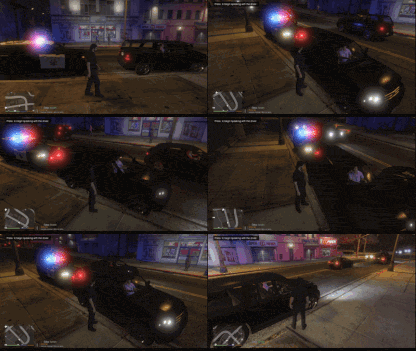 It appears your pathway for the install is incorrect. This is not a standalone plugin. Needs to be plugins > LSPDFR I won't leave a review just yet as it wouldn't be fair until you work out the issues with the plugin. This plugin needs A LOT of work. The traffic are not reacting to your vehicle lights, the traffic is reacting to you being in the vehicle. They slam their brakes on both sides of the road, the AI traffic brake off and on. Impossible to shoot radar even from 30 feet away from the highway, the traffic slams their brakes at the sight of you inside your vehicle. So essentially your vehicle becomes a mass MVA casualty maker on the highway.
- 26 comments
- 3 reviews
-
-
- 9
-
-
Love this plugin @AstroBurgers Worked great for Ultimate Backup, sure it will be the same for PR. I'll leave a review once I get going with it. Simply a must have when converting your backup unit uniforms!
-
 Config files will be populated once you load lspdfr and are on duty. They will be under your Settings folder. You will have several configs after you are on duty at least once. If you are not seeing those, then the mod is not installed properly. Visit the discord if you need further help. Do you need Stop The Ped? This is mentioned on the page above. Disclaimer, Please Read. First, this will be completely incompatible with Stop The Ped, Ultimate Backup, and Compulite, it is recommended you remove them for the smoothest experience.
- 621 comments
- 48 reviews
-
-
-
- 4
-
-
Truly a game changer if you play LSPDFR you will want this for your gameplay. Thanks to all the developers for all of your hard work!
- 621 comments
- 48 reviews
-
-
-
- 6
-
-
This weekend 😉
-
 Thank you for the info. I have been modding GTA 5 with LSPDFR for 10 years now. Baffles the hell out of me, that I can still miss something this simple. Spent the last 4 hours trying to find out why my game has been crashing about 30 seconds into gameplay. So I would consider this actually as a "critical" problem with the ELS config, unless people are comfortable wasting hours of time trying to figure it out on their own. Thank you again for taking your time and pointing out the error of these configs.
- 260 comments
- 37 reviews
-
 You didn't test your own mod?
 -
-
 GP Uses Speech recognition. You can't expect GP to understand all of the 10-codes. It would be your job to add in the phrases that you want. There are plenty of videos and documentation explaining how to do that.
- 1,350 comments
- 82 reviews
-
 InteriorsV works fine for those that can't get the other EAI or OAI to work. Not a big fan of my partners waiting outside, had to use a few tricks to get them in. Not sure I would include SHVDN to be honest. It updates too frequently and it's bound to cause issues not to mention needing auth to include it in the download itself. Nah, I would just give the link in description, that way people can just download themselves if it needs this prereq.
- 75 comments
- 5 reviews
-
-
- 3
-
-
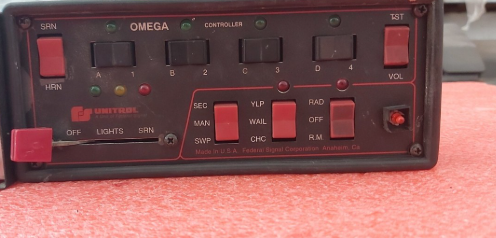 I like the siren, but it seems a bit quiet.
 -
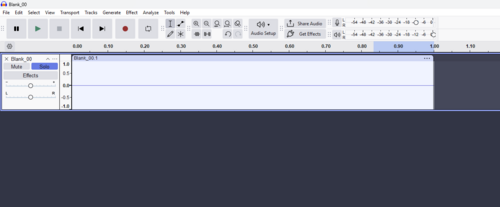 I don't hear anything

.thumb.png.30177a0c051e229db6773959bc72cd65.png)
.thumb.png.656f907bc2febc81911b0b821cb502c8.png)