


A Stranger
Members
-
Joined
-
Last visited
Everything posted by A Stranger
-
Yes.
-
Locate to GTAV/lspdfr and open the lspdfr.ini.
-
Please send your RagePluginHook.log.
-
Open commandline.txt; located in your GTA V folder, delete everything in it, save & close.
-
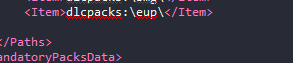
Go to the path I wrote above, scroll to the bottom.
-
Send a new RagePluginHook.log.
-
Send your RagePluginHook.log.
-
In your GTA V folder.
-
Send your ScripthookV.log.
-
You have an issue with your speech recognition. VD is by default set to American English. Is your Windows set to that? If so, did you check if your Speech Recognition is set to AE as well?
-
Your update.rpf in /update.
-
If it's ELS; did you follow the instructions? Did you press "J" 3 times? Did you placed the .xmls correctly?
-
Please send your RagePluginHook.log.
-
Please send your RagePluginHook.log
-
You're welcome!
-
Rename your ELS folder to _ELS and mods to _mods.
-
Check if it works with your keyboard. It could be a controller issue. My XBOX360 Controller works perfectly fine.
-
Rename mods to _mods. Make sure you have all of the requirements installed. If it says you already have them installed; reinstall them to be sure. https://www.microsoft.com/en-us/download/details.aspx?id=48130 http://www.microsoft.com/en-us/download/details.aspx?id=13523 https://www.microsoft.com/en-us/download/details.aspx?id=52685 **Then, add your GTAV folder (named Grand Theft Auto V, nothing else) to your Antivirus exceptions.**
-
Open OpenIV -> Go into your Mods folder -> Enable "Edit Mode" -> Click on the green banner.
-
Check dlclist.xml. If "eup" isn't in it, reinstall it. Dlclist.xml: mods/update/update.rpf/common/data
-
That's true. If the game works, it was your mods folder though.
-
Rename the LSPDFR folder on /Plugins to _LSPDFR and mods to _mods in your GTA V folder.
-
Please send your RagePluginHook.log. Also, did you change any keybinds in the original GTA V game?
-
Update RagePluginHook to version 1.74.
-
You are missing backup.xml. Redownload LSPD:FR 0.45 manual and drag & drop the files you need. Change the plugin timeout threshold from 10000 to 60000 in the RagePluginHook.ini file and disable Main.PreloadAllModel in GTAV/LSPDFR -> LSPDFR.ini.

