


A Stranger
Members
-
Joined
-
Last visited
Everything posted by A Stranger
-
You need to update your game. If there is no update available: Delete GTA5.exe in your GTA V folder and then verify your game files.
-
Are you pressing 1,2,3,4 / G when you are in Stage 3?
-
Your RagePluginHook.log is unavailable. Please reupload it. 🙂
-
First, update RagePluginHook. If it crashes with mods, but not _mods, then it's your mods folder crashing your game, like I said. RDE has also not been updated in 2 years.
-
Did you by any chance install anything into your GTAV vanilla folder? Verify your files and rename the LSPDFR folder in /Plugins to _LSPDFR.
-
It is! Please update RagePluginHook.
-
No, you are on 1.73. Latest is 1.74.
-
You just had to update RPH.
-
Please send your latest RagePluginHook.log. It's in your GTA V folder, not /Logs.
-
SDK has nothing to do with it. You don't need it to play. Just drag & drop the files and overwrite.
-
Remove BackWeapon in /Plugins. You edited Interaction+ keybinds? "T=U'" isn't a keybind. Change it.
-
Rename the LSPDFR folder in /Plugins to _LSPDFR. I see PoliceSmartRadio is trying to add buttons. Make sure you have -windowed mode enabled.
-
No. Please check his log carefully. He is using RagePluginHook 1.69. No need to spam the same solution in every single forum-post.
-
I wouldn't disable it. Just put it on "n" or something.
-
Delete startup.rphs in your GTA V folder. And rename the LSPDFR folder in /Plugins to _LSPDFR.
-
Please update Grand Theft Auto V + RPH and LSPD:FR.
-
Please only use one forum post for your issue.
-
Reinstall LSPDFR manual, then the Albo plugins.
-
Make sure to not load LSPD:FR on startup. Load it once you are ingame via the console.
-
Please send your RagePluginHook.log.
-
Check the game settings for GTA. Are there any unbound?
-
You're welcome!
-
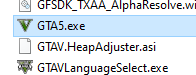
Update your game. In order to do this, delete GTA5.exe in your GTA V folder. It looks like this: After you deleted it, please verify your game files. For the Retail version of GTA V: Open the Rockstar Games launcher -> Locate "Settings" in the top right corner -> Select under "My Installed Games" Grand Theft Auto 5 -> Select Verify Integrity. For the Steam version of GTA V: Right click Grand Theft Auto V in Steam -> Properties -> Local Files -> Verify Integrity Of Game Cache
-
Remove TrafficStopbackup.
-
Please send your RagePluginHook.log.

