


Faracus
Members
-
Joined
-
Last visited
Everything posted by Faracus
-
why are you linking to .91 and not .95?
-
Thanks for doing this, I've only seen the pics, I'll test it out later, but have u updated the licence plate to an actual Toronto plate and not the EU?
- 10 comments
- 2 reviews
-
ELS V6 has this feature, which is good for SP, but for MP DAS will as long as the display is up.
-
GTA IV is a huge RAM hog, and using HQ cars, and ELS cars as they are high poly, and bigger files, it can cause the game to eat up all your ram, and with only 8GB, it will go by fast. Also if you use a lot of mods it will suck it up.
-
game running too slowly can come from your FPS being too low, are you running in Windowed mode and switching out? Or ALT+TABing out?
-
I'm guessing that your running a laptop then, and that's a integrated graphics card. I suggest try clicking on auto configure, and running it at the suggested specs for your computer, and if it is a laptop, there is nothing really you can do for upgrading at all.
-
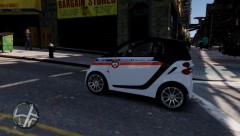 Those cars dont have lights on them. http://www.blogto.com/upload/2007/06/544863119_bc489440b7.jpg
 -
Lookin awesome man!
-
what gfx card are you using, and what settings are you running GTA IV on, also is there anything else running in the background?
-
and rather than having a whole bunch of keys to fines you can use F9: Price Down, F10: Issue Fine ($XXX), F11: Price Up!
-
well depends on the location. There are some places where the fine is a % of your net worth :) that would suck to be rich there lol. *Edit* Proof of previous statement http://www.bbc.co.uk/blogs/haveyoursay/2010/08/should_speeding_fines_be_based.html
-
Sounds like a good idea to me :)
-
Awesome, I'd love to check it out, sorry about going off topic.
-
http://gtapolicemods.com/downloads.php?do=file&id=695 didn't take me long :) *edit* Oh and locally on page 2 is so I don't think you looked far.
-
Will you be doing a Parking Enforcement skin?
-
1) because the OP was asking what the difference between the two where, and Carrythxd just gave his personal opinion 2) because Carrythxd was agreeing that Bandicam was a better choice due to it being easier on the frame rates.
-
you need to turn off keybindings. 1) in the .ini look for keybindinsdisabled and set it to a 1 or 2) in game press F3 > Options > Turn off in game keys then go to the second page and save settings to .ini.
-
if your using SNT make sure you have your keybindings disabled.
-
I prefer to use Bandicam, it's a lot less power hungry.
-
the Title "Smart Car Police" sounds like police that only pull over Smart Cars.
-
look around for the type you want.
-
if that does not work, sadly there are a few DOA items, so just take it back and explain the reason, and they should replace it for you.
-
Legally any site hosting the original files are subject to a DMCA takedown, as those files are copyrighted to R*, and no one should be hosting them, as such G17 does not tolerate any illegal activities, or talk of illegal activities. *EDIT* For the future, please ensure you back up your original files before modifying it.
-
no guy is talking, it is just a series of bleeps and blips.
-

