


Pedro Rios
Members
-
Joined
-
Last visited
Everything posted by Pedro Rios
-
 That’s a great suggestion. I understand the convenience of being able to select different tow trucks directly (small/medium/heavy) without making the call each time. Adding configurable keybinds to request specific tow classes is definitely something I can look into implementing in a future update ^_^ I’ll work on implementing this as soon as I’m able to get to it (busy life). Thank you so much for your input!
- 5 comments
- 1 review
-
The slight height issue comes from how different vehicle models handle attachment bones and dimensions. Since they’re not standardized, alignment can vary a bit. This is the first iteration of the towing system, and I’ll be improving the attachment and grounding behavior in a future patch. Thanks for pointing it out.
- 5 comments
- 1 review
-
-

- 1
-
-
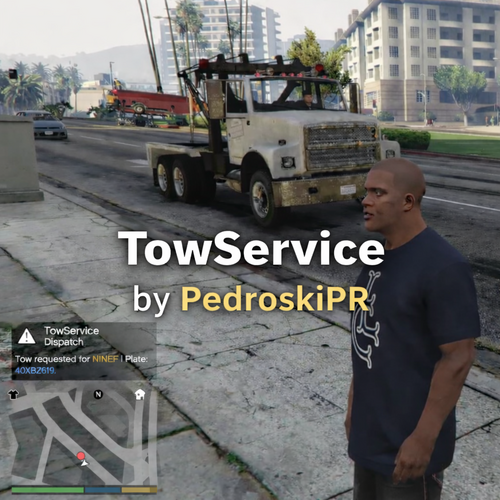
TowService adds a realistic and configurable tow truck system to LSPDFR. Request a tow truck for any eligible vehicle near you and watch it arrive, secure the vehicle, and transport it away, "smoothly" and "professionally". TowService uses a hybrid system: AI drives toward the vehicle. A replacement vehicle is safely attached to the tow truck. The original vehicle is hidden. Tow truck transports vehicle away (in the air) Cleanup occurs after departure distance/time. Built using RAGE Plugin Hook Developed and tested on: RAGEPluginHook_1_107_1334_16527 Designed for seamless compatibility with the LSPDFR ecosystem. Showcasing a working tow Showcasing a time when the Tow Truck gets stuck or doesn't drive, it still gets cleaned. Two times is the charm! FeaturesRequest tow truck with a configurable hotkey Smart vehicle detection (radius + forward cone system) Prevents towing unrealistic vehicles (planes, boats, military, industrial, etc.) Optional prevention of towing occupied vehicles Tow truck spawns dynamically behind player Intelligent AI driving with: Retasking logic Hill detection & recovery Backup maneuver if stuck (timeout recovery coded) Hook delay simulation Clean vehicle cleanup after transport Fully configurable via INI file Debug mode for logging and development Vehicles That Cannot Be TowedTo maintain immersion, TowService automatically blocks: Helicopters Planes Boats Military vehicles Industrial vehicles Commercial vehicles Cycles Oversized vehicles are also automatically filtered. Installation Drop TowService.dll into: Grand Theft Auto V\plugins\ Edit TowService.ini inside: Grand Theft Auto V\plugins\ Launch the game via RagePluginHook. Configuration (TowService.ini)All major behavior is configurable: Key SettingsRequestTowKey – Change hotkey TowTruckModel – Choose towtruck or towtruck2 SpawnDistance – Distance tow truck spawns from player ApproachDistance – Precision stop distance HookDelayMs – Hook simulation time Target DetectionTargetRadius TargetConeDegrees AllowTowOccupied AI & SafetyTowTimeoutMs RetaskEveryMs DebugDebugNotifications No code editing required.
- 5 comments
- 1 review
-
-
- 2
-
-
-
-
 Hi, Mozilla has been acting up with me as well. I have full paid antivirus, I downloaded multiple files from here using another browser and found no virus. I think Mozilla is getting stricter or something. It is safe to use. There has been a security breach with Flash, thus now is not safe. Make sure you update your Flash manually again. It's been on the news around the Internet.
 -
After the installation of the new rolled out 1.0d, the problem has been fixed. Thanks for the help
-
Yes, I have done the install process two times. It is also a vanilla GTA IV. Here is the screenshot you wanted.
-
Hi there, long time haven't been in the forums, happy holidays! Well, I reinstalled everything because I bought an SSD, got everything back to perfect and decided to reinstall the copy of the game. Well, after taking the time to install the packages and all that. It's running and no problem until this. When I pull over anybody and get out of my patrol car to their window, it ask what is the reason for them to be pulled over, i can't select nothing. Neither using the DPAD of my controller or even using the ARROWS on the keyboard. It switches between weapons but do not select the action on the menu thus I can't play it. I reinstalled LCPFR 1.0c and still does not work. I have been looking and can't find someone with this error. Any suggestions? [uPDATE] I found out I can't use any LCPFR buttons, game is running, AI is arresting fugitives, but I can't order a single command. Pointing out someone and hitting the action button, either E or LB won't work. It's like just ignoring or not detecting my inputs. The game is working perfect, no crashes, LCPDFR Diagnostic tool finds no error.
-
Hi guys, I'm back making videos :-) I am using my country textures that I've created. Vehicles are not made by me, have fun! Hope you like! Comments are welcome, I do not talk on the video. I've used Need for Speed music for the chases only.
-
The latest version improved the AI a lot, but if you are on their way you better move out because they'll will splash you like a rat if you are on their way hahaha. I hate it but hey, this game was not meant to be a cop game so, I am grateful with all the developers here that made this game x100 better. :-)
-
Please do not listen to the guy stating that Windows 8 is the problem. If you do not feel comfortable opening the case and doing so, at least, try booting into the BIOS Screen, and see how many memory sticks it reads, and if it reads 4GB and only one, then probably one stick needs to be re-inserted. If you are still under warranty, just take it to them and explain them the issue. If you are not warranted, it is actually easy to do that. Just make sure you disconnect the power cable, then press the Power On button to remove any charge inside the board, and ground yourself, just touch the chassis before touching the memory rams. If you still can't do it, try some youtube videos, if not, then have a professional do it.
-
If you have Windows 8, then you'll have to follow a topic that helps you on how to run it without problems. Don't use Bitdefender Free antivirus because GTA won't open at all. I had been trying for a day finding an alternative, but there is no single way to add an exception on the free version. Hope it helps, if not, at least worth the shot. When you install the game, and lcpdfr. Don't forget to make the LaunchGTA run with administrative privileges ;-)
-
The only thing that work properly is the honk so that they move, but the auto siren with els v7 does not work right, it sounds like it's automatically pressing the Y button lots of time. But I got what I wanted! Thanks
-
Thank you!! I owe you!!! lol, I paid you with the green arrow button. I was trying so hard to find it.
-
If you watch this video: You'll see what I'm referring, when you have your siren, traffic may jam, but when the guy honks, the car in front of you will move regardless of your lights so that you can pass. That's what I am looking for.
-
Hi, I found a script that allows you to honk and cars in front of you will move, but can't find it. I've noticed that on the EMS mod videos they have it. Where can I download such script ?
-
Hi there, You are stating that it starts recording automatically if I understood correct. You should change your F8 recording button to something like I did [Pause Break] key. Hitting F8 is done in LCPD:FR very often and I think that should be your issue.
-
Hi, i have Windows 8.1 and I've been running fine with no issues, recording for over an hour using Bandicam and it runs fast with a lot of mods on it. It only crash when ELS and LCPDFR does not co-ordinates. Just make sure the Compatibility Mode is set to Windows 7 in the file GTA.exe in the GTA IV Folder. Hope it helps --------------- My specs -------------- Power Supply 750w CPU Intel Core i5-3570K @ 3.40GHZ Motherboard FoxConn 875M Memory Ram Crucial Ballistix Sport 8GB 240-Pin Graphic Card nVidia Geforce 550ti 2GB Hard Disk Western Digital WD WD10EZEX 1TB OS Windows 8.1 Pro
-
I think the officer did the right thing. The outcome could not have been better for someone that is suicidal like him. There are many scenarios like people here posted and there are more lives to protect besides the officer's.
-
-
-
Perhaps this one ? http://www.gtagarage.com/mods/show.php?id=9129
-
-
Never did till now :-) I'll work on a NON-ELS, I don't have that much time free but, my days off are coming... I'll release them Alright,:-) I'll update you when I made the non-ELS :-) My cars dont have a template right now, Im going to work on the template so I don't think they will be the same. I will do my best to do it fast so that you can start working on it.

