




TheF3nt0n
Members
-
Joined
Everything posted by TheF3nt0n
-
RDE dlc.rpf, have you tried it?
-
Carvariations for pranger is located at carvariations.ymt in x64a, it isn't decrypted yet but there's a guy who decrypted the carvariations.ymt. carvariations.ymt
-
Show me your carvariations.meta again, please?
-
Just use the lines I've told you before, <liveries/> isn't needed for police vehicles, change your lightsetting and sirensetting from mine, but keep the rest of it intact.
-
I'll download the mod to see what's the sirensetting for your vehicle. @alweed Do you have another dlcs inside your mods folder? This problem seems to be coming from another dlc.
-
This seems complicated, Show me your modified carvariations.
-
Pranger entry wasn't even in your carvariations.meta, add the entry and test your game.
-
Show me your carvariations.meta, I'll see what I can do with it.
-
What's the sirensetting for that vehicle?
-
Absolutely, unless the vehicle is a civilian vehicle. Like an example, a Marshall with paintjobs which come from the flag. If it's a Canadian flag on it, they will spawn with red and white paintjobs alongside with Canadian flags attached to them. But, if they have Swedish flags on it, they will spawn with blue and yellow paintjobs alongside with Swedish flags instead.
-
Taken from the original carvariations.meta, should works with modified vehicles. <Item> <modelName>pRanger</modelName> <colors> <Item> <indices content="char_array"> <Item value="111" /> <Item value="7" /> <Item value="2" /> <Item value="5" /> </indices> <liveries/> </Item> </colors> <kits> <Item>0_default_modkit</Item> </kits> <windowsWithExposedEdges /> <plateProbabilities> <Probabilities> <Item> <Name>police guv plate</Name> <Value value="100" /> </Item> </Probabilities> </plateProbabilities> <lightSettings value="23" /> <sirenSettings value="1" /> </Item> Keep this entry '<liveries/>' intact, they'll spawn as normal with liveries.
-
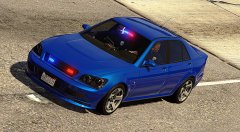 I like your lore vehicles by the way, any plan to release some of them? I've downloaded your Fugitive before you removed it and I need more lore vehicles for my game, I don't want to download real vehicles because they don't fit my taste.
 -
If the vehicle supports vehicle colors, they'll spawn with the assigned colors from carvariations. If the vehicle have a livery, the livery color becomes what colors are used for the vehicle and if the livery texture is white and the assigned colors is black, the vehicle will spawn with black livery regardless the color of the livery.
-
That numbers define what colors are used in the assigned vehicle. 0 is black and 134 is white, if it's set to 0, the vehicle will spawn with black paintjob and if it's set to 134, It'll spawn with white paintjob, 134 and 111 are usually reserved for police vehicles.
-
Have you guys fixed the gameconfig.xml for in-game internet access? I can't even access the internet straight from the phone, instead of directing me into the internet, my phone's screen becomes black and gets stuck holding the phone until I restarted the game, this is a game breaking bug, it should be fixed. I didn't get any answers from RDE Feedback, Bug Reports & Suggestions, so I have to post my problem here. I'm a bit concerned by RDE carvariations.meta with their vehicle lines are absolutely wrong from their original vehicle lines. wrong colors, wrong lightsettings, wrong license plates, I've fixed it. About RDE carvariations.meta liveries, I might can help. You don't have to assign multiple liveries for one vehicle in carvariations.meta, it'll work as vanilla police vehicles. Nonetheless, it'll save your time to create a carvariation setting for a vehicle. <Item> <modelName>police</modelName> <colors> <Item> <indices> <Item value="134" /> <Item value="134" /> <Item value="0" /> <Item value="156" /> </indices> <liveries/> </Item> </colors> <kits> <Item>0_default_modkit</Item> </kits> <windowsWithExposedEdges /> <plateProbabilities> <Probabilities> <Item> <Name>police guv plate</Name> <Value value="100" /> </Item> </Probabilities> </plateProbabilities> <lightSettings value="1" /> <sirenSettings value="13" /> </Item> This is what it looks like above, this lines were found in the original carvariations.ymt. <liveries></liveries> shouldn't be used unless it's a civilian vehicle with a flag and the colors of the flag on the vehicle, like Marshall. RDE Team is the best GTA 5 team i've ever seen in my life, but you guys need some improvement in fixing bugs and especially, fixing the carvariations.meta and peds.meta which are should be identified like the originals .ymt.
-
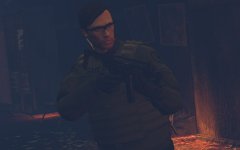 Where is the LSSD version?
 -
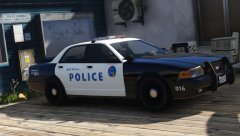 Do you have an ETA for the release anyway? I can't wait to use these delicious liveries. My free time. As usual, waiting for lore-friendly liveries and today, there are no lore-friendly liveries for vanilla vehicles on Downloads section, everyone is busy on their real life vehicle modding. My life sucks.
 -
 I've discovered a bug from the new gameconfig.xml, I can't access the IG internet from my phone, after clicking "Internet" then, the phone screen went blank and I can't exit the phone until I restarted the game. The same problem happens too for IG computers and laptops around San Andreas.
- 1,524 comments
- 85 reviews
-
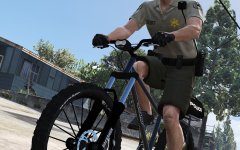 Damn, good luck catching criminals with your super bicycle, but there is one thing. Where's my VCSO-inspired BCSO uniform?
 -
Great texture! but you should make a version with WiWang replacing Motorola like in RDE. Other than that, great progress.
-
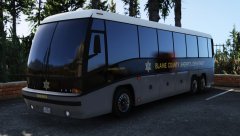 Well, I also prefer BCSO rather than BCSD, every each sheriff's departments is unique in term of equipments and liveries and BCSO's equiments seem to be more obsolete than other departments. I hope you can show us more of your new vehicle liveries and I'm tired of seeing real life vehicles swarming the forum lol. LORE 4 LIFE!
 -
So, it's no longer BCSO and a new agency called BCSD replacing the old sheriff's department. Well, I kinda miss the old BCSO liveries, however I still love your new BCSO liveries.
-
@dilapidated So I found this annoying problem's culprit, it wasn't from gameconfig.xml, but from the default vehicles.meta. The layout names are wrong and this makes FIB Granger, Sheriff SUV and Park Ranger SUV doesn't spawn as they do usually. Their layout lines is "LAYOUT_RANGER_SWAT", I've modified the lines to "LAYOUT_RANGER" and then they spawn as usual again and Arrest Manager is fixed for good. You should've fixed this bug from the start.
- 1,524 comments
- 85 reviews
-
The problem couldn't be from .meta and .ymt files and I'm very sure the problem lies in gameconfig. Could you lend me all of your edited lines from the current gameconfig.xml? So I can made it compatible with my own modified gameconfig.xml before installing the RDE 3.0.1 one. EDIT: Read my new update post on the next page.
- 1,524 comments
- 85 reviews
-
That's the one I am using it, I do show Albo my log earlier before reporting here. He said test the game without mods folder and the problems wasn't from RDE DLCs but in update.rpf.
- 1,524 comments
- 85 reviews


