Albo1125
Insiders
-
Joined
Everything posted by Albo1125
-
No worries about that: you can still set the spawn point before displaying. You then only spawn the entities after acceptance.
-
There's a method that you can override called OnCalloutNotAccepted() I'm guessing that'll be called. I tend to spawn my entities in only after the callout has been accepted for the sake of realism > I've come across random Road traffic collisions just because the callout appeared, but I had not accepted it. Slightly annoying imo, which is why I only spawn after acceptance.
-
I will definitely start digging deeper into the liveries soon!
-
@Kal74 @Virzza Work In Progress
-
Once 0.3 is released, I hope I can make the patrols tie in with any LSPDFR pursuits. Gonna have to wait for the new API, though. They do chase you when you're wanted (if you meant GTA's classic wanted level with stars).
-
 @ajjk1402 please post in the support forum as also stated in the troubleshooting tool.
- 379 comments
- 113 reviews
-
@ajjk1402 please post in the support forum as also stated in the troubleshooting tool.
- 379 comments
- 113 reviews
-
1. Not at this time. 2. If you set the radius appropriately, sure. You can't just type in a district name yet though, you'll have to set values yourself. I'm sure the upcoming ini thread will see people doing this kind of thing, though.
-
 @billc5123 Does this happen more often or just once? Looks like some kind of one-off RPH failure.
- 3,646 comments
- 306 reviews
-
Glad it worked! If you could leave a 5 star review via the reviews tab above, that would be amazing
- 379 comments
- 113 reviews
-
-
 Quoted from above: Please read this before asking for support! Are you experiencing crashes, bugs or other problems? A fix is most likely minutes away. Please follow below steps. After each step, try using my mod again. Are the new jails not appearing? They are, but their icons are transparent while you don't have someone in your vehicle to reduce the minimap contamination. Watch the installation video and follow the instructions. Use the following tool: http://www.lcpdfr.com/files/file/9755-lspdfr-troubleshooter-by-albo1125/ Are you not an experienced user? Please report your issue via this form! Otherwise, in the unfortunate and unlikely event the above didn't work, please add a comment (not a review) below. Be sure to include a description of what is happening, and include your Ragehook log file, located in your GTA V Root folder. If you do not provide a detailed description and your Rage log, I most likely will not be able to help you. See below to get an idea of what is a good support request.
- 1,915 comments
- 242 reviews
-
 Fantastic A**-class mod that also integrates perfectly with mine? Count me in! Double Doppler has done it again
- 12 comments
- 6 reviews
-
-

- 2
-
-
The ini file only changes when I mention it in the changelog. If I don't you van just keep your old one in - it's been like this for a long time. And if you accidentally leave an old INI in when you shouldn't, the game will tell you without crashing. This basically means you can just leave the old ini in every time and if you need to copy a new one in, the game will tell you via a notification on startup. I hope this answers your query!
- 1,915 comments
- 242 reviews
-
Thanks a lot, would be really nice of you! I'm happy everything is working again now
- 379 comments
- 113 reviews
-
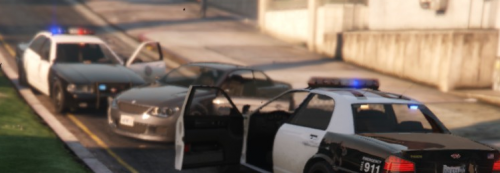 With the new fixes in to add compatibility with other mods, and the option to disable the radio chatter in the INI file, I can only say this is a top-of-the-notch mod that will come in very useful if you can work with LSPDFR's backup AI. Joshy24 has definitely done a good job on this and has really listened to my feedback, so the 5 stars are fully deserved! Recommended!
- 108 comments
- 16 reviews
-
-
- 2
-
-
-
The most recent one is always bundled with the latest Arrest Manager, traffic policer, assorted Callouts. I recommend updating those mods if you haven't done so yet as well. I wouldn't know if this is the only cause of your crash. Try and see :)
- 379 comments
- 113 reviews
-
-
- 1
-
-
-
 Yes, I am working on all of these new situations for the traffic stop backup for the next release. I 100% agree with your feedback, I just had some time constraint issues. Glad you enjoy! Thanks!
- 1,081 comments
- 166 reviews
-
Results so far: After only 15 hours since the release of 0.0.2.8, here are the results I have managed to trace so far: 13 people have clicked the link to download .NET framework 4.6 after a lower version was detected. 3 people have clicked the link to update their ScriptHookV to the latest version after a lower version was detected. 56 people have clicked the link to update their RagePluginHook to version 0.29 or higher after a lower version was detected. I'm not currently tracking the other results, but I'm sure many more problems are being solved. If you have any suggestions for other things I can check for, please let me know!
- 379 comments
- 113 reviews
-
-
- 3
-
-
In that log, you still have arrest manager 4.2.1.20 installed and there's nothing to suggest a crash.
- 1,915 comments
- 242 reviews
-
Just wanted to showcase a recent video of @JFavignano's that really struck me as being extremely awesome! Probably one of the smartest drugs runners I've ever seen https://www.youtube.com/watch?v=SCyur7JxCRA
- 3,646 comments
- 306 reviews
-
-
- 1
-
-
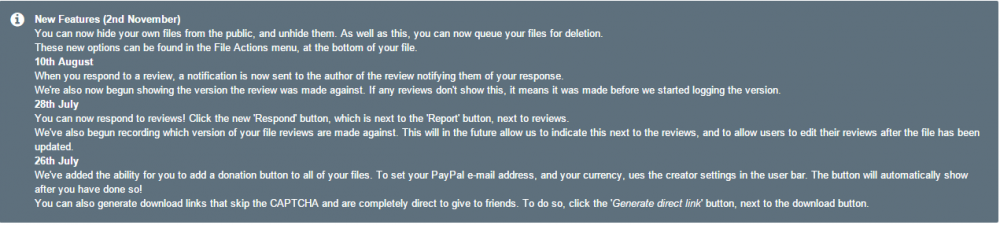
To the excellent LSPDFR.com devs, I appreciate that you have added some awesome new features for mod authors. However, for the past few months I have been seeing the following box above every single one of my download pages and it's starting to get a little annoying I would greatly appreciate it if you could remove this box or give us the option to hide it. Thanks!
-
I got back from London and tried this. Unfortunately, it seems to break all my own mods and some others. If you need any help coding around this please shoot me a PM
- 108 comments
- 16 reviews
-
-
- 1
-