
alexguirre
Members
-
Joined
-
Last visited
Everything posted by alexguirre
-
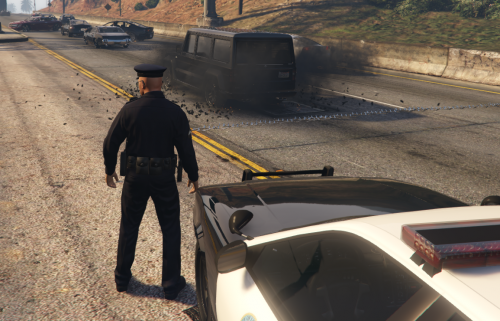 Probably you will only notice the performance if you're a crazy maniac like me who likes to drop various spike strips across the highway
- 131 comments
- 20 reviews
-
@Aleirin Yes, it's normal. In the pictures the spike strip is also multiple spike strips side by side but with less space between them because it's from an old version where it didn't have much performance impact, since the update where it detects each wheel individually it has a bit more of performance impact so to reduce that having the same effect I decided to space them a bit. Would you like to have them again without spaces in a future update?
- 131 comments
- 20 reviews
-
I can't help you, I have no idea what can be causing that, post your issue in the GTA V support section, maybe someone knows a fix.
-
Do the tbermal and night vision work when using the binoculars?
-
I contacted him to try to fix, he said that it happened when you turn it off and on and he didn't have the log anymore, from that it could be one of those 'System.AccessViolation' crashes due to the anti-modding protections, these crashes seem to be really random and I can't do anything about them.
-
I tested it and it's working for me(RPH 0.38, GTA V v678 Retail), if someone could post their log with the Spotlight crash I could try to fix it.
-
 In the .ini, where it says "Excluded AI models =", put there the vehicle models you don't want to have strobes, for the towtrucks it should be "Excluded AI models = towtruck,towtruck2"
- 246 comments
- 45 reviews
-
 It should work as long as it's in the Police Station Armory Resources\Loadouts folder and it has the .xml file extension. Do the default ones show up in-game? If these ones load your one should load too.
- 127 comments
- 33 reviews
-
No, I didn't see it, but I can't add anything between the picking character and car screens so this is the closest thing we have.
- 127 comments
- 33 reviews
-
 Take a look few comments above where I explain to jpllkyddd how to fix that, it's not that it isn't working is that the spotlight is inside the car because it doesn't have the same size as the original car.
- 473 comments
- 73 reviews
-
Why do you need an update? It works fine with tge latest versions of GTA V and RPH.
- 473 comments
- 73 reviews
-
 Wilderness Callouts works with both versions of RAGENativeUI, just stay with 1.3.1. If you still have issues, the cause must be other thing.
- 302 comments
- 66 reviews
-
Just one thing, you're passing an angle as the radius in World.TraceExtent(), this parameter defines how thick the ray is, not the heading.
-
For time calculations I would use DateTime.UtcNow instead of DateTime.Now. Using this approach it will have better performance since it doesn't need to convert the time to the current user time zone, I would use DateTime.Now only for cases where the current time needs to be displayed to the user.(https://blogs.msdn.microsoft.com/kirillosenkov/2012/01/10/datetime-utcnow-is-generally-preferable-to-datetime-now/) Though probably you won't notice the performance gain unless you need to get the current time lots of times in loop. I don't think the OP will need a better time accuracy for what he wants but in case he needs it, he can use System.Diagnostics.Stopwatch Stopwatch sw = new Stopwatch(); sw.Start(); //... sw.Stop(); TimeSpan elapsedTs = sw.Elapsed; long elapsedMs = sw.ElapsedMilliseconds; long elapsedTicks = sw.ElapsedTicks;
-
Those flags specify what the ray can hit/detect. For example, if you use TraceFlags.IntersectPeds it will only hit peds so it will ignore/pass through vehicles, walls, vegetation, ... If you use TraceFlags.IntersectVehicles | TraceFlags.IntersectPeds it will only hit peds and vehicles. For what you want(determine line of sight) you probably just want TraceFlags.IntersectEverything, it will hit/detect peds, vehicles, walls, vegetation, objects,...
-
If you are going to use ray tracing I recommend you to use the method included in RPH, World.TraceLine(). It return a HitResult instance that includes wheter it hit something or not, the hit entity, the hit position and the hit normal, you can even pass an array of ignored entities(using the native you can only pass one). There's also World.TraceExtent() that does the same but allows you to specify the radius of the ray. Example: Vector start = Game.LocalPlayer.Character.Position; Vector end = start + Game.LocalPlayer.Character.Direction * 50f; // the end position is calculated by starPosition + direction * distance HitResult rayResult = World.TraceLine(start, end, TraceFlags.IntersectPeds | TraceFlags.IntersectVehicles, Game.LocalPlayer.Character); // a ray that can only hit peds or vehicles and ignores the player ped To use more than one flag you have to use the symbol "|" as shown in the example.
-
Not really sure what you mean with "not functioning fully" but I use windowed but borderless and it works fine.
- 473 comments
- 73 reviews
-
You will need to change the position of the spotlight, to do this you can change it directly in the .ini file or you can use the in-game edit menu, just enter the vehicle, activate the spotlight and press the Insert key.
- 473 comments
- 73 reviews
-
-

- 1
-
-
-
It's not possible to disable them but in 0.3.1 was added the API function StartCallout, you can use it like this: LSPD_First_Response.Mod.API.Functions.StartCallout("yourCalloutName"); "yourCalloutName" is the name you have set in the CalloutInfo attribute.
-
-
That's due to Agency Callouts conflicting with this mod because both use the same location, in the latest version of Agency Callouts you can disable the feature that conflicts with Police Station Armory, just set EnhanceLoadout to "EnhanceLoadout=no" in the AgencyCallouts.ini file.
- 127 comments
- 33 reviews
-
-
- 1
-
-
You can't load Police Station Armory Loadouts Creator.exe, you only have to load Police Station Armory.dll
- 127 comments
- 33 reviews
-
-
- 1
-
-
-
A little teaser of the Murder Investigation callout: