


LtFlash
Members
-
Joined
-
Last visited
Everything posted by LtFlash
-
 Fuck yea! That's what I'm waiting for! You guys could also "teleport" to V the model of 94-96 generation which was actually used by LAPD. Love your job!
 -
@alexguirre, magnificent work! This will be used by many modders. I think you have the right to decide where the code should have it's place.
-
At this moment I'm on a serious backlog in real life, I'll try to look at the code later this week.
-
We won't use LSPDFR API (I hope! xD), thanks to liberal politics by LMS we can upload there non-API projects too OK, we can roll guys. Everything is uploaded, including my changes.
-
Alex, would you mind if we upload it on LSPDFR Git? I think it is better to keep all of things in one place. I can do in right now and you'll just replace the original files with your edits.
-
You may upload all files and add me as a contributor so we can have some communication (you'll find my account ID in LSPDFR github). I'm currently working on UIResText.cs, using Community SH code to re-create classes which are not implemented in RAGE.
-
Could you upload it on GitHub or at least send me through PM? I'll take a look and try to help you if only my skills are good enough. I found the source but still, it would be great to have it on our LSPDFR GitHub to synchronize the work, I guess we need Guad's permission. I don't have idea if we can fork it ourselves or need LMS to do it?
-
NYPD, FDNY:
-
ad.1) There is (was?) a tradition that new Officers are supposed to wear long sleeve shirt for some period of time, no matter how hot is outside. ad.2) The Dept. is divided into Bureaus->Areas(Station)->Sectors. Here you can see how the Southeast Station in divided: this specific area consist/is neibourghing to the real-life equivalent of Davis. The site this map comes from has a lot of information about LAPD communication, worth to read: http://harrymarnell.net/kma367.htm. I also recommend to watch some old Cops episodes from LA and listen to LAPD radio: http://www.broadcastify.com/listen/feed/20296 (you can find other broadcasts from other areas and units)
-
I was about to ask @LukeD if he used a 3rd party library or created one himself. There's a great NativeUI for Community SH but I don't know if there's a version/plan to port it to RAGE.
-
-
YEY! I just did my first commit to LSPD:FR Git repo! It is a really basic example of Gwen library usage, ask if anything seems to be unclear. I'll try to extend it in a week, when I'll be back from holiday.
-
Albo1125, do you need something specific on that form? I used GwenForm in my plugin (screenshots here: https://www.gta5-mods.com/scripts/enraged-trucking), I could create an exemplary form to show how it works. BTW GwenForm is not a part of LSPD:FR but RAGE Plugin Hook, what location would be suitable for that kind of example?
-
The value of this footage can't be overestimated; it shows where much of the "police abuse" BS comes from, what kind of situations and people Officers deal with on a daily basis (most of calls are small things like that), how minor issue can turn to major fight (noone should doubt that it could turn to 10-85 and huuuge drama how an innocent poor man was roughed up by NYPD poh-leece), how f**ckin HARD is to deal with people and actually enforce the law with the consciousness you can be "thrown under the bus" because of a minor thing. I feel sorry for MOSes they have to be so kind for people like that.
-
Stealth22 has included every important aspect. When you get more practice with C# (console apps!) you'll be able to read the documentation with more consciousness. It is actually a working plugin, a "Hello World!" kind of plugin. It does nothing but you can go deeper and use the RHP classes to fill it with your code and create almost everything you want. In RAGE SDK pack you'll find a couple of examples how to call natives. I recommend to regularly read the RAGE forum where there were resolved many issues of using natives and many more. You might also check our GitHub repo: https://github.com/LMSDev/LSPDFR-API Don't be affraid to ask, we'll help or show a good source of knowledge.
-
-
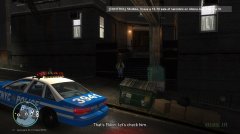
From the album: The Wasteland
Tests of a new world event: a known felon in the vicinity. -
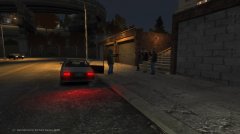
From the album: The Wasteland
Tests of a new callout. http://www.urbandictionary.com/define.php?term=Crap+Game -
I'd recommend you to get familiar with RAGE Plugin Hook documentation: http://ragepluginhook.net/ - temporarily offline, in the "Documentation" section you'll find a complete info about how to create a working plugin from scratch and a full reference of RPH. I recommend to start with writing simple scripts which tests how different functions and entities work. and with native functions database: http://www.dev-c.com/nativedb/ which I find VERY important. It collects everything you can do with the game no matter what hook you use etc. Most of functions are not added and sooner or later you'll need a function which is not implemented by a hook. With some knowledge about how a single plugin works and what kind of operation you can perform in the gameworld you can check the API examples of LSPD:FR.
-
-
-
The initial release of “Rush Hour” includes 4 callouts located in Algonquin with hundreds of spawn points all over the borough. The mod is built from selected callouts of The Wasteland but some of them were modified to fit the new environment. A new feature of zoning system will introduce a whole new level of realism to your gameplay. A mugging victim calls for help EMS is requesting assistance (480 spawn points) A street fight (1756 spawn points!) Prisoner transport Special features: zoning system let you divide the borough to smaller zones and work in one specific area, no more responding to calls located somewhere on the other side of the borough, custom radio chatter with real NYPD recordings by FCV96, more will be added in the next releases. RushHour-0.5.0-Beta.zip
-
 The initial release of “Rush Hour” includes 4 callouts located in Algonquin with hundreds of spawn points all over the borough. The mod is built from selected callouts of The Wasteland but some of them were modified to fit the new environment. A new feature of zoning system will introduce a whole new level of realism to your gameplay. A mugging victim calls for help EMS is requesting assistance (480 spawn points) A street fight (1756 spawn points!) Prisoner transport Special features: a zoning system let you divide the borough to smaller zones and work in one specific area, no more responding to calls located somewhere on the other side of the borough, custom radio chatter with real NYPD recordings by FCV96, more will be added in the next releases. Forum thread: http://www.lcpdfr.com/forums/topic/53782-rush-hour-callouts-pack/ VirusTotal report: https://www.virustotal.com/en/file/d20fff4c34d5e57e9f36339b0c8efd28b177e832c343273caa30be3d1b160c4c/analysis/1439311609/
 -
RAGE Plugin Hook has a built-in tool to check the time of execution of the loaded plugins. I don't remember the exact commands but type "performance" in the console and you'll get two cmds: one starts logging and the second prints the results.
-
ad. 1) You can use a native function for this, eg. PATHFIND::GET_CLOSEST_VEHICLE_NODE_WITH_HEADING (http://www.dev-c.com/nativedb/)



