


Francis
Members
-
Joined
-
Last visited
Everything posted by Francis
-
 How do you expect someone in a car to see you clearing the intersection? Ridiculous. Very unsafe.
 -
 What's the model?
 -
He means template support, so you can draw a face on the back door if you want to.
-
Play & Charge kit has no interface in it, it's just passing USB power. ;) You're probably turning your Xbox on when plugging your remote through your computer's USB because it powers on. :)
-
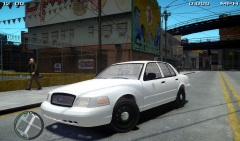 Moldings indicate that this isn't a 2011 :P
 -
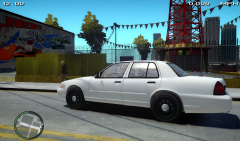 Moldings indicate that this isn't a 2011 :P
 -
You look like a power-hungry kid to be honest. Lights and sirens on a vehicle are no "fun" matter, they are present for a reason. Besides, you know, every state has laws against lights and sirens abuse. I'm completely against.
-
The video is NOT the actual siren. LOL! That's a fake SmartSiren, ZTEP's siren is completely different.
- 14 comments
- 12 reviews
-
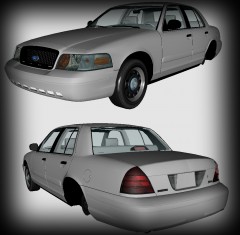 Okay well, it's nice but it has the FLEX FUEL engine but still has the old door moldings? That's a 2008 because the CVPI changed for the LX moldings in 2009. If you were aiming for a different year, you should make it accurate to the actual car :)
 -
We are well underway for the next release of LCPDFR, which may be the actual .95 release (we're still in RC, remember), or a 1.0 release, depending on the developers themselves. You guys do not have to worry, it is being developed and even though as of right now there is no release date, don't worry. :)
-
Okay let's see. The idea is great, really, I'm not kidding. Of course the quality is somewhat very low. With time and perseverance, this could become a very awesome skin that could be used in RIOT ROLEPLAYS. Others, try to see the potential instead of bashing without any reason.
- 21 comments
- 15 reviews
-
-

- 1
-
-
-
Nothing to see here! This topic has been closed by G17 Media staff. If you feel that this topic has been closed in error, please report this post.
-
Topic moved to the right spot.
-
That would be golden.
-
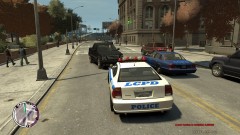 It's not ELS, it is related to the way the car was made. The arrow bar was made so that if you have your four way blinkers, it will flash like a "halt" pattern. It's normal, each half of the TA is a blinker in the model.
 -
-
No, you set up red as the left color, and you wanted blue on the left. [ POLICE ] Active = 1 Halogen_Only = 0 Color_Light1L = 1 Color_Light2L = 1 Color_Light3R = 0 Color_Light4R = 0 Color_Light7L = 3 Color_Light8C = 3 Color_Light9R = 3 Offst_SLights = 0
-
![Serbian Police BMW [ELS]](//s3-gallery.int-cdn.lcpdfrusercontent.com/gallery/album_575/sml_gallery_5415_575_85210.jpg) Cut it off. My last warning to both of you. You hate yourselves? Fine, don't talk to each other anymore.
Cut it off. My last warning to both of you. You hate yourselves? Fine, don't talk to each other anymore. -
It would be easier to write the version of the "keys file" the SAME as the version of the mod. For example, now the version is 1.5.1, it should be 0.95 RC2, easier to manage.
- 36 comments
- 18 reviews
-
-
- 1
-
-
Not in this case, GIMS is used to create models for GTA IV, and most likely this sounds like a "content modification", even if the topic says "help". Try not to act your way as a moderator. You did report the topic, that was great, let us do our job and deal with it.
-
Looks like the lightbar is completely opaque, the lens can't let light through, or is it just me? If you edited the lightbar's colors, it may be possible that you have no used the right transparency to have them possible to work with ELS. Also on the image called "1", it seems there are coronas, normally ELS vehicles don't. Try and make sure you have an ELS activated vehicle. Also, in ELS.ini, The "Active = 0" must be "Active = 1" for ELS to work for the specific car (i.e. [POLICE])
-
V6 never crashes for me.
-
The topic was locked because we already get tons of reports that GPM has troubles with their system, we are not affiliated with them. Most likely, people will just get to see what it was redirected to anyways, even by warning them. (I got tricked) There's no further need to talk about GPM's troubles or downtime around here unless it involves directly the LCPDFR community. (FORGOT TO EXPLAIN, SORRY FOR LATE REPLY)
-
Nothing to see here! This topic has been closed by G17 Media staff. If you feel that this topic has been closed in error, please report this post.

![Serbian Police BMW [ELS]](http://s3-gallery.int-cdn.lcpdfrusercontent.com/gallery/album_575/sml_gallery_5415_575_85210.jpg)