




CouthInk4
Members
-
Joined
-
Last visited
Everything posted by CouthInk4
-
Change your password. There's really nothing we can say or do about it as it's FaceBook, if you didn't send it then apologize to the person, explain it wasn't you then change your password. It's not someone hacking your computer, it's someone hacking your account. Also, before creating topics in the future please make sure you're posting in the correct section, in each forum section there is information about what that section is about, read it carefully and post in the correct location in the future. This topic has been moved to the appropriate forum. Please post in the correct location in the future.
-
Hello there -- welcome to LCPDFR.com and thanks for trying out LCPDFR! Please do the following: Make sure you aren't using a crack - We don't support cracks or people using pirated softwareUpdate GTA IV to 1.0.7.0 (the latest version of the game, or 1.1.2.0 for EFLC) - These patches are needed. Make sure that you run the game as an administrator.Make sure that your GTA IV root folder (and every subdirectory) is not set to "read-only"Ensure that AdvancedHook.dll, ScriptHook.dll, ScriptHookDotNet.asi and Dsound.dll OR Xlive.dll are in the GTA IV ROOT folderEnsure that there is a folder titled 'LCPDFR' in the ROOT GTA IV folder.Check that all the above files exist, if they do not, reinstall LCPDFR with the MANUAL installation.Ensure that you are using up to date versions of every LCPDFR dependency and LCPDFR itself.Install these: https://www.microsoft.com/en-us/download/details.aspx?id=30653 , https://www.microsoft.com/en-us/download/details.aspx?id=30679 In some cases, your issue is resolved after following the above steps. If it did help, please let everyone know in the topic that your issue is resolved. If you do have to post a topic, do the following; Give a clear, detailed description of the problem.Explain any circumstances surrounding the problem.State what solutions you have tried.Post ALL relevant logs (LCPDFR.log, Scripthook.log, ScriptHookDotNet.log, AdvancedHook.log).Include as much information as possible.Post your system specifications.Post what other mods you are using. This includes car and script mods.Post a screenshot of your GTA IV or EFLC game directory. Please note that failure to follow these instructions may cause this thread to be closed.
-
This topic has been moved to the appropriate forum. Please post in the correct location in the future.
-
This topic has been moved to the appropriate forum. Please post in the correct location in the future.
-
I've merged your two media topics, in the future please stick to this topic when posting LSPDFR videos. Keep in mind that you're also allowed to post in your own media topic even if it's over the 30+ day limit =)
-
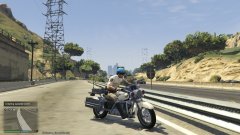 Lundy's version is SHiPs, based on CHiPs but lore friendly.
 -
Your thread has been moved to LCPDFR Support Requests as it isn't a LSPDFR Support Request. Hello there -- welcome to LCPDFR.com and thanks for trying out LCPDFR! Please do the following: Make sure you aren't using a crack - We don't support cracks or people using pirated software Update GTA IV to 1.0.7.0 (the latest version of the game, or 1.1.2.0 for EFLC) - These patches are needed. Make sure that you run the game as an administrator. Make sure that your GTA IV root folder (and every subdirectory) is not set to "read-only" Ensure that AdvancedHook.dll, ScriptHook.dll, ScriptHookDotNet.asi and Dsound.dll OR Xlive.dll are in the GTA IV ROOT folder Ensure that there is a folder titled 'LCPDFR' in the ROOT GTA IV folder. Check that all the above files exist, if they do not, reinstall LCPDFR with the MANUAL installation. Ensure that you are using up to date versions of every LCPDFR dependency and LCPDFR itself. Install these: https://www.microsoft.com/en-us/download/details.aspx?id=30653 , https://www.microsoft.com/en-us/download/details.aspx?id=30679 In some cases, your issue is resolved after following the above steps. If it did help, please let everyone know in the topic that your issue is resolved. If you do have to post a topic, do the following; Give a clear, detailed description of the problem. Explain any circumstances surrounding the problem. State what solutions you have tried. Post ALL relevant logs (LCPDFR.log, Scripthook.log, ScriptHookDotNet.log, AdvancedHook.log). Include as much information as possible. Post your system specifications. Post what other mods you are using. This includes car and script mods. Post a screenshot of your GTA IV or EFLC game directory. Please note that failure to follow these instructions may cause this thread to be closed.
-
This topic has been moved to the appropriate forum. Please post in the correct location in the future.
-
Hello there -- welcome to LCPDFR.com and thanks for trying out LCPDFR! Please do the following: Make sure you aren't using a crack - We don't support cracks or people using pirated softwareUpdate GTA IV to 1.0.7.0 (the latest version of the game, or 1.1.2.0 for EFLC) - These patches are needed. Make sure that you run the game as an administrator.Make sure that your GTA IV root folder (and every subdirectory) is not set to "read-only"Ensure that AdvancedHook.dll, ScriptHook.dll, ScriptHookDotNet.asi and Dsound.dll OR Xlive.dll are in the GTA IV ROOT folderEnsure that there is a folder titled 'LCPDFR' in the ROOT GTA IV folder.Check that all the above files exist, if they do not, reinstall LCPDFR with the MANUAL installation.Ensure that you are using up to date versions of every LCPDFR dependency and LCPDFR itself.Install these: https://www.microsoft.com/en-us/download/details.aspx?id=30653 , https://www.microsoft.com/en-us/download/details.aspx?id=30679 In some cases, your issue is resolved after following the above steps. If it did help, please let everyone know in the topic that your issue is resolved. If you do have to post a topic, do the following; Give a clear, detailed description of the problem.Explain any circumstances surrounding the problem.State what solutions you have tried.Post ALL relevant logs (LCPDFR.log, Scripthook.log, ScriptHookDotNet.log, AdvancedHook.log).Include as much information as possible.Post your system specifications.Post what other mods you are using. This includes car and script mods.Post a screenshot of your GTA IV or EFLC game directory. Please note that failure to follow these instructions may cause this thread to be closed.
-
Please stick to one topic - http://www.lcpdfr.com/forums/topic/58237-can-someone-convert-a-iv-car-to-v-for-me-please/ creating multiple topics about the same thing in a short time is against the Community Guidelines, not to mention it makes the Forums look untidy. be patient, if someone is willing to do your request they'll find your topic and do them. If you feel this topic has been closed in error, please report this post.
-
it can't read the disc, take your disc out and give it a clean then re-try.
-
The captchas aren't that hard, you just need to click on the pictures that contain the item that is said. For example it may say "select the pictures with Steak" your then select the picture(s) that have steak in it.
-
the LCPDFR modification is in the downloads section - http://www.lcpdfr.com/files/file/4607-lcpd-first-response/ Your topic has been moved to LCPDFR Support Requests. Please post in the correct location in the future.
-
Nope, as it's callouts for LSPDFR it belongs in the LSPDFR suggestions section =) the section you listed is for mods that isn't LSPDFR related.
-
All my mods are listed in this text file (don't mind the formatting, it's intended for the description in my YouTube videos) YT technical BS.txt
-
Have you tried tazing them, then as they're getting up do the arrest button? that's how i always do it, use the taser of bump them with my car.
-
Aim with a gun and press E (you may have to press it multiple time) for them to surrender. if you're on a controller then aim and press right on the D-Pad
-
As in get the highway patrol car respond in backup rather than the unmarked car? No, it's currently not possible.. however this will be possible with 0.3 as it'll have a customization backup config file.
-
Aussie cars will come to GTA V soon, i believe there are a few screenshots in the Australian Emergency Textures thread over on GPM with models in GTA V.
-
That wouldn't run GTA V unfortunately. it's an old card with 1gb VRAM, you need atleast 2GB to play on low settings.
-
should do, however what's the graphics card in it? it doesn't list it in the title.
-
Mose departments use them during winter, so as it's not a beanie it's pretty close - http://www.lcpdfr.com/files/file/6747-winter-caps-for-cops/ This topic has been moved to the appropriate forum. Please post in the correct location in the future.
-
Well my guess is "it's done when it's done" too bad it's not a voting choice =(
-
Depends on the PC you buy, it's generally encourgaed to build you own PC, although some pre-built computers can do the job. if you have any computers you've found, just link them here and we can tell you if it'll be fine or not.
-
You already have a topic regarding this issue, please don't create multiple topics regarding it, stick to this topic - http://www.lcpdfr.com/forums/topic/58137-help-pless/ If you feel this topic has been closed in error, please report this post.

