




CouthInk4
Members
-
Joined
-
Last visited
Everything posted by CouthInk4
-
ah thanks. And do the ped model files go into a patchday aswell?
-
and which patchday file would it go into? Rockstar's stupid file sorting/DLC folders get me confused on where things should be added to
-
after spending an hour searching the internet and with trial and error, i've come to a complete loss. Would anyone know of how (or link to instructions on how to) add peds to GTA V? I'm looking to add a law enforcement peds (mainly some LSSD SWAT and some others that RDE uses). Also, I know i could just use RDE but if i'm honest adding a ton of models just to use 5 models seems a bit to excessive so i'm avoiding using the RDE mod itself (apart from using some models from the download/.rpf file) Any help will be greatly appreciated! :D
-
true. It's not perfect ( i wasn't saying that it was though), Although there's nothing game breaking with LSPDFR 0.3 so it doesn't exactly need an update just yet (if that makes sense)
-
I'll be released, when it's done being developed. There is nothing wrong with LSPDFR 0.3, so not entirely sure why people would want a 0.4 at the moment.
-
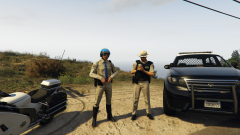 Will this be released sperately aswell? or is it just an RDE exclusive?
 -
Hello there -- welcome to LCPDFR.com and thanks for trying out LCPDFR! Please do the following: Make sure you aren't using a crack - We don't support cracks or people using pirated softwareUpdate GTA IV to 1.0.7.0 (the latest version of the game, or 1.1.2.0 for EFLC) - These patches are needed. Make sure that you run the game as an administrator.Make sure that your GTA IV root folder (and every subdirectory) is not set to "read-only"Ensure that AdvancedHook.dll, ScriptHook.dll, ScriptHookDotNet.asi and Dsound.dll OR Xlive.dll are in the GTA IV ROOT folderEnsure that there is a folder titled 'LCPDFR' in the ROOT GTA IV folder.Check that all the above files exist, if they do not, reinstall LCPDFR with the MANUAL installation.Ensure that you are using up to date versions of every LCPDFR dependency and LCPDFR itself.Install these: https://www.microsoft.com/en-us/download/details.aspx?id=30653 , https://www.microsoft.com/en-us/download/details.aspx?id=30679 In some cases, your issue is resolved after following the above steps. If it did help, please let everyone know in the topic that your issue is resolved. If you do have to post a topic, do the following; Give a clear, detailed description of the problem.Explain any circumstances surrounding the problem.State what solutions you have tried.Post ALL relevant logs (LCPDFR.log, Scripthook.log, ScriptHookDotNet.log, AdvancedHook.log).Include as much information as possible.Post your system specifications.Post what other mods you are using. This includes car and script mods.Post a screenshot of your GTA IV or EFLC game directory. Please note that failure to follow these instructions may cause this thread to be closed.
-
Your topic has been moved to LCPDFR Support Requests. Please post in the correct location in the future.
-
This topic has been moved to the appropriate forum. Please post in the correct location in the future.
-
Hello there -- welcome to LCPDFR.com and thanks for trying out LCPDFR! Please do the following: Make sure you aren't using a crack - We don't support cracks or people using pirated softwareUpdate GTA IV to 1.0.7.0 (the latest version of the game, or 1.1.2.0 for EFLC) - These patches are needed. Make sure that you run the game as an administrator.Make sure that your GTA IV root folder (and every subdirectory) is not set to "read-only"Ensure that AdvancedHook.dll, ScriptHook.dll, ScriptHookDotNet.asi and Dsound.dll OR Xlive.dll are in the GTA IV ROOT folderEnsure that there is a folder titled 'LCPDFR' in the ROOT GTA IV folder.Check that all the above files exist, if they do not, reinstall LCPDFR with the MANUAL installation.Ensure that you are using up to date versions of every LCPDFR dependency and LCPDFR itself.Install these: https://www.microsoft.com/en-us/download/details.aspx?id=30653 , https://www.microsoft.com/en-us/download/details.aspx?id=30679 In some cases, your issue is resolved after following the above steps. If it did help, please let everyone know in the topic that your issue is resolved. If you do have to post a topic, do the following; Give a clear, detailed description of the problem.Explain any circumstances surrounding the problem.State what solutions you have tried.Post ALL relevant logs (LCPDFR.log, Scripthook.log, ScriptHookDotNet.log, AdvancedHook.log).Include as much information as possible.Post your system specifications.Post what other mods you are using. This includes car and script mods.Post a screenshot of your GTA IV or EFLC game directory. Please note that failure to follow these instructions may cause this thread to be closed.
-
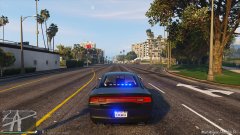
From the album: CouthInk4's LSPDFR Gallery
after a couple months of GTA absense (thanks Rockstar with your stupid updates ruining my motivation) i re-modded my game... And now it looks pretty again :D -
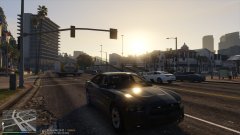
From the album: CouthInk4's LSPDFR Gallery
after a couple months of GTA absense (thanks Rockstar with your stupid updates ruining my motivation) i re-modded my game... And now it looks pretty again :D -
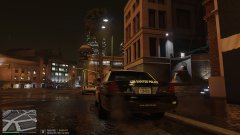
From the album: CouthInk4's LSPDFR Gallery
after a couple months of GTA absense (thanks Rockstar with your stupid updates ruining my motivation) i re-modded my game... And now it looks pretty again :D -
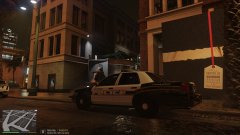
From the album: CouthInk4's LSPDFR Gallery
after a couple months of GTA absense (thanks Rockstar with your stupid updates ruining my motivation) i re-modded my game... And now it looks pretty again :D -
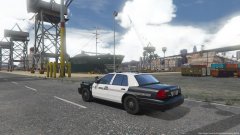 I was about to remove these images... I thought they were RL images. Until i noticed the RPH version at the bottom right... I have no idea how a game can look so realistic!
 -
If you paid for it, and they're letting you keep it.. it's essentially yours. Take it back to wherever it's from (i'm assuming university?) and see if they can make your the computer's Administrator, You're probably already meant to be it, but didn't set it up. Education Department IT Techs aren't that great in Australia to be honest so they probably messed up.
-
Then you can't, Running things as Admin is an option only available to admins. If you're not listed as an Administrator on the computer then you're essentially screwed. Although if you're using the PC all the time, i'm not sure why they didn't give you partial Admin control on the PC.
-
run Steam as administrator, then run GTA IV through Steam, it should run GTA via administrator. I believe that's what i had to do to be ableto get mods working with the Steam version.
-
If you feel this topic has been closed in error, please report this post.
-
When you make your first video, create a topic in the media section. That way you'll be able to get feedback from people who watch it. Until then this could've been more useful as a status update on your profile rather than a topic. I'll close this topic.
-
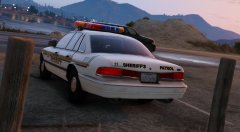 I do like that, it needs work, but i do like it. I'm staff so i have some say in this community... and i say you're now the classic vehicle texture god :D
 -
Oooooh that looks sexy.. especially with that livery. You should just be in charge of doing all the textures for Lund's classics.
-
Hello there -- welcome to LCPDFR.com and thanks for trying out LCPDFR! Please do the following: Make sure you aren't using a crack - We don't support cracks or people using pirated softwareUpdate GTA IV to 1.0.7.0 (the latest version of the game, or 1.1.2.0 for EFLC) - These patches are needed. Make sure that you run the game as an administrator.Make sure that your GTA IV root folder (and every subdirectory) is not set to "read-only"Ensure that AdvancedHook.dll, ScriptHook.dll, ScriptHookDotNet.asi and Dsound.dll OR Xlive.dll are in the GTA IV ROOT folderEnsure that there is a folder titled 'LCPDFR' in the ROOT GTA IV folder.Check that all the above files exist, if they do not, reinstall LCPDFR with the MANUAL installation.Ensure that you are using up to date versions of every LCPDFR dependency and LCPDFR itself.Install these: https://www.microsoft.com/en-us/download/details.aspx?id=30653 , https://www.microsoft.com/en-us/download/details.aspx?id=30679 In some cases, your issue is resolved after following the above steps. If it did help, please let everyone know in the topic that your issue is resolved. If you do have to post a topic, do the following; Give a clear, detailed description of the problem.Explain any circumstances surrounding the problem.State what solutions you have tried.Post ALL relevant logs (LCPDFR.log, Scripthook.log, ScriptHookDotNet.log, AdvancedHook.log).Include as much information as possible.Post your system specifications.Post what other mods you are using. This includes car and script mods.Post a screenshot of your GTA IV or EFLC game directory. Please note that failure to follow these instructions may cause this thread to be closed.
-
Your topic has been moved to GTA V Support, this is not LSPDFR related. Please post in the correct location in the future.
-
It's against our Community Guidelines to obtain or link to sites that contain original GTA files, It's considered piracy. If you encounter issues with your files while modding, use your backup you were meant to create before modding or repair your game via the disc or Steam. If you feel this topic has been closed in error, please report this post.


