



GravelRoadCop
Members
-
Joined
Everything posted by GravelRoadCop
-
-
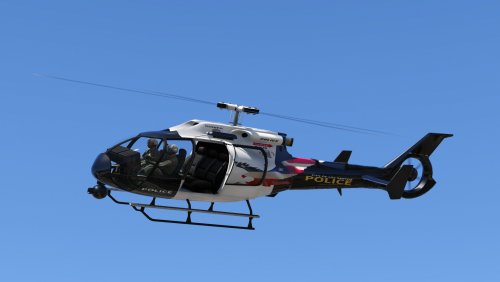 Yeah, this is normal. The reason this happened is because I used the original frogger's template. No one has made a custom template that allows both side to work and not one side to mirror to the other side like you guys see, so until then we'll just have to deal with what we have, and hope that a modeler will volunteer and make a UV map of the helicopter.
- 11 comments
- 2 reviews
-
-

- 1
-
-
-
 Maybe if you guys took the time to read the readme, you'd find the answer to this : THE FOLLOWING EXISTING SIRENS HAVE BEEN AMPLIFIED IN VOLUME OR MAY HAVE REPORTED BUGS/ISSUES: - FEDERAL SIGNAL SMART SIREN WAIL, THERE IS A CLICK/BEEP HEARD. -- I CANNOT UPDATE THIS UNTIL THERE IS A RELIABLE QUALITY VIDEO THAT I CAN EXTRACT THE WAIL FROM ON YOUTUBE. UNTIL THEN, YOU'LL HAVE TO BEAR WITH IT. THE BEEP ISN'T LOUD BUT IF YOU HAVE SUPERB HEARING, YOU MIGHT HEAR IT BUT IT WILL BE WASHED OUT BY AMBIENT ENVIRONMENTAL SOUNDS IN-GAME.
- 316 comments
- 31 reviews
-
-
GRAVELROADCOP / LEDESIGNS 2016 1/23/2016 !!!! Always make sure you backup your files, I'm not responsible for any corrupt files !!! Fictional Los Santos Police Department Frogger Helicopter, replacing the vanilla Police Maverick. Bugs : - One side of the helicopter has mirrored texture, nothing i can do about this until someone decides to make a UV map of the frogger. - SWAT does not rappel from helicopter. INSTALLATION : Using OpenIV, Drag the new files in the following dictionary path and click edit to save once finished : UPDATE - X64 - DLCPACKS - PATCHDAY8NG - DLC.RPF - X64 - LEVELS - GTA5 - VEHICLES.RPF Credit : GRAVELROADCOP - LEDesigns YOU DO NOT HAVE MY PERMISSION TO USE THIS FOR YOUR PERSONAL MODS UNLESS YOU HAVE PERMISSION, ASK ME FIRST !
- 11 comments
- 2 reviews
-
-
- 8
-
-
.thumb.png.5fbbb989547defaeeb5c22864df62b54.png) Nvm it's fine in the game but the lights are out of place. This is what I need to fix.
Nvm it's fine in the game but the lights are out of place. This is what I need to fix.- 174 comments
- 47 reviews
-
Pardon my ignorance, but can you guide me through how I can get this to work on policeslot 3 ? I installed it in that slot and the wheels are sitting in the middle :P
- 174 comments
- 47 reviews
-
Why be fake? In the end, the truth comes out and when that happens, you're standing alone.
-
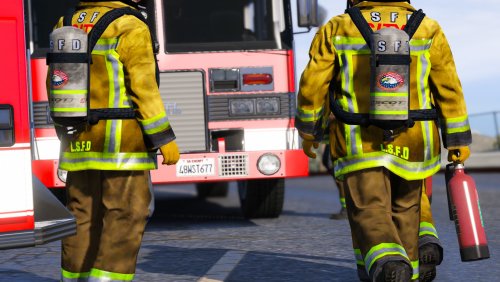 GRAVELROADCOP 1/22/2016 !!!! Always make sure you backup your files, I'm not responsible for any corrupt files !!! This is not allowed to be re uploaded to other websites without my permission. Realistic Los Santos Firefighters Bunker Gear/SCBA FEATURES - A mix of clean and dirty bunker gear / SCBA ( to stimulate it went through fires) - Hi-Vi Flashlight - Hi-Visibility Chevron stripes applied to all bunker gear. - Nylon strap material - Updated SCBA to Scott Safety SCBA tank INSTALLATION : Place the S_M_Y_FIREMAN_01.YTD in the following dictionary path using OPENIV, Edit mode enabled : UPDATE > x64 > DLCPACKS > PATCHDAY3NG > DLC.RPF > X64 > MODELS > CDIMAGES > PATCHDAY3NG > S_M_Y_FIREMAN_01.YTD Click Edit Mode again to save it. Credit : GravelRoadCop - LEDesigns YOU DO NOT HAVE MY PERMISSION TO USE THIS FOR YOUR PERSONAL MODS UNLESS YOU HAVE PERMISSION, ASK ME FIRST !
- 1 review
-
-
- 1
-
-
 You did a really good job on the trailer :)
 -
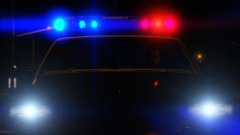 First stop when I download this car : Go ELS.
 -
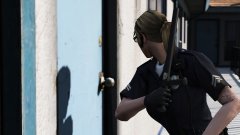 Open up, it's the hotz cops ! * the strippers are here ! *
 -
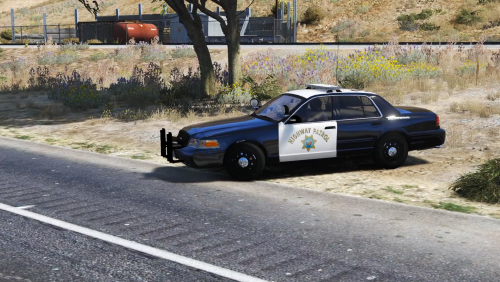 Nice Job with the sirens, dude ! I actually made one for my American Siren Pack and I was planning on releasing it in the next version, but you know what ? I'll leave it out so they can download yours ! Thumbs up !
- 32 comments
- 11 reviews
-
-
- 2
-
-
This is great. With this model and my American siren pack (Motorola Astro spectra siren,) it can finally be a true "LAFD accurate" ambulance in-game now.
-
For those having trouble with the latest OpenIV version, Do this: Export your current vehicles.awc as openFormats to a blank folder with OpenIV. In that folder, replace all the files in \vehicles with the .wav files from this siren mod you're installing. Now with OpenIV reimport the .oac file from said folder. That should be all you need to do as the latest OpenIV update fixed the issue with importing the sound files. If problem still persist, use the comment section and complain there.
- 316 comments
- 31 reviews
-
Yes you will be able to switch it off. I never encountered this problem while using ELS V.
-
With the ELS system, the operator will be able to use all four siren slots available in the game, which are Wail, Yelp, Police Priority and Ambulance Priority, along with the air horn. The sirens will respond quickly and sensitively and when you have a tone activated, the air horn will override the tone when pressed down. Also, the siren tones will remain activated when you exit the vehicle during pursuits, which makes the game play more exciting and it gets your adrenaline pumping. This system is vastly improved over the original game siren system. You can finally do this now : I understand your point of view. Needless to say, I personally don't feel comfortable releasing a game play footage of using ELS in it's current state because i don't want to be rubbing the program in everyone's faces and be teasing them. Also, I am not authorized to make my ELS videos public unless Lt.Caine tells me otherwise. So when Lt.Caine and our ELS testing team feel confident to show the current version, we will post one, but until then you'll have to rely on Police Wag's video of the older ELS system he showcased. I can assure everyone that Lt.Caine is making stronger steady strides with the ELS program now and has been able to check a few things off his list but still have a long way to go. I can't go in details on this but it is promising :) This is all I can say for a while now. Thank you for your understanding !
-
When we feel ready to make a update on our progress we will use this thread unless Lt.Caine makes his own. Patience is the key. Don't build your hopes up for an update everyday.
-
Thanks. My computer is broken for a while now and i cannot update this mod for probably a week or two, but i appreciate you going an extra mile to make this work. Also i will try and use your suggestion by using the other technique for others to have an easier installation process. All the best.
- 316 comments
- 31 reviews
-
 Just curious, will snow be seen in interiors of vehicles and buildings ? Other than this, great addition, LMS !
- 85 comments
- 33 reviews
-
It will be released, eventually. Designing ELS is an arduous process for Lt.Caine to work on and it takes time to bring you guys the results that you can be happy with in the long-run. It's not the same as modeling or skinning, it's a very different campaign to navigate through. The videos you see aren't personal favorites playing ELS for fun. He hand-picked himself a trusted team that he can depend on for bug reports and other testing tasks in order to design ELS to the fullest working capacity.
-
The most common is the Whelen Freedom Ultra.
-
Looks great ! What kind of light package do you have in mind ? Will it be LAFD specs or generic ? Will it have a Whelen Freedom Ultra ? You could try and clone the LAFD new KME Predator Whelen light package to your Pierce Arrow Apparatus, http://www.shapirophotography.net/fire%20trucks/2011/Southern%20CA%20March/images/small/LAFD_E27_000491A.jpg
-
When you are ready, feel free to give us the texture map so we can create several textures for you. When it's time to take photos of it you can use the textures to show how it looks skinned. Other than this. Keep it up. If you finish this you will be a game changer.

.thumb.png.5fbbb989547defaeeb5c22864df62b54.png)
