



GravelRoadCop
Members
-
Joined
Everything posted by GravelRoadCop
-
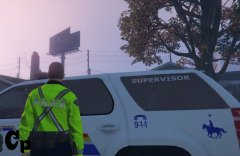 Just so you know if you plan on releasing that uniform, you don't have my permission to use it since you edited my Sheriff's Hi-Vi jacket and the same for the pants as well.
 -
Are you going for LAFD ? This is awesome and a nice change.
-
Obviously you have not heard of the American Siren Pack made by me. Look it up under audios, GTA V modding section.
-
Are you using my Q2B ?
-
-
 !!!! Always make sure you backup your files, I'm not responsible for any corrupt files !!! -- American Federal Signal Corporation EQ2B-Q2B Siren pack by GravelRoadCop/LEDesigns 12/05/2015 *** THE FIRST SOUND MOD OF IT'S KIND FOR GRAND THEFT AUTO 5 *** Author's Note ** IMPORTANT ** : In order to accommodate the sirens for lengthy siren tracks, i had to remove an audio file named 0x17E9AF5D and 0x1AE3EF45 from the sound dictionary to allow the extra space for the EQ2B/Q2B sirens to work. The 0x17E9AF5D is a train track sound, so you hear it play when the train passes you. Unfortunately, if I do not remove it, the sirens will not work as it will exceed the 15.7mb limit imposed. You will have the backup files provided in case you wish to revert to default settings but this will make the sirens mod not to work. You have been advised !! DO NOT EXCEED VEHICLE FOLDER SIZE OVER 15.7MB OR IT WILL MUTE THE DICTIONARY. Features : - 4 EQ2B tracks to choose, 1 yelp and 3 wail tracks. 1 of the wail tracks is a full wail loop, and the other 2 is a manual coast track. - 5 Q2B tracks to choose, all of the tracks contains different coast tones, and 1 full screaming wail ( my favorite ! ) I recommend you to use the EQ2B yelp, and select the screaming Q2B wail for a full firefighting response experience ! If you don't like the high pitch wail, choose the manual tones as it will be softer on your ears. IMPORTANT NOTE : In order to install the sirens, you must proceed to a folder entitled " GO TO THIS FOLDER 1st before installing " Inside it will contains the backup folder and dead air folder. You must install the dead air files in the vehicle folder ( instructions below ) before you install the sirens !!! INSTALLATION: Make a new folder somewhere on your desktop, name it anything. Open 'OpenIV' and go to your GTA V Directory. In 'OpenIV', go to the 'x64' folder, then audio > sfx > resident.rpf Inside Resident.rpf should be 16 .awc files. Click edit, Find "Vehicles.awc" and right click it, select " export to openformats" in a folder you created on your desktop. Navigate to the newly created folder that contains "vehicles" folder and the "vehicles.oac" -- INSTALL THE DEAD AIR FILES, THEN SELECT YOUR DESIRED EQ2B/Q2B TRACKS AND TRANSFER THE CUSTOM TONES INTO THE VEHICLES FOLDER * note * If you are using other siren mods, it will be fine for as long you transfer the new tones in whatever vehicles folder and vehicles.oac you saved. IT WILL BE AVAILABLE IN AMERICAN SIREN PACK V7 SO USE IT INSTEAD IF YOU WANT TO HAVE MANY OTHER CUSTOM TONES. Go back to OpenIV, 'x64' folder, then audio > sfx > resident.rpf, CLICK EDIT Import openformats, navigate to the folder you put the 'vehicles' folder and the 'vehicles.oac' with the new EQ2B/Q2B tones and select the 'Vehicles.oac' save and you're good to go. Happy Code 3 ! CREDITS: - Federal Signal EQ2B - Edited by -- Gravelroadcop/LEDesigns 2015 - Federal Signal Q2B - Edited by -- Gravelroadcop/LEDesigns 2015 - Federal Signal Corps. - Original Tones - EQ2B Source - Rafael Fernandez ( Youtube ) - Q2B Source - fmartinjr ( Youtube ) - DaveDoppler for the Usage License You may use this mod as long as you follow these terms: • Don't redistribute without my permission. • Don't edit any file and redistribute it without my permission. • I am not responsible for any damage that may be caused to your PC or game directory during a) the installation b) usage or c) removal of this mod. You are responsible for backing up your files! • If you want to include this mod in a pack, please contact me. Clan and private packs are an exception, as long as they stay 'private'. Correct credits must be given at ALL times.
- 4 comments
- 4 reviews
-
-

- 2
-
-
I am sorry if this has been answered already, but do you know if the AI backup will act more rationally during pursuits ? I find it frustrating when I am tailing a suspect, and I radio for back-up, moments later that backup is hauling ass to the location, ramming everyone in it's path, tail gating me, and driving very aggressively. Is this a complicated behavior to adjust or will we see a calmer demeanor ?
-
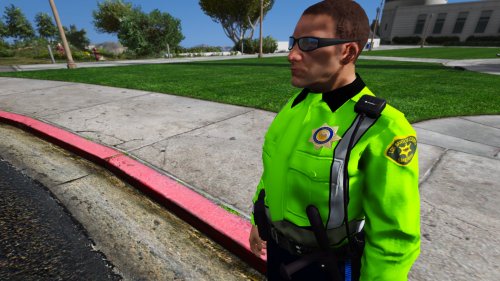 GravelRoadCop / LEDESIGNS 2015 11/25/2015 !!!! Always make sure you backup your files, I'm not responsible for any corrupt files !!! Los Santos Sheriff Department Fictional Deputy Uniform, 2k resolution. FEATURES - All of the texture resolutions are 2000x2000, high quality. - Hi-Visibility Jacket for traffic safety - High Quality shoulder patch, and badge. What is left to do : - Re-texture the campaign hat. Recommendations : To have the duty belt seen in the screenshots, i recommend you to download OfficerL6's Improved and Realistic belt mod found here : http://www.lcpdfr.com/files/file/8801-improvedrealistic-belt2k-textures/ INSTALLATION : Using OpenIV, go to : UPDATE > x6E > MODELS > CDIMAGES > COMPONENTPEDS_S_M_Y.RPF Enable the edit mode, find the following files : s_m_y_sheriff_01.ytd and open it, then drag the new sheriff texture contents from the mod .rar into the file, then click save. Happy Code 3 ! Credit : GravelRoadCop - Uniform edits, including the front badge Shoulder Patch - http://gtarg.wikia.com/wiki/Los_Santos_County_Sheriff_Department You may use this mod as long as you follow these terms: • Don't redistribute without my permission. • Don't edit any file and redistribute it without my permission. • I am not responsible for any damage that may be caused to your PC or game directory during a) the installation b) usage or c) removal of this mod. You are responsible for backing up your files! • If you want to include this mod in a pack, please contact me. Clan and private packs are an exception, as long as they stay 'private'. Correct credits must be given at ALL times.
- 4 comments
- 4 reviews
-
-
- 1
-
-
Is this still alive ?
-
The only peeve that I have with your arjent is that you mapped some of the lights tied to the turn signals, and because my LED Corona mod has indicator lights set to on, your lightbar ambers will stay on. Could you remove this please ? Edit : I didn't see your latest update.
-
I cannot answer this directly, but I can speculate that the ELS system will not have any influences over the LSPDFR framework. If LSPDFR framework has it set so that when you activate the horn, it pulls the suspect over, as they have it coded that way. ELS is a third party source that allows you to have in-depth light and siren features, so it's not coded to influence the actions of LSPDFR. Again, this is not the official capacity of ELS, so it might change down the road, or it might not.
-
I get it. You want to recreate this :
-
Two options, A.) Don't use it. B.) Use the trainer and remove the stun gun from your inventory.
-
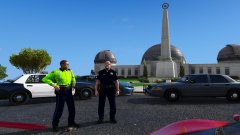
From the album: GravelRoadCop
Will be released this week due to popular demand. It features 2000x2000 texture with updated badge, shoulder patch, and polyester/cotton fabric uniform. Also includes a hi-vis jacket. -
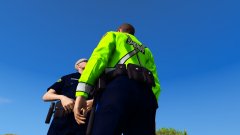
From the album: GravelRoadCop
Will be released this week due to popular demand. It features 2000x2000 texture with updated badge, shoulder patch, and polyester/cotton fabric uniform. Also includes Hi-vis jacket. -
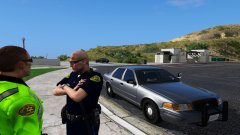
From the album: GravelRoadCop
-
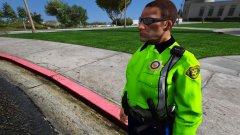
From the album: GravelRoadCop
Will be released this week due to popular demand. It features 2000x2000 texture with updated badge, shoulder patch, and polyester/cotton fabric uniform. -
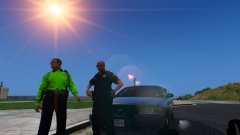
From the album: GravelRoadCop
Will be released this week due to popular demand. It features 2000x2000 texture with updated badge, shoulder patch, and polyester/cotton fabric uniform. -
-
 Do you have OpenIV ? Click Edit, then go to new tab, and you'll see openformats.
- 246 comments
- 40 reviews
-
-
- 1
-
-
Make a new folder somewhere on your desktop, name it anything Move Both the Vehicle folder and vehicle.oac file out of this .rar pack into the folder you just created on the desktop Open 'OpenIV' and go to your GTA V Directory. In 'OpenIV', go to the 'x64' folder, then audio > sfx > resident.rpf Inside Resident.rpf should be 16 .awc files. Import openformats, navigate to the folder you put the american siren pack 'vehicles' folder and the 'vehicles.oac' in and select the 'Vehicles.oac' save and you're good to go. Happy Code 3 !
- 246 comments
- 40 reviews
-
-
It was in the description, Download this https://www.youtube.com/watch?v=rYWbyPj7Fso
- 246 comments
- 40 reviews
-
-
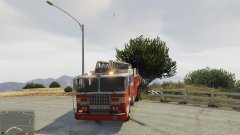 We need a tiller truck, lol.

