


Sgt.Kanyo
Members
-
Joined
-
Last visited
Everything posted by Sgt.Kanyo
-
 You can find more info about it on OpenIV's page: http://openiv.com/?p=1132 It basically lets you have a brand new folder with your mods, so you don't have to replace the original files. If you want to divert back to an unmodded GTA V, you can simply just rename or delete the "mods" folder.
- 28 comments
- 13 reviews
-
The problem is GTA V has 2 different versions, retail and steam. On the steam version you can mod the rpf files without GTA V downloading the vanilla ones, while on the retail version it automatically downloads any file that has been modded (so you need to use OpenIV's "mods" folder technique). Then there are the patches: when GTA V came out, all vehicle files were located in x64e.rpf, then came an update, some of the vehicles are now in update/x64/dlcpacks/patchday3ng. When the ill-gotten gains DLC came out for GTA V, now some of the vehicles are located in update/x64/dlcpacks/patchday4ng. It's impossible to tell where your vehicles.rpf is located, since I have no idea if you're on the steam version or if you are in fact playing on the latest patch. The best idea is to use OpenIV's "mods folder" technique and always install every single vehicle mod into the latest patch's vehicles.rpf, even if by default you can't find them there.
- 28 comments
- 13 reviews
-
The updated NYPD Taxi, the updated NYPD CVPI and the updated NYPD Highway Patrol CVPI with working high riser has been uploaded.
-
There are actually several vehicles.rpf in gta v, some contain even cars that the other rpf files have (like it was updated). The main one is in x64e.rpf, but you can also find one in update/x64/dlcpacks/patchday3ng/models/levels/gta5.
- 28 comments
- 13 reviews
-
Someone said that if the new sound file is longer then the vanilla, the sound will be muted. Unfortunately there isn't any fix for this yet. Hopefully the OpenIV team can fix this, I'm having the same problem.
-
Yes ofcourse. That doesn't it stop from contacting the server.
-
The problem isn't EFLC. LMS told me about the network check of lcpdfr. It trys to contact the lcpdfr servers every time. You can even check the log file, when I killed my internet it said: [ERROR - 0:22:03] [Authentication] Authentication: Authentication failed. Couldn't reach server or no valid lease available [INFO - 0:22:03] [Authentication] Authentication: User is in offline mode
-
Alright so first of all let me make it clear how, I have everything I need to run lcpdfr properly as it was running a few days ago, and I've seen this issue before as well. Okay so my problem is, whenever I fire up lcpdfr and go to a police station, or I initiate a traffic stop or answer a callout (after using "forceduty"), the game gets stuck in an endless loop (screen and sound freezes). I've experienced this bug multiple times when the lcpdfr servers were down, however I always managed to fix it, by simply killing my internet connection, and then it all worked fine. Today I tried blocking my eflc in the firewall and even tried killing my internet connection, but the game still just hangs whenever I do those things. It's been a few days like this, and like I said everything worked fine before, and I haven't touched my game. Is it possible to get rid of this network check for lcpdfr? Like forcing the mod to load itself like it was offline. Or is there a way to get this thing working again?
-
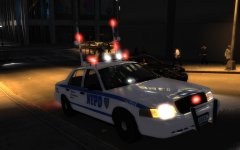 Working high riser with correct flash pattern
 -
@OfficerFive0 Try this one please: 2232.0 0.36 85 0.0 0.05 -0.28 0.7 4 0.17 4.0 196 0.45 0.55 0.5 35.0 1.8 0.95 10.0 0.05 0.47 3.0 2.0 2.0 0.1 -0.08 -0.015 0.46 2.0 1.0 2.2 2.5 0.0 25000 400010 00000010 0 If it rolls too much try a few other Interceptor Utility handlings and if all of them rolls over or something, let me know, and I'll make one for it. (I can't open the link) @OfficerYi I can't believe I haven't made an Altima handling yet :D I'll start working on it soon, but since I still have a freightliner handling to make, it might take a while. (sorry pretty busy with finals)
-
Here you go, it's already been made: 2503 0.38 80 0.0 0.1 -0.2 0.0 4 0.096 1.0 237 0.3 0.55 0.5 33.0 1.5 0.9 11 0.09 0.48 2.5 1.3 1.3 0.1 -0.08 0.0 0.5 2.0 1.0 2.2 2.5 0.0 22000 440010 0 2 optimized for kinksta's Ford E-350
-
I saw BxBugs123 posting a few screenshots of his LASD PIU back then, but I have no idea if he released it. Probably not though. Maybe if you ask him in PM, he can shed some light what happened to it. EDIT: found the pic:
-
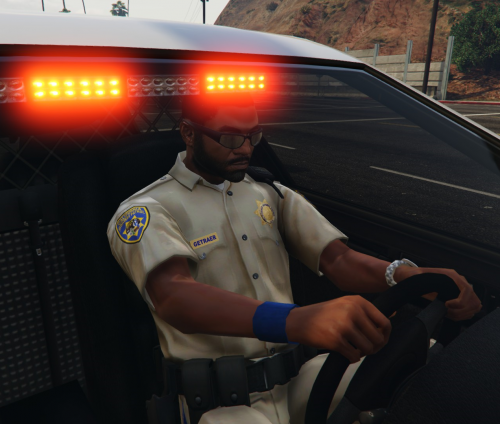 Any idea how to install this on the retail version? I tried adding this into update.rpf, but all it did was crash my game, even when I copied the whole thing, and not just the highway cop model. If I add it anywhere else, it automatically trys to redownload the original rpf files.
- 10 comments
- 3 reviews
-
I think it'll however, knowing how Lt.Caine's cars have lower camera, I believe the center of mass is lower, so if there's not a lot of suspension play, try this handling instead: 3850 0.38 80 0.0 0.0 -0.17 0.5 5 0.14 1.0 160 0.5 0.65 0.4 33 1.3 0.95 13 0.09 0.49 2.0 0.8 0.8 0.15 -0.1 0.0 0.43 2.0 1.0 1.8 2.5 0.0 49655 440010 0 0
-
-
Yeah I made one for EVI's F550. Here it is: 3850 0.38 80 0.0 0.0 -0.27 0.5 5 0.14 1.0 160 0.5 0.65 0.4 33 1.3 0.95 13 0.09 0.49 2.0 0.8 0.8 0.15 -0.1 0.0 0.43 2.0 1.0 1.8 2.5 0.0 49655 440010 0 0
-
Sure, it'll be ready in a few days.
-
-
It's the Federal Signal Smart Siren SS2000 just like the one LAPD uses.
-
I believe the handling made for Lt.Caine's Tahoe works with it.
-
 Netman made a mod which edits only the emergency lights, and it looks pretty similar to mine, so I in case you are interested, I suggest using that.
 -
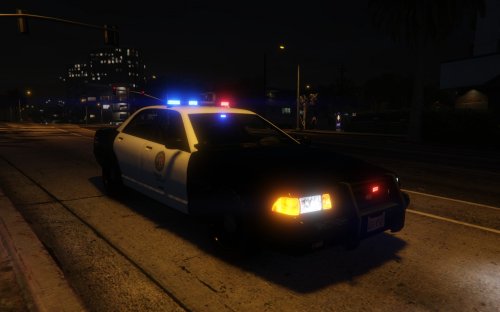
This is a simple texture edit of all the 2nd generation Vapid Stanier (police, police4, sheriff, taxi) vehicles, that changes part of the headlights and indicators to amber. Both the headlights and indicators will be amber even when the lights are turned off. Plus, as an optional mod, I added a visualsettings.dat mod that turns every indicator light on a steady glow at night. Unfortunately this means parked cars will have them on as well. Installation: You're gonna need OpenIV for this. All the .ytd files go into vehicles.rpf, while visualsettings.dat go into common/data located in update.rpf.
- 28 comments
- 13 reviews
-
-

- 6
-
-
You can change the intensity in visualsettings.dat. This is how it looks with a vanilla setup. I'll be uploading this shortly, plus a little extra.
-
Edited emergency lights, indicators and headlights
-


