
Slushy
Members
-
Joined
-
Last visited
Everything posted by Slushy
-
Yeah my fault, I updated LSPDFR but not rage 😅 thanks for the update!
-
Hello, I installed the new version of LSPDFR that was released today and now whenever I go near the actively set apartment with LSPDFR, the game crashes to desktop. I have approached a LSPDFR house that wasn't set which didn't cause me to crash. But as soon as I set that house to the active one, it crashed (hopefully that makes sense). I attached my Rage crash log. Thanks, Slushy. Edit: Sorry, didn't see the pinned thread (D'oh!) ApartmentCrash.txt
-
 Wow, great to see this plugin updated and brought back to life! Going to download once I finish work, thanks :)
- 212 comments
- 28 reviews
-
-

- 1
-
-
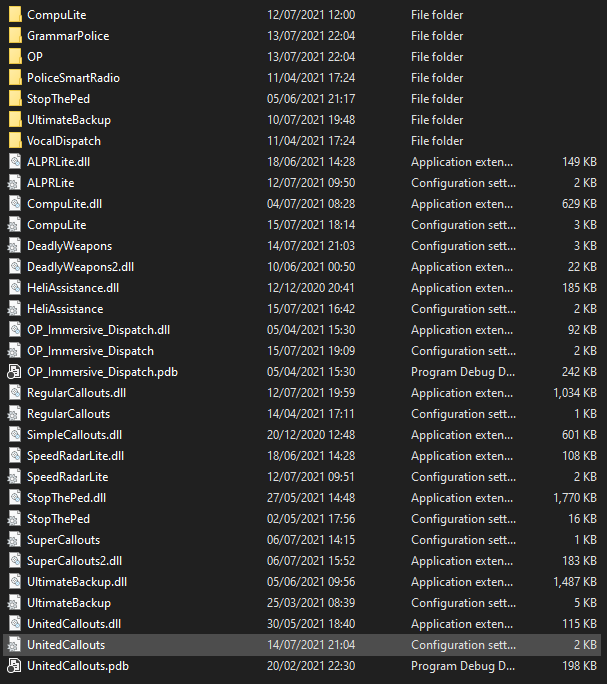
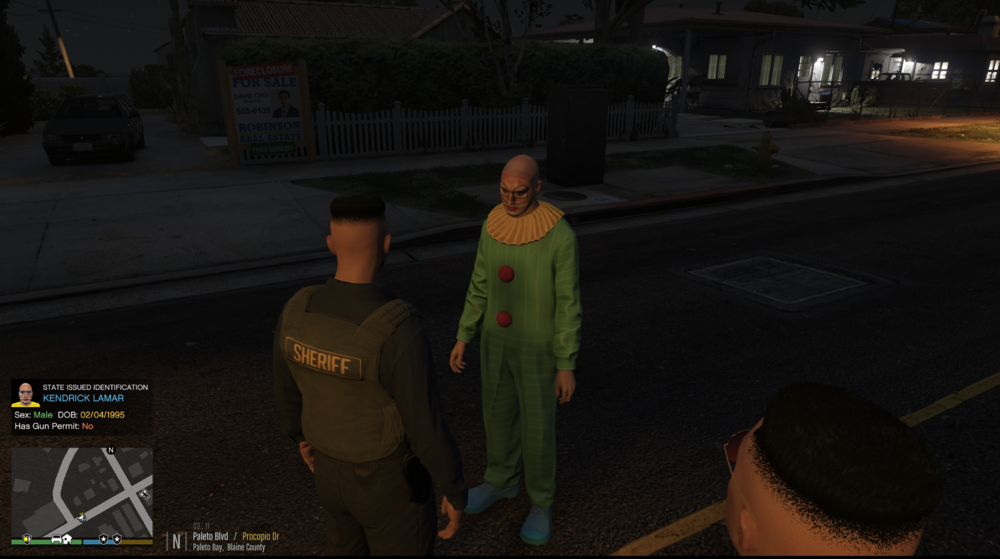
For some strange reason which I can not find out, there is a clown that is constantly spawning in my game with the name Kendrick Lamar, always Kendrick Lamar! Sometimes he is driving a car recklessly, other times he is simply stood in the middle of the street doing nothing. And for the life of me I can not find out which callout/plugin/whatever is causing him to spawn. I have tried going through each of my plugins and finding if they spawn ambient events to no avail, looked through my various trainers and there is nothing. I am at a complete loss. Here is the plugins that I have: I use Simple Trainer and Enanced Native Trainer. Someone has to stop this menace please 😞 I also included my Rage log but I can not find any plugin spawning him in. Thank you RagePluginHook.log
-
LCPDFR.com Diagnostics Report Started: 13/04/2021 @ 15:31:39 Starting diagnostics tool [information] Running module [information] navigator UA: Mozilla/5.0 (Windows NT 10.0; Win64; x64) AppleWebKit/537.36 (KHTML, like Gecko) Chrome/89.0.4389.114 Safari/537.36 Edg/89.0.774.75 [information] autonomous_system_number: 5089 [information] autonomous_system_organization: Virgin Media Limited [information] fe: metapod.g17media.net [psuedoping] Running module [psuedoping] Europe Regionserver: 253 (!) [psuedoping] US West Regionserver: 486 (!) [psuedoping] US East Regionserver: 317 (!) [psuedoping] Oceania Regionserver: 1020 (!) [psuedoping] Anycast Forwarder: 399 (!) [psuedoping] CDN: 531 () [psuedoping] Google: 512 () Finished: 13/04/2021 @ 15:31:40 I also can not download any files, on either the CDN or Internal CDN server Edit: It seems to be intermittent, I have managed to download a couple files, but now after the timer runs out, nothing happens and clicking the button to download the file doesn't do anything.
-
 Getting this with the latest update: [8/16/2020 10:06:09 PM.056] Loading plugin from path: E:\Games\SteamLibrary\steamapps\common\Grand Theft Auto V\Plugins\Persistent Weapon Flashlight.dll [8/16/2020 10:06:10 PM.778] <UNLOADED PLUGIN>: Initializing input system [8/16/2020 10:06:10 PM.779] <UNLOADED PLUGIN>: Initializing game console [8/16/2020 10:06:10 PM.780] <UNLOADED PLUGIN>: Initializing forms manager [8/16/2020 10:06:10 PM.787] Plugin "Persistent Weapon Flashlight" was loaded from "Persistent Weapon Flashlight.dll". [8/16/2020 10:06:11 PM.113] Persistent Weapon Flashlight: [8/16/2020 10:06:11 PM.113] Persistent Weapon Flashlight: ============================== [8/16/2020 10:06:11 PM.113] Persistent Weapon Flashlight: UNHANDLED EXCEPTION DURING GAME FIBER TICK [8/16/2020 10:06:11 PM.113] Persistent Weapon Flashlight: ------------------------------ [8/16/2020 10:06:11 PM.113] Persistent Weapon Flashlight: Origin: Game fiber "Plugin "Persistent Weapon Flashlight" main fiber". [8/16/2020 10:06:11 PM.113] Persistent Weapon Flashlight: ------------------------------ [8/16/2020 10:06:11 PM.113] Persistent Weapon Flashlight: Exception type: System.NullReferenceException [8/16/2020 10:06:11 PM.113] Persistent Weapon Flashlight: Exception message: Object reference not set to an instance of an object. [8/16/2020 10:06:11 PM.113] Persistent Weapon Flashlight: ------------------------------ [8/16/2020 10:06:11 PM.113] Persistent Weapon Flashlight: Inner exceptions: [8/16/2020 10:06:11 PM.113] Persistent Weapon Flashlight: ------------------------------ [8/16/2020 10:06:11 PM.113] Persistent Weapon Flashlight: Stack trace: [8/16/2020 10:06:11 PM.113] Persistent Weapon Flashlight: at PersistentWeaponFlashlight.Memory.MemoryFunctions.GetObjectWeapon(Int64 obj) [8/16/2020 10:06:11 PM.113] at PersistentWeaponFlashlight.EntryPoint.Main() [8/16/2020 10:06:11 PM.113] at Rage.GameFiber.Main() [8/16/2020 10:06:11 PM.113] Persistent Weapon Flashlight: ============================== [8/16/2020 10:06:11 PM.113] Persistent Weapon Flashlight: Not sure if this will ever get updated, but it was a brilliant plugin 😃👍
- 60 comments
- 20 reviews
-
 Great plugin! It's a new must have for the true realistic LSPDFR experience. Removes the need to open 5 different menus whilst being easy to use. Would recommend!
- 1,365 comments
- 87 reviews
-
-
- 3
-
-
-
Use the life preserver with 'O' and stand on your boat all happy, casually saving people from shark infested waters 🙂
-
The mod is working fine for me, but I am wondering if there is some kind of prompt to say if a near by boat has been anchored? Currently I am flying over a "vessel in distress" and spamming that button the closer I get with no indication as to whether it has been anchored? Maybe I am being silly and doing it wrong but idk. Great plugin and mod, really enjoying it 🙂
-
 Will there ever be functionality to attach multiple weapons to the ped e.g an AR to the back and a taser to the front?
- 266 comments
- 22 reviews
-
 Would it be possible to disable all prompts about an event? I see that blips can be disabled, but I was hoping all prompts could be.
- 222 comments
- 22 reviews
-
-
 I haven't had a crash in-game on the latest version, it has been working fine for me.
- 546 comments
- 103 reviews
-
-
- 1
-
-
-
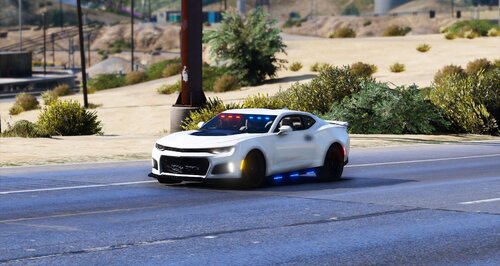 All ELS lights work for me, but the hellcat brake lights + reversing lights + head lights do not work. Very odd. https://gyazo.com/46a47cb250a1391c40daa682b47ecbba Edit: Also the headlights first activates the internal light, and then the headlight with no beam from the headlight. Edit2: Other car is working perfect, just the dodge that seems to have the issue. Great work on the car btw 😄 https://gyazo.com/f2141e6d0572fc3cff7807d4b2b708b1
 -
The ini comes with the download, so try redownload the plugin using the "new install" file.
- 546 comments
- 103 reviews
-
-
- 1
-
-
 Light enhancement mods are essential to ELS to make them bright. I would recommend VisualV or MVGA, should fix your problem 🙂 v1.05 is the latest version of ELS, so I would recommend that 😉 If either of you two still need help please PM me and I will try my best
- 2,700 comments
- 241 reviews
-
I downloaded files I needed through my phone using data and transferred them to my pc, so not a problem 🙂
-
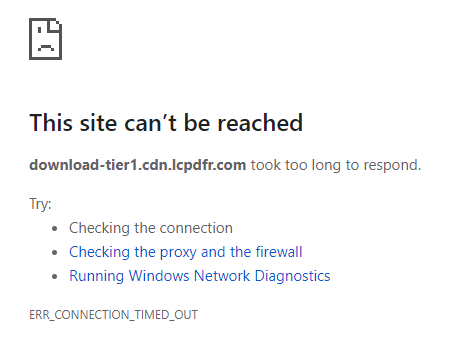
It was working for a short while - Tried downloading a vehicle and it no longer works.
-
What ISP you use? I am on VM Weirdly enough I can download it using my phone data, very weird. Maybe it is something Virgin Media has done? Edit: Wrong
-
Ah ok, glad you got it sorted 🙂
-
Download server for LSPDFR currently isn't working, so not sure if this is connected with that or your internet speeds aren't sufficient enough to load the full web page.
-
Same with me, trying to download either manual installation or automatic, both result with same thing.
-
As of LSPDFR 0.4, it has it's own character creation system to allow players to create their own personalised characters, which links up with the website to view stats. If you don't want to use one, just go on duty, create a character and then when on patrol, use a trainer to switch to an NPC ped, or one of the main characters (I believe this works, don't see why not). There is a SWAT character, righly named 'SWAT' in the Enhanced Native Trainer, not sure as to the class name of it. This mod doesn't change the vehicles in game, so any modded vehicle should be compatible with it.