southaussiemate
Members
-
Joined
-
Last visited
Everything posted by southaussiemate
-
Hey mate, I dunno if you fixed this or not but I just figured it out. i watched a video about it and what he did was change this from "True" to "False" in the LSPDFR .ini file. ("Main.PreloadAllModels = False") He also installed the 2 mods mentioned in the recommendations section on the forests download page. here's a copy and paste of that part for your reference: I did all of this, then ran LSPDFR and it all worked a treat! The tutorial I watched was titled "Forests of San Andreas | Updated 2023 | By Request | Install and Showcase" by "Geoffrey_Gamer" on youtube.
-
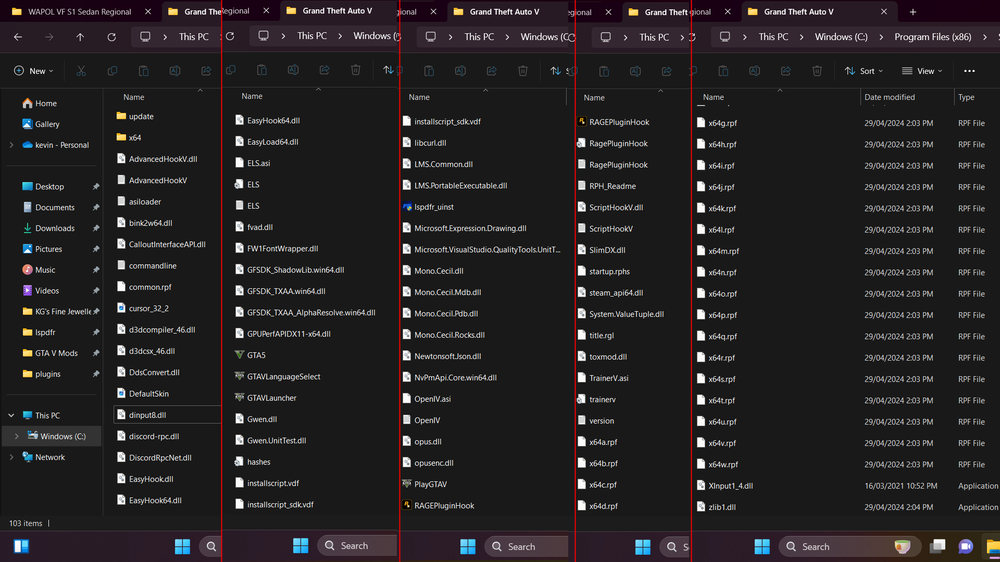
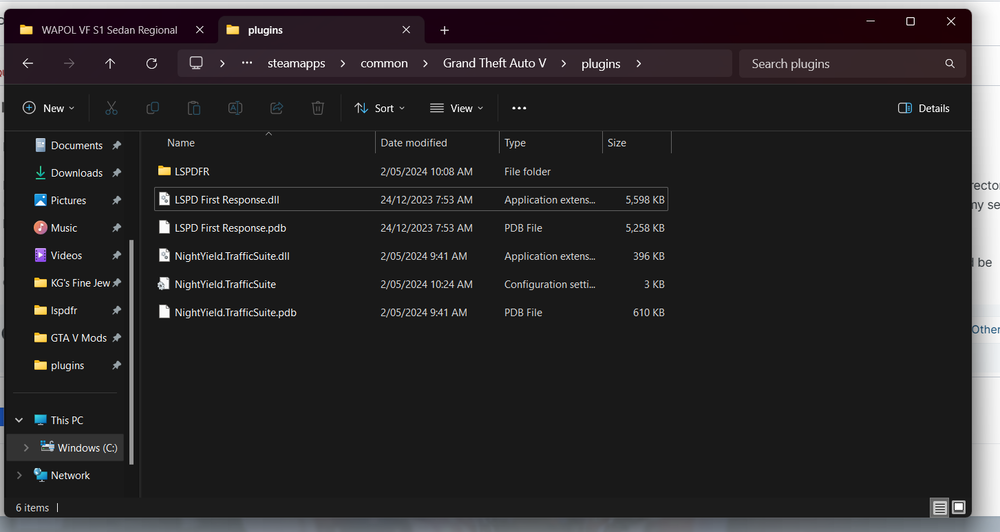
I have LSPDFR, ELS, a simple trainer and a few callout scripts installed - all of which work perfectly fine! I have tried to install a few different fuel scripts, including the traffic suite mod, and none of them load when I launch the game. It seems that anything I place inside this directory (C:\Program Files (x86)\Steam\steamapps\common\Grand Theft Auto V\plugins) will not load in-game and I am totally lost. The internet has given me no help so far; all of my searches lead to dead posts, un answered questions and unrelated problems. I have just re-installed GTA V after a 3 year break and downloaded everything else yesterday (1st May 2024) so everything should be the latest versions and all of it should be compatible, right? I'll admit that I am very rusty with modding this game but from what I can recall, I don't see any reason preventing these scripts from working. I've attached a screenshot of my plugins folder and a compiled series of screenshots of my main directory. I've installed everything as described in the readme files. Hopefully someone here can help me out.
-
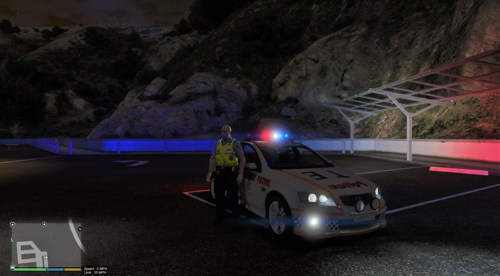 Fantastic model. I've wanted this rig in GTA since the first commodore was released for GTA IV! However there are a few bugs that prevent me from enjoying it. I noticed there are multiple "carcols" files in the directory in various locations so i might be replacing the wrong one since your directions aren't specific but here's what I've been experiencing. Firstly, the lights are buggy in the sense that i have one random white corona that flashes with the first light left on center rather than where it should and the ELS lights themselves are rather dim (even with radiance mod) so that white corona is the only light i see once i walk a few meters from the car. I've also noticed that every so often a car will spawn where the light bar is entirely solid (no transparency) so i cant see the lights at all. Aside from that i am in love!
- 11 comments
- 1 review
-
-

- 1
-
-
-
-
-
-
-
Great looking model and I love that you used a new/unique lightbar and not another bloody liberty haha. The interior looks amazing.
- 15 comments
- 1 review
-
-
- 1
-
-
I've been in a relationship for about 2 months now with an amazing Irish girl. I love it and it's going great so far but god damn women can be confusing sometimes (no offence ladies). It just sucks there is a whole planet between us at the moment.
-
Go to gtapolicemods.com or gta-mod-center.com to find a large number of Australian police car models and if you want Victoria specifically you'll have to use texture packs for now I think. I have some high quality Victorian police textures on gta-mod-center.com and another one on GPM. As for the ambulance and fire trucks I don't believe anyone has made them yet. I would post links but I can't copy/paste them here for some reason.
-
I like the idea but it's extremely plain. I would have placed a NOoSE logo on the sides and on the back with maybe "Liberty City Police Tactical Response" in medium sized text with "Riot control vehicle" under it in a larger size. That's just me though.
- 8 comments
- 2 reviews
-
-
- 4
-
-
I have a pretty average laptop so most ENB's I've tried lag like a motherfu..... The only one that works well for me, and looks great with ELS, is CryENB v3. My game runs a steady 20-25 fps during the day and 30-40 fps at night with medium game setting and the low end option for the ENB.
-
That depends on the model and how the person designed ELS for it. On most models you can't but there is a few out there that can. There's 2 models I know of so far, try searching for the "Harbour county CVPI" and there is currently an Impala in the top downloads section that does the same thing. it's the Harris county impala. I'm sure there is a few CHP cars around that do this too.
-
There's several vehicles on gtapolicemods from BxBugs123 that are identical to the NYPD vehicles but have LCPD skins.
-
Australian stuff! Cars, money, clothes....hell, even road textures and street signs. Other than the typical stuff like LSPD:FR and what not I would love to see some sort of picture in picture display or reflections like the house interior mirrors so we can actually use see what is around us better in vehicles. This is the only bad point I have seen about next gen so far. Truck driving missions/mods and stuff would be awesome in first person then.
-
Wow. we are no longer the most boring state for police vehicles haha. I plan on having a crack at making this very soon but I don't suppose you can drop a link to the place you found the picture at? Oh and nice profile picture ;)
-
I have the waterloo CVPI already but there isn't enough white. That Valor on the FPI would be perfect...It's just a pity he chose the FPI as the vehicle to mount it on. I hate the shape of the FPI...One of the worst looking cars to roll out of the factory I think. Thanks for the help though.
-
Hey guys, I'm seeing more and more vehicles released with the Valor but they're only using the red and blue multi colour led style. I would love to see a Valor with a full white light option. There was a pack released a while ago with the Integrity light bar that did this very well and I think it would look sweet on this bar. Here's a video showing what I mean:
-
Nice. I'm not a fan of the wrap around on this particular vehicle but i look forward to using it in my game.
- 23 comments
- 7 reviews
-
-
- 1
-
-
When will these dumbasses get the hint?! You must be doing something wrong if you have criminal groups as well as several major world powers coming down on your head. Just give up, you aint gonna win. note: I use the term "criminal" very losely. Not all biker groups or the people in them are outlaws. Some people just like to ride their bike with mates and have a good time.
-
-
I think there is another texture somewhere that you need to edit. To start with, on your emerglights file in the bottom left corner where those boxes are, copy the white one and place it over the red, blue and amber ones so they are all white. If that doesn't work try looking through the vehicles WTD for any textures that look like the lightbar and change them to white (unless it's the emerglights_emis file) What model is that? i might download it and have a look if you can't figure it out.
-
I would love to go and kick their ass but I don't think the Australian armed forces are cabable of an assault like that on our own. It's not that we don't have the equipment to make it happen but we just don't have the man power. What other countries are being threatned like this? (other than the USA...who doesn't want to kill them haha)
-
I like the idea and i think it has the potential to look really nice. I'm going to give you a few suggestions though to help you improve.
- 4 comments
- 3 reviews