


Nocheese4u
Members
-
Joined
-
Last visited
Everything posted by Nocheese4u
-
-
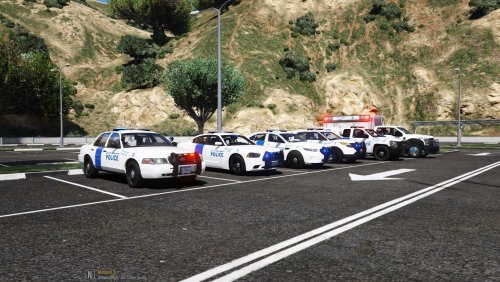 I love it, been using it as addons to do high level calls. The only thing missing is a Tahoe since that seems to be a very common DHS vehicle, but the skins themselves are very HQ. 2K skin might be nice as well for those with weaker PCs.
- 12 comments
- 3 reviews
-
 An absolute shame its been discontinued. It was amazing and worked for some time up until more recent updates where it wont work at all make the mod non-functional and mods by Albo have been abandoned. Was pretty good while it lasted.
- 1,196 comments
- 127 reviews
-
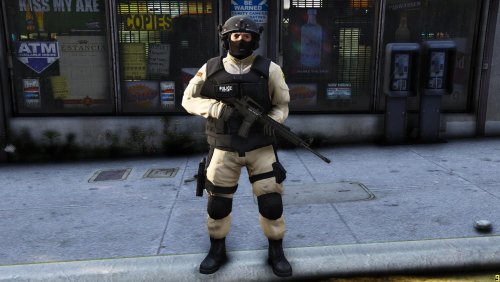 So I installed this but I realized it doesn't replace any ped and the game doesn't recognize s_m_y_noose_01 unless I were to rename it to an existing ped name.
- 6 comments
- 1 review
-
I'm an absolute idiot and skipped right over it, whoops! Anywho I wanted to make them addons using Albos Modding DLC and after 6+ hours of work, I finally got it.
- 12 comments
- 3 reviews
-
What vehicles did you use for these? I can't seem to find the correct model to make the skins fit without looking weird.
- 12 comments
- 3 reviews
-
They look great, my issue though is the models I have aren't what the skin templates are based from so they are off on my cars
- 12 comments
- 3 reviews
-
I'm having a similar problem, but I actually get as far as to the loading screen where it lists all the stuff it's doing but when it "loads story mode" it just crashes. It's either scripthook or ragehook, the two most important files 😕
-
Hello all, I am having the issue many others seem to be having as well which is the game loads and then crashes and seems to be related to RAGEhook. I attached the RAGEhook log and then an advanced report it generated as well. Vanilla works fine but as soon as I put in RAGEhook the game can't load. I tried disabling DirectX in RAGEhook settings along with removing scripts and mods but nothing worked. Unless there is a workaround, I assume we just have to wait for a patch to RAGEhook? I can say with certainty that the following are fully up to date: GTA V RAGEhook LSPDFR Scripthook The majority of my script mods, the "outdated" ones would be non-intrusive ones such as Spike Strips V. RagePluginHook.log RAGE log report.txt
-
 That's a shame that this has been discontinued and the other "Police Search" has been deleted/removed.
- 342 comments
- 49 reviews
-
-

- 2
-
-
My absolute apologies to both of you, I just found there there's another lspdfr folder inside plugins and I didn't have that. I'm not sure if I deleted the folder myself or what happened to it but I have moved everything back to how it should be. Everything seems to be working as it should, thank you!
-
Ah, attached that one below! I just said they worked fine before. I didn't change anything and suddenly it doesn't work. Pretty sure if my plugins are not installed properly then they wouldn't have worked for the past week. RagePluginHook.log
-
Hey there all. Yesterday my game was totally fine and I only added one plugin which was Keep the *ing Door Open but then today no other plugins are working. LSPDFR works totally fine, but any other plugin just refuses to load. I have tried setting my startup.rphs to "ReloadAllPlugins" and to also load every plugin manually but no luck. I have not moved anything in or out of my plugins folder (or any folder inside my game folder), it is all as it was yesterday when all mods were still working fine. I have the Steam version of GTA 5 all up to date via auto-update, my RageHook is up to date along with all the needed .dll files for all mods. Ragehook's console keeps giving back an error you can see in the ragehook log I attached below, it gives this everytime I try to do "LoadPlugin abc.dll" and I'm not sure what it means. I tried the command with a few plugins, you can see me trying to try to fire up plugins using it towards the end of the log. RagePluginHook_17052019_012550.log
-
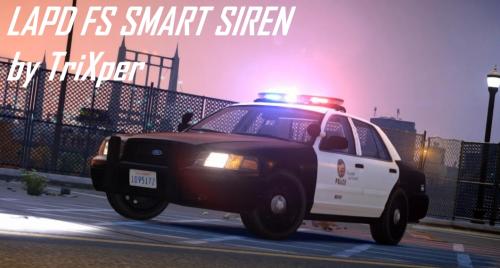 Very good but for some odd reason after using the 1-4 keys to swap siren types, I lose all siren audio and slowly lose all audio. No more collision sounds, no more glass breaking, no gunshots, no vehicle engines or tires screeching. It all slowly fades over the course of a minute until the game just goes totally mute. Ever heard of this?
- 9 comments
- 3 reviews
-
 Hey minor issue, it tells me that it won't work with this version of GTA even though it's totally up to date (automatically by steam) and ragehook is updated too.
- 149 comments
- 29 reviews
-
 Absolutely wonderful. Adds so much more variety and the customizable ini to set how frequent certain calls come in is a huge plus. Great voicing for the pacific heist as well!
- 1,081 comments
- 166 reviews
-
 Hey, great looking model. I need some help though, I only have a few modded cars in GTA V now and in the readme where you say "To make the rambar not to fall off. goto: (mods)\Update.rpf\common\data\levels’gta5\vehicles.meta. replace vehicles.meta or at the flags in the flags file." I opened the file with Wordpad++ to edit it, (I replaced the original for a RIOT van mod) it gives me 5 lines to possibly replace. Which one do I replace with the one in your provided vehicles.meta?
- 202 comments
- 51 reviews
-
-
If I'm replacing police4 from the More Vehicles mod, what do I change in morevehicles.ide? Just everything from FBI to police4? Because ingame I have a white plated car haha.
- 19 comments
- 7 reviews
-
Soooo who still plays GTA IV? I'm willing to play LCPDFR multiplayer with people, or if it's just messing about that's fine too. My mic is broken but in a way I prefer typing things out to each other unless the other person prefers voice. My GFWL is BadAssCop911 and you can send a friend invite/message me and we can go from there (like adding via Steam).
-
-
-
-
-


