


Nocheese4u
Members
-
Joined
-
Last visited
Everything posted by Nocheese4u
-
Mine already says +livery for some reason. Mine comes out black rather than white like the screenshots. And I don't understand the "texture file" part, I'm not a modder haha. This is my FBI line from vehicles.ide:
- 20 comments
- 15 reviews
-
Well I suppose, but not I'm getting 3 different skins for the crown vic. I changed the crown vic's default from police2 to police (or vice versa can't remember) and it still works, but now I have 3 COMPLETELY different skins to it. an LCPD, a "Port authority" and the CHP, the first two which I've never downloaded...
- 42 comments
- 8 reviews
-
I want this skin, but I don't know how to apply the skin to the car, I only know how to replace the car itself. Not .png files for skins, support?
- 12 comments
- 1 review
-
So I've been testing out the cars and I replaced the crown vic with police2, but the durango with noose. Now it spawns with a white skin half the time and crashes my game after 3-4 spawns of it, probably when the black and white is going to spawn. What's going on?
- 42 comments
- 8 reviews
-
-
-
A reinstall fixed this somehow. Either way, it works now once again, and it's cool! haha
- 42 comments
- 12 reviews
-
Hey, I downloaded the last update to this and now all open doors make some weird fart-like sound, it's a continuous tone.
- 42 comments
- 12 reviews
-
Shortly after posting I completely reinstalled LCPDFR and the scripts/mods after a test. It seems the BaitCar script uses another form of scripthook so it probably confused LCPDFR. Just no matter what, GTA4 is bound to crash one way or another. As for the topic, I was using that to post haha.
-
Hi guys, Normally I have good tolerance but today I decided I had enough of all these crashes. I will try to provide a LOT of screenshots of my directory and attach the needed logs to help diagnose. Yes I read the rules and posting threads and am ready to be cooperative! (Just no difficult stuff please!) There's three "types" I've experienced (so far): 1) Usually when LCPDFR is not running and I'm roaming as Niko Bellic I get the crash "FATAL ERROR: SMPA60" or something. I read that it has to do with custom/modded cars, usually if you saved the car at your safehouse. Removed the car and threw a Cavalcade in, still got it. It happens when I shoot pigeons or am in the progress of it. Sucks too, because I've only killed about 8 / 200 pigeons!!! The mod that is "ON" while doing the activity is the Simple Native Trainer with pigeon locations set to Enabled. All other scripts/mods are by LCPDFR and are on "standby" as I call it. 2) This is the most common problem I get. Random crashes, accounts for every 19 / 20 crashes I have. The crash type is called a "GTAIV has stopped working." so it's sort of associated with Windows. As far as I remember, it has all happened within LCPDFR (or with a script/mod that I use with it.) I really can't say much on this, it happens at random times, usually when I feel the need for resources (spawning things, LARGE item movements, etc.) jumps and the game overwhelms itself and dies. If THIS specific crash can be fixed for good, I'd be so happy. 3) This problem doesn't lead to a crash immediately, but I feel as more and more errors pile up in LCPDFR, it eventually leads to one. It's when the message "LCPDFR has encountered an unknown error...restarting the game is recommended...we are sorry for the inconvience." This really has RARELY come up since 1.0a but recently I feel it's happening more than before. Part 4) Other problems: I ran the LCPDFR Diagnostics tool and since day one, 90% of it works. I open the LCPDFR Diagnostics Tool, check game installation (it looks like when a folder is open at GTAIV, I have to use Advanced Mode), and it says "Check successful: LCPDFR is set up correctly. You can close the tool now..." And then I press "Open log file" and the diagnostics tool stops working (screenshot provided). This isn't mandatory but like all other safety gear, you want it working in the event of a situation. If something else pops up or I have an update on something, I will edit this. But for now, here are the tools for you fixers: SYSTEM SPECS: OS: Windows 7 home (64 bit) CPU: Intel i7 3770 @ 3.4GHz - 3.9GHz RAM: 8GB DDR3 @ 1600MHz of some expensive brand, Limited Edition GPU: nVIDIA GeForce GTX 550 Ti (yet I can run GTA4 on MAX, minor tweaks) HDD: SATA? I honestly don't remember but it's a 500GB, about 450GB usable @ 7200 RPM I am using LCPDFR 1.0c GTA IV version 1.0.7.0, using "compatibility mode" set at Windows Vista (Service Pack 1) otherwise my game loads, then instantly stops working/crashes. I'll post a picture of my scripts folder to help, but I tend to jump from one script to another, if say the one I have is lacking one feature I really want and I remove this and use that (or use both if the 2nd one lacks the material from the first). Here's the list, whether I have it WORKING OR NOT: LCPDFR 1.0c (obviously haha) Simple Native Trainer ELS V8 Indicator (hazard lights, turn signals; I disabled everything except turn signals) Seat Belt chime Spotlight (this technically works, I just have to do the thing with images.txt so that it works again.) TrafficFlow (slightly tweaked the value for less callouts across the city) vdH Towing Service (I have not even used this yet...) vdH Police Helper Menu (recently removed to use Towing Service) Wouters Callouts vdH Police Station mod (love the new paint scheme and feel of this) -Just added, probably one of these is the culprit to EDIT 1.1- Bait Car (this was it, removed) Door Ajar Chime And finally modded cars/pedestrians (cop only), which is an LAPD set, here is the link. Didn't use ALL of it, I'm also renaming a few files because I want to use some CHP models as well: '?do=embed' frameborder='0' data-embedContent>> I think this is it, unless something is blatant and I'm missing it. Attached are the screenshots, I will try to get pictures of the specific crashes if they happen or if requested. But chances are it'll come out as a black screen, I play on fullscreen. The first 3 files, are the logs. I decided to attach more than enough instead of less. The next 5 files (pictures) are pictures I took of...well, my folders and such. Thought they might help, will gladly provide more screenshots of different folders if it's needed. EDIT 1.1: So it seems like LCPDFR had an accident of some sort, It was shut down due to a critical error as soon as I loaded the game, and it also said "error in LCPDFR.loader.loader" or something, I assume the .dll file in /scripts/. Running diagnostics now and....."LCPDFR is set up correctly." How unusual, it was fine a few hours ago..? Might be because of a different save file, but it shouldn't be affected. Attached again at the VERY bottom, is the newest LCPDFR log. EDIT 1.2: BaitCar was the issue from 1.1, LCPDFR works once more. Until GTA IV crashes, that is >.< .
-
5/5 I've been wanting a complete package like this for a long time now. Though I would have preferred a mix of CHP too instead of straight LAPD, but regardless, thanks for putting t his together!
- 126 comments
- 54 reviews
-
-
Can you tweak this for ELS 8.0? Would love to have this.
-
For some reason when I respond to a call specific to your mod, my game crashes (stops working). I'm thinking it's leftover script/plugin files from before?
- 74 comments
- 36 reviews
-
-
These are really cool, I wish you could make a non-ELS version. I'm not a fan of ELS.
- 42 comments
- 12 reviews
-
-
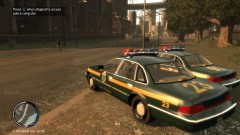 That's a really cool skin, where can I download it?
 -
Hello, I decided to Role Play as airport security for Francis International Airport, so I walked into the station, everything went well, but when I got out to pick my car it was a mid-air bug. Screenshot provided below. I was able to pick a car, and drive off in it without actually seeing where I am going, only could tell by radar. Was reset/fixed by walking into the station and walking back out where I saw my Police Patriot in the guardrail, sirens on lol. I'm not sure if this was a problem on my end or yours, but there is a quick solution. Thought I should post in case anyone experiences this.
-
I thought I should step in because I personally have a 550 Ti. It's actually a great piece of hardware for GTA4, but if you're going to be playing stuff like BF4 or ARMA 3, it's time for an upgrade. But above ALL, upgrade your RAM. I have 8GB DDR3 and it's fantastic, can run any game without running out of RAM. Good luck and have fun! I sure am with LCPDFR 1.0 :D
-
Sorry to revive this topic but I am new to LCPDFR and GTA. I added the LCPDFR 0.95 mod and the spotlight mod. Worked fine yesterday, then today it says on bottom right LOADING - LOGGING ON then as soon as it should load game crashes. Is there any way to recover before or something? I do remember saving last as a cop on duty.

