


LtKeller
Members
-
Joined
-
Last visited
Everything posted by LtKeller
-
Try turning MaxElsCarsAtOnce down, ClearRandAiExtras off, and cruise lights in the individual vehicle config files off. If this answered your question, please mark this post as "Best Answer" to indicate this thread as solved.
-
To find the log, just search for "log" in the GTA IV directory. As for your problem, it is probably caused by ELS AI. Try disabling cruise lights, ClearRandAiExtrasSp, Ai_Els, and changing your ASI loader. These steps typically solve instability problems with ELS. If that doesn't work, please post ALL relevant logs.
-
Textures are mapped to polygons on a model (in this case, a light bar). Instead of remapping the textures to fit the desired appearance, you can just manually combine Hilth0's textures with BxBug's textures by copying the desired texture out of the image, pasting it on the original texture, and scaling it so it fits properly. You can use an image editing application, such as Microsoft Paint (which comes with every copy of Windows) or GIMP to preform this operation. Specifically, select the LED texture out of the second picture, copy it, paste it on the default texture, and scale it so the old texture was completely covered. Mark this post as "Best Answer" if it answered you question, to indicate this thread as solved.
-
This error is very common with ELS. Try disabling ClearRandAiExtras, Ai_Els, changing the ASI loader, and/or disabling cruise lights for vehicles in their configuration file. And GTA IV runs better in Windows Vista compatibility mode.
-
Because the uniforms are being worn in the police station, but not outside, this means that the textures are avaliable to the peds but they are not wearing them, or the peds in the police station are different then the peds naturally spawning. If the former is true, make sure you have updated <<pedVariations.ide>> after installing. If the latter, the files are possibly installed in the incorrect location. Install the uniforms by replacing <<m_y_cop.wdd, wtf, and wtd?>>? If you are in a different area, you could be seeing different peds than the ones you have installed (ex. In Alderney, State Police Peds spawn instead of LCPD). Check componentpeds.ide to make sure the new files are in the correct location.
-
My best guess would be ELS. Try changing [ClearRandAiExtrasSp = off] to [ClearRandAiExtrasSp = on], your asi loader, and disabling ELS AI altogether (in ELS.ini). Also, individual vehicle configuration files with enabled cruise lights could be problematic.
-
As already stated, you need to post the log files and system specifications for anyone to help you. The problem is problably ELS; It can be problematic. Try: Disabling ELS AI and any cruise lights in the vehicle configuration files, And setting compatibility of "LaunchGTAIV.exe" and "GTAIV.exe" to Windows Vista. That can be untrue, so try to install them anyway.
-
Actually, yes. If you go into peds.ide, you can replace the noose line with this: M_Y_Swat, M_Y_SWAT_P, COP, move_rifle, GESTURES@MALE, GESTURES@M_PHONE, FACIALS@M_LO, visemes@m_lo, 0, move_rifle, null, -1,-1, PED_TYPE_PLAYER, VOICE_PLY_CR, VOICE_PLY_CR This changes the animations to move_rifle, and the noose peds will animate correctly.
-
Well, it depends on what you want. LCPD:FR is merely a script modification, so it won't modify your files. Therefore, if you want to change the cars, pedestrians, or even the gameplay area, you would have to download models and install them yourself. This is actually easy, and there are plenty of tutorials online. Keep in mind, some car models require ELS (Emergency Lighting System), another script like LCPD:FR you will have to also download. To install non-vanilla models, you first need to install an application that can modify .iso directories, such as OpenIV (again, downlodable online). You can use this to open [Grand Theft Auto IVGTAIVpcmodelscdimagesvehicles.ide or componentpeds.ide] and replace the files inside with the files of the downloaded vehicle model.
-
I've had this problem with using the ELS ai. Try disabling it, and then reenabling after sucessful launching.
-
There should be errors in the even logs, for both Windows itself and other miscelanous logs in the directory. Please post all log files, along with your GTA IV version and computer specifications. It is imperative that you include detailed information about any problems you face. To start with: Make sure you aren't using a crack - We don't support cracks Update GTA IV to 1.0.7.0 (the latest version of the game, or 1.1.2.0 for EFLC) - This sometimes fixes a wide variety of issues Make sure that you run the game as an administrator. Make sure that your GTA IV root folder (and every subdirectory) is not set to "read-only" Ensure that ScriptHook.dll, ScriptHookDotNet.asi and Dsound.dll OR Xlive.dll are in the GTA IV ROOT folder Ensure that there is a folder titled 'LCPDFR' in the ROOT GTA IV folder. Check that all the above files exist, if they do not, reinstall LCPDFR with the MANUAL installation. Ensure that you are using up to date versions of every LCPDFR dependency and LCPDFR itself. Install these: .Net Framework 4.5, Microsoft Visual C++ Redist 2012
-
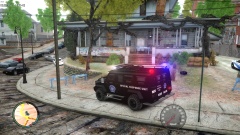 Looks like the SWAT truck from Need For Speed Most Wanted. Any chance of a release?
 -
Glad to hear it! I though it was a problem with the data files.
-
There could be many scenarios as to why your game crashes. Is there any error associated with the crash, or is it a basic GTA IV has stopped responding? Also, did you directly modify any data files? Can you post any logs from your directory? How do you spawn the vehicle? Did you modify one of the vehicles? Do you have ELS installed?
-
Can you please post more details, such as all error logs and your system specifications?
-
Glad I could help!
-
I meant the scripts folder, excluding all LCPDFR scripts of course. Again, try deleting <<AdvancedHookInit.asi>> before you do this, or disabling ELS Ai.
-
From your log, it looks like a problem with the taser. Try deleting <<AdvancedHookInit.asi>>. Also, ELS and high quality car models can cause problems. In order to diagnose the problem most effectively, try uninstalling all scripts and reinstalling each one individually until the problem reappears.
-
Make sure all of these are installed: http://www.microsoft...s.aspx?id=30679 http://www.microsoft...ls.aspx?id=5555 http://www.microsoft...ails.aspx?id=35 http://www.microsoft...s.aspx?id=30653 Try running the included LCPDFR diagnostics tool, located under GTAIVLCPDFRLCPDFR Diagnostics Tool.exe, then please post the results here. Also post your system specifications and all log files generated in the game directory. This could be a problem with Games for Windows Live, try to reinstall that and also: Error Message - Error in Module DSOUND.dll Usually followed by a path like this: Program Files (86x) > Rockstar Games > GTA IV > asilog.txt The problem here is that dsound is trying to write it's log file but is being denied access to create it. What you need to do is one of these three things, and that will fix it. 1) Disable the need for UAC in your control panel (google it, I will not write a guide on how to do that) 2) Always run your GTAIV.exe and LaunchGTA.exe as an administrator 3) Set the GTA IV directory to not be in read-only mode. Finally, if all else fails, deleate dsound.dll and replace it with xlive.dll (xliveless).
-
When you try to run it, what exactly happens? Also: Make sure your version of game is legitamete. Update GTA IV to 1.0.7.0 (the latest version of the game, or 1.1.2.0 for EFLC) - This sometimes fixes a wide variety of issues Make sure that you run the game as an administrator. Make sure that your GTA IV root folder (and every subdirectory) is not set to "read-only" Ensure that ScriptHook.dll, ScriptHookDotNet.asi and Dsound.dll OR (not and) Xlive.dll are in the GTA IV ROOT folder Ensure that there is a folder titled 'LCPDFR' in the ROOT GTA IV folder. Check that all the above files exist, if they do not, reinstall LCPDFR with the MANUAL installation. Ensure that you are using up to date versions of every LCPDFR dependency and LCPDFR itself. Install these: .Net Framework 4.5, Microsoft Visual C++ Redist 2012, Microsoft .NET Framework 3.5 SP1, and Microsoft Visual C++ 2005, 2008, 2010, and 2012. Install oldest first, then 2nd newest, and so on.
-
You need to run the installer inside the download package, problably named <<LCPD First Response 1.0c Installer.exe>>. It's pretty simple to navigate through, and you just have to specify the directory of your game, but you should make a backup of the game directory by copying it to another location in case something goes wrong. After it has installed, just run GTA IV and press Alt-P in game. It should then guide you through the basic aspects of using LCPD:FR in game. As OfficerCharles mentioned, OpenIV is a modification tool. You can use it much like Windows Explorer to edit files in GTA IV. This is especially useful if you want to change the appearence of pedestrians or vehicles in game, but OpenIV is not neccessary to use LCPD:FR.
-
Glad I could help.
-
Inside <<pedVariations.ide>>, there is the following text: #model no. of variations we are setting values for M_Y_COP, 10 #slot geometry BULK JOB SUNNY WET MAT1 RES1A RES1B RES2A RES2B AUDIO ID feet, 0, 0, 1, 0, 0, 0, -1, -1, -1, -1, 1 head, 2, 0, 1, 0, 0, 0, -1, -1, -1, -1, 10 head, 0, 0, 1, 0, 0, 0, -1, -1, -1, -1, 6 head, 1, 0, 1, 0, 0, 0, -1, -1, -1, -1, 6 uppr, 1, 0, 1, 0, 0, 0, 2, 1, 100, 1, 3 uppr, 0, 0, 1, 0, 0, 0, 2, 1, 100, 1, 1 lowr, 0, 0, 1, 0, 0, 0, -1, -1, -1, -1, 1 suse, 0, 0, 1, 0, 0, 0, -1, -1, -1, -1, 1 p_head, 0, 1, 1, 1, 0, 0, -1, -1, -1, -1, 0 p_head, 1, 1, 1, 0, 1, 0, -1, -1, -1, -1, 0 end Each value inside each column corresponds to a varation of a body part. An example body part would be <<head_002_r>>. In the case of voices, each numerical value cooresponds with a file (<<M_Y_COP_BLACK>>,<<M_Y_COP_HISPANIC>>,etc. by default) defined in the bottom of <<peds.ide>>. M_Y_Cop, M_Y_COP_BLACK, 0 M_Y_Cop, M_Y_COP_HISPANIC, 1 M_Y_Cop, M_Y_COP_WHITE, 2 The actual files themselves are stored inside <<GTAIVpcaudioSfxspeech.rtf>>. You van try changing the values of the numbers to match the voices, or modfy the voices directly using OpenIV to replace each file. I reccomend trying to change the numerical values in <<pedvariations.ide>> as it is the simplest and would work better with the game. I hope this helped!
-
LCPDFR uses the native voices of each ped, so your problem most likely has to do with the coorespondence of each voice to each ped. You can change the native voices in <<PEDS.IDE>>.
-
I've had the same problem because of ELS AI. Try disabling it.

