




Kode103
Members
-
Joined
-
Last visited
Everything posted by Kode103
-
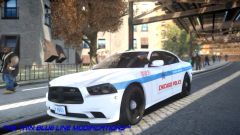 CPD does use all blue on their models. However, they seem to be switching to red and blue for their Traffic units (Highway Patrol). These are rare models. Just as rare as some of their models also use Vector lightbars and TA. Its still considered a "Test model", but usually they keep the test models. Just as the CHP Ford Utility was a test model, they kept it.
 -
Dat Charger ;D Let the comments that CPD does not use Chargers begin.
-
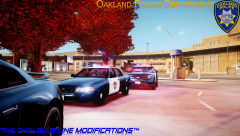 @IronicRainbow I can see the excitement that you really want to use them. Soon my friend, soon. And please, respect that site by its proper name (Code Zero Forums), as we respect this site by its proper name.
 -
It looks ok. Since you are a beginner I would advice
-
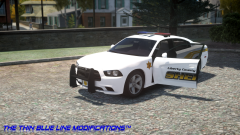 That sexy skin and that sexy Charger ;D @Jerbell92 I dislike that they didn't opt in for Chargers. I see a Taurus on the here and there around my area, but just wanted to see how it would look on a Charger.
 -
-
Very good. I should know, I made this skin a year ago ;D Keep it up.
-
-
-
Down the list: - In game screenshots would be useful. Even if they arn't HD images, as long as they show greater details than OpenIV. - Alignment is way off on the Taurus. Slightly off on the Explorer. - When placing credits, just give credit to the people who created the models you are linking. In this case, just Chippy. You do not need to add the whole read me credits.
-
![[WIP] Liberty County Sheriff Skin Pack](//s3-gallery.int-cdn.lcpdfrusercontent.com/gallery/album_1761/sml_gallery_10683_1761_224456.jpg) Still, yes. Finally pushing this pack forward.
Still, yes. Finally pushing this pack forward. -
![[WIP] Liberty County Sheriff Skin Pack](//s3-gallery.int-cdn.lcpdfrusercontent.com/gallery/album_1761/sml_gallery_10683_1761_7735.jpg)
From the album: RK's Skin Packs WIP
Preview of upcoming Liberty County Sheriff skin pack. Model made by Heisenberg. -
From the album: RK's Skin Packs WIP
Preview of upcoming Liberty County Sheriff skin pack. Model made by Heisenberg. -
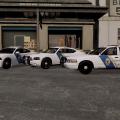 The links are not broken. LCPDFR does not allow clickable links to the LCPDMods domain. Check the PDF for the links.
- 3 comments
- 2 reviews
-
Hey guys, this is my first Liberty State Police skin pack. It is based off the Belle Isle Police Department in Florida. After extensive modifying the skins for months now, it is finally ready for release. Special thanks to The0ptimopti for his support, ideas, and especially help in modifying the Emis files for Napoleon’s car pack. Hope you all enjoy. Thank you all for your support and keep on the lookout for more to come! Thanks for downloading! PLEASE DO NOT REUPLOAD, EDIT, OR MODIFY WITHOUT PROPER PERMISSION. Credits for the models go to their respective owners. (PLEASE USE LINKS ON PDF, LINKS BELOW WONT SEND YOU TO DOMAIN) ’12 Charger, ’10 Charger, JM CVPI, Tahoe – JokerMods http://www.lcpdfr.com/files/file/4705-liberty-city-sheriff-department-vehicle-package/ Taurus, Explorer, HB CVPI – Heisenberg http://www.gta-universe.com/forums/index.php?/files/file/57-ford-police-interceptor-pack/ (NO LONGER AVAILABLE) Caprice, NP CVPI - Napoleon https://gtamodsdb.com/files/file/184-liberty-county-sheriff-units/
- 3 comments
- 2 reviews
-
![[REL] Liberty State Police Skin Pack](//s3-gallery.int-cdn.lcpdfrusercontent.com/gallery/album_1761/sml_gallery_10683_1761_15851.jpg)
From the album: RK's Skin Packs WIP
Final preview before release. Model made by Napoleon. -
![[REL] Liberty State Police Skin Pack](//s3-gallery.int-cdn.lcpdfrusercontent.com/gallery/album_1761/sml_gallery_10683_1761_103214.jpg)
From the album: RK's Skin Packs WIP
Final preview before release. Model made by Napoleon. -
Nice design. I like it! 4.9/5. Just fix that "Police" behind the Charger. Looks weird on the side like that.
- 8 comments
- 2 reviews
-
-

- 1
-
-
Me being from Chicago, and have traveled around Cook County and other counties in the area, I know that this skin is pretty off. The only part that is right is the "Highland Park" text. The rest of the skin is off. The numbers and "Police" are the wrong font and the flag is on the wrong place. Your alignment is off on the right door side and the police star is on the wrong place. If you're from around the HP area then you would know how they look if you see them once in a while. 2/5
- 2 comments
- 1 review
-
-
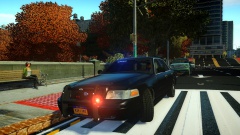 Pretty clean. I like it! :D
 -
"This is my first upload so be nice" I'm sorry but we are being nice. You had to put more thought into this. Your alignment is off, text is small, logo on the door is off, color are plain... ugh... I will tell you this, go back to the drawing board. Check other departments decals and mix ideas together. 1/5. I give you the 1 for effort.
- 23 comments
- 2 reviews
-
-
- 2
-
-
Well.... Its improving, however, still not as much as it should be at this time. The text alignment needs to be fixed on "Sheriff". Different font on the motto, the stripe is kinda ok.... but I feel you should look a different real police departments to get a better idea of where to place the line. The bottom stripe just... Stops. That just makes it look horrible. Sorry but 1/5.
-
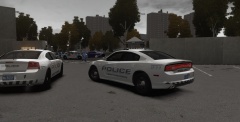 I still remember your first skins... and now you are doing this ='] Bravo! Keep it up!
 -
Im sorry to say this, but this was poorly done. Your allignment is off (text and decals). As for the "911 Emergency", you copied and pasted it. It would look much better if you would've typed on it instead of pasting an image. The rear text needs to be a different color rather than yellow and you need to make it larger. The rear is also missing the black area of CVPI. And you are missing the plates. 1/5.

![[WIP] Liberty County Sheriff Skin Pack](http://s3-gallery.int-cdn.lcpdfrusercontent.com/gallery/album_1761/sml_gallery_10683_1761_224456.jpg)
![[WIP] Liberty County Sheriff Skin Pack](http://s3-gallery.int-cdn.lcpdfrusercontent.com/gallery/album_1761/sml_gallery_10683_1761_7735.jpg)
![[REL] Liberty State Police Skin Pack](http://s3-gallery.int-cdn.lcpdfrusercontent.com/gallery/album_1761/sml_gallery_10683_1761_15851.jpg)
![[REL] Liberty State Police Skin Pack](http://s3-gallery.int-cdn.lcpdfrusercontent.com/gallery/album_1761/sml_gallery_10683_1761_103214.jpg)
