


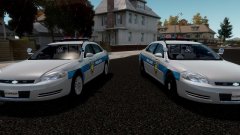


Vehicles!
This is a fictional variant of the Tucson Arizona Police Department
- 2014 Ford Police Interceptor Sedan purchased by Him1250, edited and converted to IV by Trewq34, converted into a '14 PI by Napoleon.
- This version of the Sedan has been extensively modified and enhanced by Napoleon and XBR410.
- Front bumper modelled by Ridgerunner.
- Rims and hubcaps modelled by Napoleon.
- 2011 Ford Explorer by EA Games, converted to GTA IV by Hilth0, heavily modified to a 2013 Ford Explorer Police Utility by Hilth0, Tire tread by TraumaPak.
- Odyssey 2011-2013 Ford Explorer Police Utility Cabinent made by Napoleon
- Federal Signal Integrity by Hilth0, Stands by EVI, mapped to full takedown by Chippy
- Whelen PAR46 Spotlight by Napoleon.
- Federal Signal Camera by Hilth0
- Whelen Ion by Lccop
- Havis Console modelled by Napoleon
- Whelen Sapphire by NickieB
- Generic Police scanner by Heisenberg
- Panasonic Toughbook CF31 by Ridgerunner Designs
- Setina The Bodyguard by Napoleon
- Federal Signal VPX Directional Bar scratch modeled and converted to GTAIV by Pengi
- Whelen Talon by BxBugs123
- Decatur Genesis I Radar Made & Converted by Bxbugs123
- Whelen M2 Series by Heisenberg
- Skins by firefighterJBW(Tucson) & Chippy(Other)
- This version of the Sedan has been extensively modified and enhanced by Napoleon and XBR410.
- Front bumper modelled by Ridgerunner.
- Rims and hubcaps modelled by Napoleon.
- 2011 Ford Explorer by EA Games, converted to GTA IV by Hilth0, heavily modified to a 2013 Ford Explorer Police Utility by Hilth0, Tire tread by TraumaPak.
- Odyssey 2011-2013 Ford Explorer Police Utility Cabinent made by Napoleon
- Federal Signal Integrity by Hilth0, Stands by EVI, mapped to full takedown by Chippy
- Whelen PAR46 Spotlight by Napoleon.
- Federal Signal Camera by Hilth0
- Whelen Ion by Lccop
- Havis Console modelled by Napoleon
- Whelen Sapphire by NickieB
- Generic Police scanner by Heisenberg
- Panasonic Toughbook CF31 by Ridgerunner Designs
- Setina The Bodyguard by Napoleon
- Federal Signal VPX Directional Bar scratch modeled and converted to GTAIV by Pengi
- Whelen Talon by BxBugs123
- Decatur Genesis I Radar Made & Converted by Bxbugs123
- Whelen M2 Series by Heisenberg
- Skins by firefighterJBW(Tucson) & Chippy(Other)
.thumb.png.4deec47dddfa9b451f2914e13c09d10f.png)










![Los Santos County Sheriff Livery Pack [Berkeley County-based]](http://s3-screenshots.int-cdn.lcpdfrusercontent.com/resize/500/-/monthly_2026_04/20260415155948_1.thumb.jpg.4cd04373ce1cf72df8e99a993cf4a145.jpg)



![Clayton County Sheriff's Office [4K]](http://s3-screenshots.int-cdn.lcpdfrusercontent.com/monthly_2026_04/Screenshot_2511.thumb.png.e79613aafaa7abfbd34da660fe32acd3.png)
Recommended Comments