
Skip to content
View in the app

A better way to browse. Learn more.

LCPDFR.com

A full-screen app on your home screen with push notifications, badges and more.

To install this app on iOS and iPadOS
  1. Tap the Share icon in Safari
  2. Scroll the menu and tap Add to Home Screen.
  3. Tap Add in the top-right corner.
To install this app on Android
  1. Tap the 3-dot menu (⋮) in the top-right corner of the browser.
  2. Tap Add to Home screen or Install app.
  3. Confirm by tapping Install.

Traffic Control 1.1.1

(46 reviews)

4 Screenshots

Traffic Control for GTA V
Copyright (C) 2018 Stealth22. All rights reserved.

Any unauthorized modification, reverse engineering, or distribution (including re-uploading of any kind) is strictly prohibited.


Requirements
You must have version 0.63 (or newer) of RAGE Plugin Hook. You must have a fully legal, non-pirated version of GTA V.


Automatic Installation
- Extract the ZIP archive; ensure that setup.exe and Traffic Control.msi are both in the same folder
- DON'T run Traffic Control.msi unless you know what you're doing
- Run setup.exe, and ensure that the installation directory detected matches the main/root folder of your GTA V install directory
- If setup.exe is unable to detect your GTA V directory, or fails in some other fashion, start Traffic Control.msi, AND SELECT YOUR GTA V PATH AS THE INSTALL DIRECTORY


Manual Installation
- Copy the TrafficControl.dll and TrafficControl.ini files into the Plugins folder of your GTA V directory.
- Copy the Stealth.Common.dll and RAGENativeUI.dll files into your main/root GTA V directory.


Features
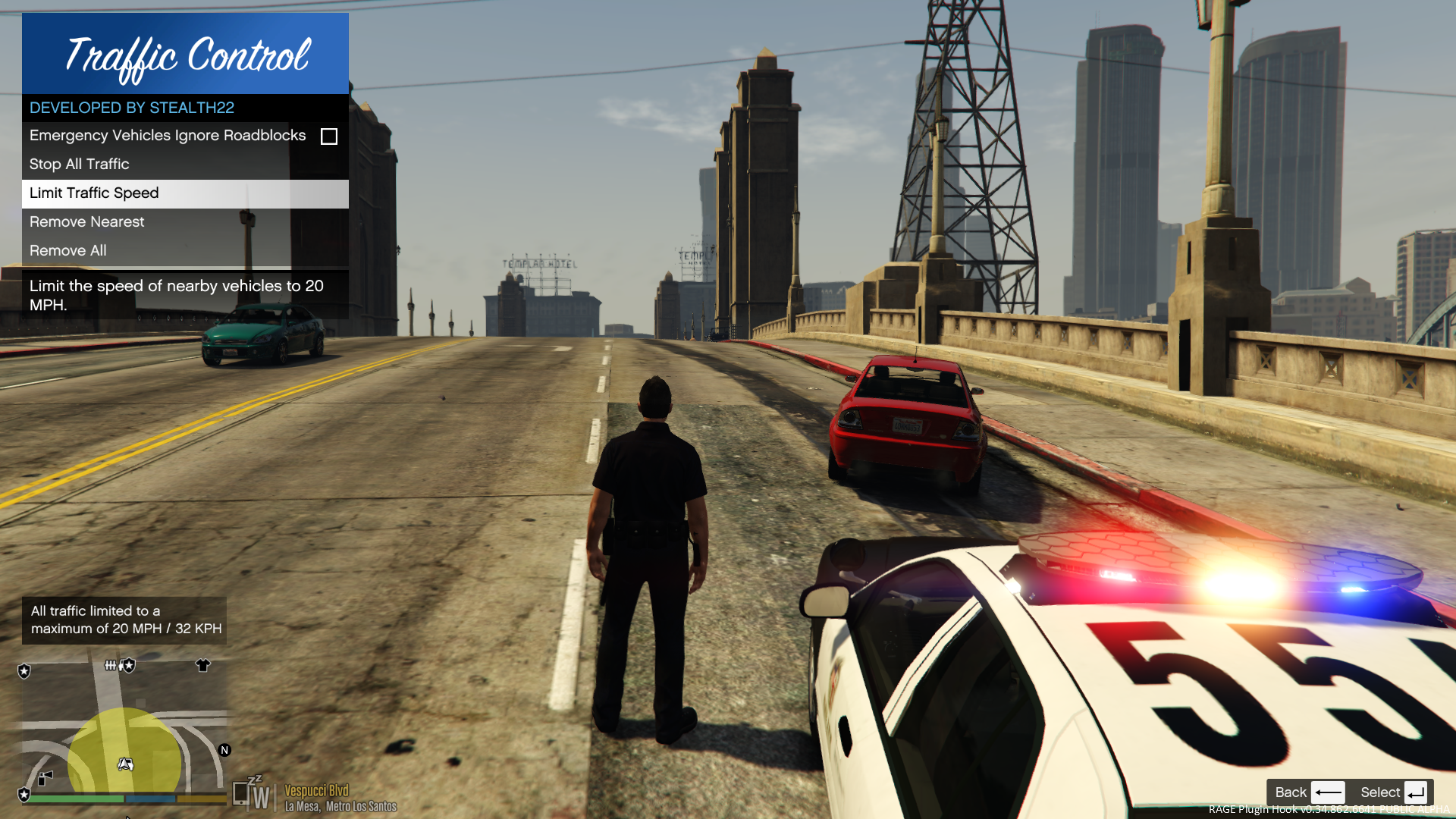
- Stop or slow down all traffic within a certain radius of the player, in order to close a road for investigative purposes, or for safety reasons during a traffic stop
- Multiple "roadblocks" or "speed zones" can be placed
- Roadblocks will remain in place until removed by the player
- A (beta) setting to allow any emergency vehicles to drive through "roadblocks"/"stop zones" can be enabled in the INI file ("Stop Traffic" orders only; speed restrictions are not affected)
- The above setting can also be changed on-demand through the new in-game menu
[NEW!] - Traffic Control now includes a new in-game menu, powered by RAGENativeUI!
[NEW!] - Keyboard shortcuts can now be changed in the INI file!
[NEW!] - Keyboard shortcuts can be disabled, if desired (to use the in-game menu exclusively)

[NEW!] - Integration with Police SmartRadio!


Usage
- Press the menu keybind (CTRL + F10 by default) to open the Traffic Control menu; use the menu options to place/remove roadblocks
- Alternatively, you can use the shortcut keys (see the INI file) to place/remove roadblocks
- Keyboard shortcuts can be disabled through the INI file, if you wish to only use the in-game menu


Forum Thread

http://www.lcpdfr.com/forums/topic/51961-rel-traffic-control-beta-close-off-the-road-while-you-investigate-and-clear-a-scene/ 

What's New in Version 1.1.1

Released

VERSION 1.1.1

  • Added missing Police SmartRadio files; fixed directory structure
  • Had some issues building the auto installer; this version will be manual drag and drop only
     

VERSION 1.1.0

  • This version requires RPH 0.62+, as well as RAGENativeUI v.1.6.3.0
  • This version also requires Stealth.Common v2.0+ (included; older versions will not work)
  • Brought this plugin into the 21st century, and best of all...
  • Integration with Police SmartRadio, built by our very own @Albo1125!!

User Feedback

Recommended Comments

Kilyin

Members

3 hours ago, James4114 said:

Had to stop using this script, unfortunately. Traffic at the edge of the stop zone tries to overtake the last vehicle, the vehicle behind him tries overtake etc.. etc.. until there is a big vehicle mess at the back of the stop zone. cars in all lanes all over the place. Nice idea though, the speed limit still works OK but when I clear all traffic restrictions, the big yellow circle stays on the mini-map. No biggy.

Then you must be using RPH 43 which is pretty buggy.

James4114

Members

Suggest reverting back to 0.42.9?

James4114

Members

35 minutes ago, Kilyin said:

Then you must be using RPH 43 which is pretty buggy.

Suggest reverting back to 0.42.9?

Kilyin

Members

6 hours ago, James4114 said:

Suggest reverting back to 0.42.9?

Yeah, 43 has some issues.

James4114

Members

55 minutes ago, Kilyin said:

Yeah, 43 has some issues.

I re-installed 042.9 but the cars still act strange at the edge of the road closed zone. They, more or less, end up lining up, line abreast the span of the whole road, on both sides.

Not to worry, I can substitute it with some creative cone placement, that sorts them out!

Stealth22

Friends of LSPDFR Author

The blip thing is a bug in RPH. Update to RPH 44.

Destroyer11687

Members

Great mod @Stealth22! Have you had any success getting the toggle to work allowing emergency vehicles through? They all still stop at the edge of the cone for me. I know it's in beta and I was just wondering if you e heard anyone have success with it?

siamone755

Members

Hi, I need 1.0.1 version but when i try to download it I always get 1.0.2, I can normaly download 1.0.0 but it doesn't work for me!!!

Please reupload 1.0.1 or give new link do download it, Thank You!

Quakex64

Members

3 hours ago, siamone755 said:

Hi, I need 1.0.1 version but when i try to download it I always get 1.0.2, I can normaly download 1.0.0 but it doesn't work for me!!!

Please reupload 1.0.1 or give new link do download it, Thank You!

but why do you need an older version??

Destroyer11687

Members

@Stealth22, 

I posted on your relevant script page, but you said on it you rarely check the comments, so I thought I'd post on one of your popular plugins.

 I've got something weird going on with my game and I've narrowed it down to your stealth.common.dll file. When I'm playing the story mode and not lspdfr, during pursuits, the helicopter AI flys away from the main character whenever he stands still. If he's moving the helicopter joins the pursuit, but as soon as he stops, they immediately fly away and de-spawn. It took some time, but I narrowed it down to this file. Once I removed it from my directory, the helicopter AI went back to normal. But when I put it back, it did it again. 


I'm not sure what is conflicting in my files with this .dll that causes th AI to act in such a weird way, but I wanted you to know. I will just have to remove the .dll file whenever I play story mode and put it back in when I play lspdfr for now.

Stealth22

Friends of LSPDFR Author

@Destroyer11687

I don't mean to be rude or dismissive, but that is literally impossible. A common DLL is a support library...it does not run any active plugin code at all, let alone interfering with the helicopter AI logic. And it certainly doesn't do anything when LSPDFR isn't running.

I suppose Keep Calm could be doing something with it, but Keep Calm doesn't run unless LSPDFR is running.

Destroyer11687

Members

@Stealth22

Thanks for being kind in your rebuttal. I thought the same thing I just was reporting what was happening. I was running the game without RPH and it was doing it. I couldn't figure out why so I took out the stealth.common.dll after trying a few other things and it acted normal. I then put back your .dll and it did it again. Took it out and it didn't. I have no idea why. I will run it again tomorrow and see if it behaves differently. If it does I'll let you know. 


Husnein786

Members

(edited)

@Stealth22


Hello

Traffic Control always crashes for me when all of my plugins are loading at the start. any advice or anything on what I should do?

Edited by Husnein786

Quakex64

Members

2 hours ago, Husnein786 said:

@Stealth22


Hello

Traffic Control always crashes for me when all of my plugins are loading at the start. any advice or anything on what I should do?

how are you loading it? do you have it set to be auto loaded in the console? auto loaded via startup.rphs?

9Lincoln20

Members

I have the latest version of traffic control installed, GTA version 791 running ragehook 0.45.


The problem I have is that while playing the game traffic control stops working after a few callouts or traffic stops. All the files are installed correctly however for some reason traffic control just stops working.


I go to stop all traffic but everyone just continues driving past.  I also try using the traffic control menu but it doesn't work either.


I have LSPDFR+ installed as well.


Any ideas or suggestions as I love this plugin and want to keep using it 

Quakex64

Members

16 hours ago, 9Lincoln20 said:

I have the latest version of traffic control installed, GTA version 791 running ragehook 0.45.


@9Lincoln20 latest game version is 877? have you not upgraded in a while?also latest RAGE is 47

9Lincoln20

Members

no I haven't upgraded. Rage 0.47 is too unstable and causes a lot of crashes.


Traffic control should still work on GTA version 791 and rage 0.45

9 hours ago, Quakex64 said:


@9Lincoln20 latest game version is 877? have you not upgraded in a while?also latest RAGE is 47


Quakex64

Members

@9Lincoln20 ok but do you have or updated to 877 which is latest game version???  your issue could be that you dont have the latest update, where the mods you are using are updated for it..

9Lincoln20

Members

The traffic control script hasn't been updated since June 28th. I can't see the latest version for 877 or 791. 

7 minutes ago, Quakex64 said:

@9Lincoln20 ok but do you have or updated to 877 which is latest game version???  your issue could be that you dont have the latest update, where the mods you are using are updated for it..


Quakex64

Members

no.. I meant do you have the latest game update?

9Lincoln20

Members

3 hours ago, Quakex64 said:

no.. I meant do you have the latest game update?


No I don't. I heard about all the issues 877 was causing with carcols and such. I'm still on 791

abecker221

Members

Does this work on the latest update?

Quakex64

Members

1 hour ago, groovybluedog said:

You don't mention anywhere that you have to load the plugin separately, either in the RAGE software or with "LoadPlugin..." 

-------------------------
Manual Installation
-------------------------
- Copy the TrafficControl.dll and TrafficControl.ini files into the Plugins folder of your GTA V directory.
- Copy the Stealth.Common.dll and RAGENativeUI.dll files into your main/root GTA V directory.


if its a ragehook plugin, you have to load it via F4 or startup.rphs  ALL RPH mods are like that...."LoadPlugin" IS RAGE software /facepalm

Quakex64

Members


Requires

RAGE Plugin Hook
Other (See Description)

but it says so on the description of the mod

JamesLockworth

Members

For me, when I open gta using Rph, it stops loading as soon as it hits Traffic Control.

Create an account or sign in to comment

Latest Mods

Account

Navigation

Search

Search

Configure browser push notifications

Chrome (Android)
  1. Tap the lock icon next to the address bar.
  2. Tap Permissions → Notifications.
  3. Adjust your preference.
Chrome (Desktop)
  1. Click the padlock icon in the address bar.
  2. Select Site settings.
  3. Find Notifications and adjust your preference.




