


Installation: use sparkIV or openIV
If you have any trouble or have any suggestions please send me a PM.
And please give me some feedback so i know what i should do next time.
NOTE: It is forbidden to upload this or a modified version for public WITHOUT permission. Changing textures is ONLY allowed for PERSONAL USE.
Credits are given i the credits section.
CAR:
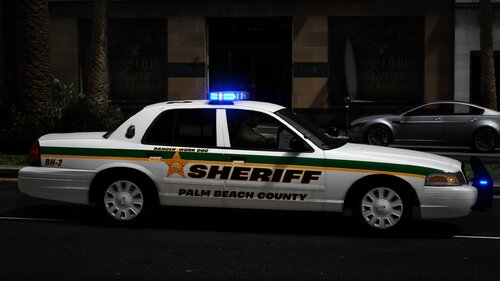
- Chevrolet Caprice by Carface
- Modified and Converted to Grand Theft Auto IV by compeast
- Dirt texture by Lt.Caine
- 94 Caprice steel wheels by Schaefft
- Textured and converted by Compeast
Equipment:
- Federal Signal StreetHawk by KevinDV
- Vanilla Police Equipment by Rockstar Games and Chamimnya
- Setina The Bodyguard Partition bt Bxbugs123 and Grim
- Livery by ChrisD
- Chevrolet Caprice by Carface
- Modified and Converted to Grand Theft Auto IV by compeast
- Dirt texture by Lt.Caine
- 94 Caprice steel wheels by Schaefft
- Textured and converted by Compeast
Equipment:
- Federal Signal StreetHawk by KevinDV
- Vanilla Police Equipment by Rockstar Games and Chamimnya
- Setina The Bodyguard Partition bt Bxbugs123 and Grim
- Livery by ChrisD

![[FiveM Ready] LACoFD Battalion 6 Chevrolet Suburban | Non-ELS | 32 Sirens](http://s3-screenshots.int-cdn.lcpdfrusercontent.com/resize/500/-/monthly_2026_10/photo1.thumb.png.a26737ac0dbfebf3d7207875866d0f75.png)






Recommended Comments
Create an account or sign in to comment