Skip to content
View in the app

A better way to browse. Learn more.

LCPDFR.com

A full-screen app on your home screen with push notifications, badges and more.

To install this app on iOS and iPadOS
  1. Tap the Share icon in Safari
  2. Scroll the menu and tap Add to Home Screen.
  3. Tap Add in the top-right corner.
To install this app on Android
  1. Tap the 3-dot menu (⋮) in the top-right corner of the browser.
  2. Tap Add to Home screen or Install app.
  3. Confirm by tapping Install.
Due to overzealous filtering on Microsoft’s side, some emails to Outlook and Hotmail addresses may not be delivered. If you’re affected, please use a different email address or try again later.

RadiantFlyer

Members
  • Joined

  • Last visited

    • 12 downloads
    • Version 1.0.0
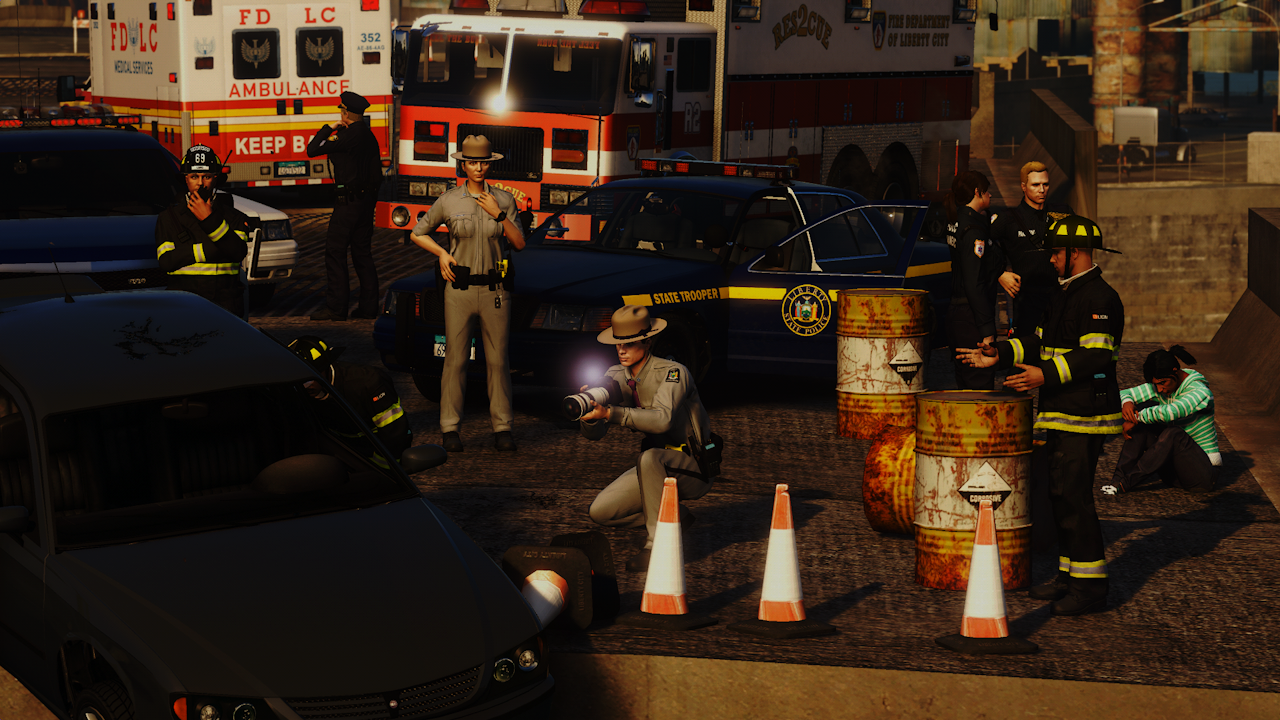
    Before installing this mod, you MUST read the terms and conditions. This wont take long. TERMS & CONDITIONS - You must credit the authors [ RadiantFlyer ] when using this modification in a FiveM server. - Using this mod inside of paywalled content is prohibited. VEHICLE LINKS Buffalo https://www.gta5-mods.com/vehicles/san-andreas-highway-patrol-pack-add-on-dls-lods Stanier https://www.gta5-mods.com/vehicles/bcso-vapid-stanier Scout 2013 https://www.gta5-mods.com/vehicles/vapid-scout-add-on Rogue+ Buffalo https://ko-fi.com/s/d715fffd03 Scout 2020 https://ko-fi.com/s/19135880a3 INSTALLATION EUP (for male outfits) https://www.lcpdfr.com/downloads/gta5mods/character/8151-emergency-uniforms-pack-law-order/ 1. Open OpenIV and open your GTA V game folder inside of it. 2. Turn on edit mode. 3. Navigate to mods/update/x64/dlcpacks 4. Drag all downloaded requirements containing the dlc.rpf into the dlcpacks folder 5. Replace the ''xxxx_sign_1'' texture inside the YTD file with the corresponding texture and vehicle 6. Add all entries to the dlclist.xml file 7. Launch game and enjoy!
  1. The new version has more skins and lightbar red textures
  2.    RadiantFlyer reacted to a comment on a file: Liberty State Police Liveries
  3. RadiantFlyer changed their profile photo
    • 55 downloads
    • Version 1.5.0
    LSP Pack ShowcaseBefore installing this mod, you MUST read the terms and conditions. This wont take long. TERMS & CONDITIONS - You must credit the authors [ redblueofficer and RadiantFlyer ] when using this modification in a FiveM server. - Using this mod inside of paywalled content is prohibited. VEHICLE LINKS Buffalo https://www.gta5-mods.com/vehicles/san-andreas-highway-patrol-pack-add-on-dls-lods Stanier https://www.gta5-mods.com/vehicles/bcso-vapid-stanier Scout https://www.gta5-mods.com/vehicles/scout-2020-medical-response-mrsa-eagl-add-on-sounds Alamo https://www.gta5-mods.com/vehicles/emergency-declasse-alamo-2600ls-add-on-sgt_jhonny Rogue+ Buffalo https://ko-fi.com/s/d715fffd03 Sandstorm LEO https://www.gta5-mods.com/vehicles/sandstorm-marked-add-on-fivem-lods-template Impaler pack https://www.gta5-mods.com/vehicles/declasse-impaler-police-pack-addon Merit https://ko-fi.com/s/c222ee7c1b 21 Alamo https://ko-fi.com/s/fb3203b0c6 Vapid Warrant https://ko-fi.com/s/500a900548 INSTALLATION 1. Open OpenIV and open your GTA V game folder inside of it. 2. Turn on edit mode. 3. Navigate to mods/update/x64/dlcpacks 4. Drag all downloaded requirements containing the dlc.rpf into the dlcpacks folder 5. Replace the ''xxxx_sign_1'' texture inside the YTD file with the corresponding texture and vehicle 6. Add all entries to the dlclist.xml file 7. Launch game and enjoy!
  4. Joe Pickleson Responded to a Pursuit in Los Santos International, La Puerta Fwy
  5. Joe Pickleson Finished responding to a Pursuit in Los Santos International, La Puerta Fwy
  6. Joe Pickleson Responded to a Pursuit in Del Perro Beach, Red Desert Ave
  7. Joe Pickleson Went on-duty at Vespucci Police Station in Mission Row, Atlee St
  8.    crunchycat reacted to a comment on a file: Generic LEO Holster For MP Character
  9. Anthony Marzio Was killed in LITAL, Feldspar St
  10. Anthony Marzio Was killed in LEFWO, Bridger St
  11. Anthony Marzio Finished responding to a [DYNC] Gunshots Reported in LEFWO, Plumbers Skyway
  12. Anthony Marzio Responded to a [DYNC] Gunshots Reported in MIDPA, Columbus Ave
  13. Anthony Marzio Finished responding to a [SC] Knife Attack in MIDPA, Columbus Ave
  14. Joe Pickleson Responded to a Pursuit in Murrieta Heights, San Andreas Ave
  15. Joe Pickleson Finished responding to a Pursuit in Vinewood, Del Perro Fwy
  16. Joe Pickleson Responded to a Pursuit in Mission Row, Vespucci Blvd
  17. Joe Pickleson Went on-duty at Downtown Police Station in Mission Row, Atlee St
  18. Anthony Marzio Finished responding to a Pursuit in Strawberry, Olympic Fwy
  19. Anthony Marzio Responded to a Pursuit in Mission Row, Strawberry Ave
  20. Anthony Marzio Went on-duty at Downtown Police Station in Mission Row, Atlee St
  21. Anthony Marzio Was killed by Keshi Escalade in CHITO, Albany Ave
  22. Anthony Marzio Performed a traffic stop on a Taxi Yellow Unknown Vehicle with registration 25XSB872 in CASGR, Union Drive East
  23. Anthony Marzio Performed a traffic stop on a Midnight Blue Unknown Vehicle with registration 68CGL719 in STARJ, Frankfort Ave
  24. Anthony Marzio Performed a traffic stop on a Midnight Blue Unknown Vehicle with registration 68CGL719 in STARJ, Kunzite St
  25. Love using this with the LCPP and LCOS Mod, very good.
  26. Guess what? NSW police now use Tiguans so this is no longer fictional!

Account

Navigation

Search

Search

Configure browser push notifications

Chrome (Android)
  1. Tap the lock icon next to the address bar.
  2. Tap Permissions → Notifications.
  3. Adjust your preference.
Chrome (Desktop)
  1. Click the padlock icon in the address bar.
  2. Select Site settings.
  3. Find Notifications and adjust your preference.