




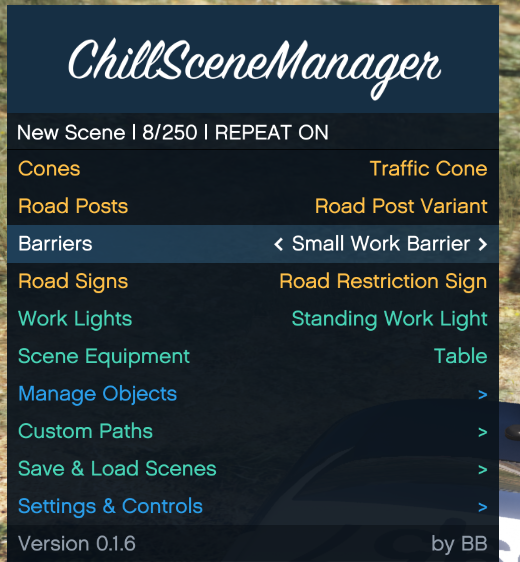
Access to 47 placeable props, including traffic cones, barriers, road signs, posts, work lights, and scene equipment.
ChillTrafficManager is a modern standalone scene construction and traffic management plugin for GTA V. Designed as a modern successor to the original Scene Manager workflow, it allows you to quickly build, edit, save, and reuse detailed scenes directly in-game.
Create traffic control setups, preview props before placement, place multiple objects without reopening the menu, and build custom routes for ambient NPC traffic.
Traffic Management
ChillTrafficManager helps ambient civilian traffic react to managed scene objects.
Vehicles can detect supported cones, signs, and barriers ahead of them and attempt to slow down, stop, reverse away, or pass the obstruction when enough space is available.
GTA V still controls the final vehicle pathfinding and driving behavior, so results can vary depending on road layout, traffic density, and surrounding objects.
Custom Traffic Paths
Create custom routes that ambient NPC vehicles can follow:
Place a collector point that detects suitable approaching traffic
Add ordered destination waypoints
Display the collector as a yellow map blip
Display waypoints as numbered blue map blips
Adjust the collector radius
Set the target driving speed
Choose between Direct and Roads driving modes
Edit existing waypoints
Save custom paths together with the scene
Create up to 8 custom paths
Add up to 64 waypoints per path
Manage up to 16 NPC drivers
Vehicles are never teleported as part of custom-path operation.
Scene Management
Complete scenes can be saved and loaded from:
GTAV\Plugins\ChillTrafficManager\Scenes
Saved scenes include managed objects, their positions and rotations, and configured custom traffic paths.
DEMO VIDEO
Thanks to @nova2727
Default Controls
F1 — Open or close the Custom Menu
W / A / S / D — Move an object or path point
Left / Right Arrow — Rotate an object or browse variants
Page Up / Page Down — Raise or lower
Left Shift — Fine adjustment
G — Snap to the nearby surface
Tab — Aim at another surface
Enter — Confirm
Backspace — Cancel or finish placement
Controls can be changed in ChillTrafficManager.ini.
Requirements
Grand Theft Auto V
RAGE Plugin Hook
RAGENativeUI 1.9.3 or newer
RAGENativeUI is included in the download. Do not replace it if a newer version is already installed.
©BB. All rights reserved.
This plugin, including its code, content, and included files, may not be reused, redistributed, repackaged, modified for redistribution, or included in other plugins or mod packs without the explicit permission of the author.
Edited by BB.
What's New in Version 1.0.2
Released
Changelog — v1.0.2
Added full controller support for menus, object placement, and custom path creation
Short Description
AI disclosure
The author has disclosed that AI tools were used in creating the following aspects of this file:
- Description
- Images
- Mod and Mod Content (Minor)
AI was used to assist with minor bug fixes.
https://www.lcpdfr.com/downloads/gta5mods/scripts/27954-scene-manager/
The original idea and the original Scene Manager plugin belong to them.
ChillTrafficManager was developed independently by BB. No code, source files,
assets or other materials from their work were used in ChillTrafficManager.
Thanks to my friend JU helping me with the code!







![[ELS] 2025 CHEVROLET TAHOE PPV](http://s3-screenshots.int-cdn.lcpdfrusercontent.com/monthly_2026_10/GrandTheftAutoVScreenshot2026_10.30-12_14_12_74.thumb.png.b5ad272a14139c6076c3bf6e3c16ee11.png)


![Chevrolet Aveo - Straż Miejska (Warsaw) [ELS / Non-ELS]](http://s3-screenshots.int-cdn.lcpdfrusercontent.com/resize/500/-/monthly_2026_10/Screenshot2026-10-29175043.thumb.png.a61ab57e111d180a3f0efa8b3aedb580.png)
Recommended Comments
Create an account or sign in to comment