Skip to content
View in the app

A better way to browse. Learn more.

LCPDFR.com

A full-screen app on your home screen with push notifications, badges and more.

To install this app on iOS and iPadOS
  1. Tap the Share icon in Safari
  2. Scroll the menu and tap Add to Home Screen.
  3. Tap Add in the top-right corner.
To install this app on Android
  1. Tap the 3-dot menu (⋮) in the top-right corner of the browser.
  2. Tap Add to Home screen or Install app.
  3. Confirm by tapping Install.

ELSCode2Bridge 0.2.7

(3 reviews)

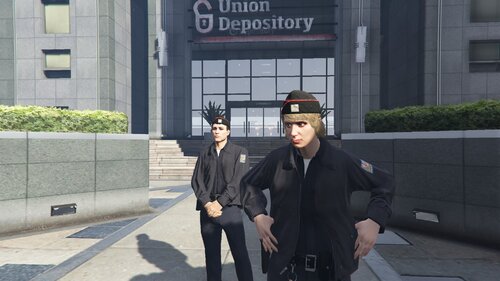
1 Screenshot

Make all backup calls VIA code 2 actually just use lights and no sirens
Works with PR and tested
Works with STP/UB
Untested Support from other code 2 menus or spawned callout NPCs
Goes into---Grand Theft Auto V\plugins\LSPDFR

Edited by Lunaveli

What's New in Version 0.2.7

Released

Fixed NPCAI desktop crash
Fixed Code 3 not working right.
Should not be anymore desktop crashes
If you have any problem please post log into comments


Short Description

All lights--No Sirens

AI disclosure

The author has disclosed that AI tools were used in creating the following aspects of this file:

  • Description
  • Images
  • Mod and Mod Content (Substantial)

AI made sure the ELS lights come on and working without the NPC turning on sirens

User Feedback

Recommended Comments

Dafm06

Members

awesome mod, works with STP/UB too. exactly what i was looking for

RWieber79

Members

I will def be testing this. If this works dude you are a legend!!! PR drives me nuts with the sirens on code 2.

Ickthy

Members

Just tested this with PR and for some reason, my units are still spawning in with their sirens blaring when I call for Code 2's. Files were placed in their proper location and nothing was changed in the ini file. I tested this with both replace and add-on vehicles, and both seem to still be rolling Code 3 instead of Code 2. Any ideas on what could be causing this @Lunaveli?

BlueLine Vibes

Insiders

Getting this error:

[9/13/2026 4:57:29 PM.981] LSPD First Response: [ELSCode2Bridge] Startup failed: System.NotSupportedException: ELS.asi differs from the verified 1.05 build. Audio integration was left disabled; SHA256=9c86c9867f9bf86d030c01bd6a2555f2413bf6768317318ac5609c3bef4728a3

[9/13/2026 4:57:29 PM.983] at ELSCode2Bridge.NativeBridge.Start(String root, ElsCatalog catalog)

[9/13/2026 4:57:29 PM.983] at ELSCode2Bridge.Main.Start()

My ELS has been on 1.05 for years

2 hours ago, Ickthy said:

Just tested this with PR and for some reason, my units are still spawning in with their sirens blaring when I call for Code 2's. Files were placed in their proper location and nothing was changed in the ini file. I tested this with both replace and add-on vehicles, and both seem to still be rolling Code 3 instead of Code 2. Any ideas on what could be causing this @Lunaveli?

I have a theory. Did you replace your ELS.asi for different button clicks?

Ickthy

Members

1 hour ago, BlueLine Vibes said:

Getting this error:

[9/13/2026 4:57:29 PM.981] LSPD First Response: [ELSCode2Bridge] Startup failed: System.NotSupportedException: ELS.asi differs from the verified 1.05 build. Audio integration was left disabled; SHA256=9c86c9867f9bf86d030c01bd6a2555f2413bf6768317318ac5609c3bef4728a3

[9/13/2026 4:57:29 PM.983] at ELSCode2Bridge.NativeBridge.Start(String root, ElsCatalog catalog)

[9/13/2026 4:57:29 PM.983] at ELSCode2Bridge.Main.Start()

My ELS has been on 1.05 for years

I have a theory. Did you replace your ELS.asi for different button clicks?

I did actually, yeah. Should I try the default ELS.asi?

BlueLine Vibes

Insiders

2 hours ago, Ickthy said:

I did actually, yeah. Should I try the default ELS.asi?


Same with me, pretty sure the default would work, have not tested it yet. Personally I like my button clicks muted.

Ickthy

Members

2 hours ago, BlueLine Vibes said:


Same with me, pretty sure the default would work, have not tested it yet. Personally I like my button clicks muted.

Just tested this plugin with the default ASI and that was indeed the problem. Very strange how just changing the button click audio would cause this plugin to start throwing a temper tantrum.

Lunaveli

Members Author

2 hours ago, Ickthy said:

Just tested this plugin with the default ASI and that was indeed the problem. Very strange how just changing the button click audio would cause this plugin to start throwing a temper tantrum.

ill check it out when I can.

This is something to use until PR is done with their rewrite
I know they plan to add Code 2 no siren into their plugin

RWieber79

Members

Mod works perfect!!! FINALLY no sirens for Code 2 on Policing Redefined!!! Thank you so much for making this bro!

RWieber79

Members

I installed v0.2.2 and took the 0Harmony.dll out of the plugins/LSPDFR folder since you said it was now built into the mod and the sirens on code 2 were back. I put the 0Harmony.dll back in the original location and the mod works perfect again. Just wanted to lyk. Aside from that this mod still works perfect and I love it.

Lunaveli

Members Author

ill check it out

Dippa

Members

(edited)

@LunaveliNever mind, I fixed it👍

Edited by Dippa

On 10/8/2026 at 9:47 AM, RWieber79 said:

I installed v0.2.2 and took the 0Harmony.dll out of the plugins/LSPDFR folder since you said it was now built into the mod and the sirens on code 2 were back. I put the 0Harmony.dll back in the original location and the mod works perfect again. Just wanted to lyk. Aside from that this mod still works perfect and I love it.

Same except I took 0Harmony.dll from 2.2 and put it in 2.3 and now it works like it should. Thanks for the help.

While testing NPCAI 4.0 with doublehook this mod constantly crashed my game while going on duty. worked fine before NPCAI 4.0 was installed. Can you see if there is a fix? Thanks!

RWieber79

Members

9 hours ago, Narobic on YouTube said:

While testing NPCAI 4.0 with doublehook this mod constantly crashed my game while going on duty. worked fine before NPCAI 4.0 was installed. Can you see if there is a fix? Thanks!

Same here I had to remove from my game to play with NPCAI 4.0. Im assuming its because there is a 0Harmony.dll that NPCAI installs into the LSPDFR folder now and it conflicts with the one in ELSCode2Bridge but Idk. Hopefully there is a fix because i cannot stand the sirens on code 2, lol.

44 minutes ago, RWieber79 said:

Same here I had to remove from my game to play with NPCAI 4.0. Im assuming its because there is a 0Harmony.dll that NPCAI installs into the LSPDFR folder now and it conflicts with the one in ELSCode2Bridge but Idk. Hopefully there is a fix because i cannot stand the sirens on code 2, lol.

Same unfortunately

RWieber79

Members

17 minutes ago, originalgamester said:

Same unfortunately

Im going to try installing v2.1 and leave out the 0Harmony.dll and see if the one with NPCAI 4.0 will work with it.

19 minutes ago, RWieber79 said:

Im going to try installing v2.1 and leave out the 0Harmony.dll and see if the one with NPCAI 4.0 will work with it.

Let me know if you can figure it out if you get it to if you get a minute to reply. I'm currently trying to fix another problem I encountered in 4.0 with my guy not being able to talk after switching back to Gemini.

Lunaveli

Members Author

working on a patch now

Please someone send their log so I can resolve this much quicker

RWieber79

Members

26 minutes ago, Lunaveli said:

working on a patch now

Please someone send their log so I can resolve this much quicker

RagePluginHook_17112026_051132.logSorry was away from the PC, I see you already got the update out but here it is just incase you still need one later.

2 minutes ago, Lunaveli said:

it shouldn't cause anymore crashes.

Legend

(edited)

44 minutes ago, originalgamester said:

Legend

Shoot actually had to pull it back out for 4.0 to work again. Would send a log but I think when I pulled out the Code2Bridge and restarted it overwrote that log.

Edited by originalgamester

Create an account or sign in to comment

Account

Navigation

Search

Search

Configure browser push notifications

Chrome (Android)
  1. Tap the lock icon next to the address bar.
  2. Tap Permissions → Notifications.
  3. Adjust your preference.
Chrome (Desktop)
  1. Click the padlock icon in the address bar.
  2. Select Site settings.
  3. Find Notifications and adjust your preference.