Skip to content
View in the app

A better way to browse. Learn more.

LCPDFR.com

A full-screen app on your home screen with push notifications, badges and more.

To install this app on iOS and iPadOS
  1. Tap the Share icon in Safari
  2. Scroll the menu and tap Add to Home Screen.
  3. Tap Add in the top-right corner.
To install this app on Android
  1. Tap the 3-dot menu (⋮) in the top-right corner of the browser.
  2. Tap Add to Home screen or Install app.
  3. Confirm by tapping Install.
Due to overzealous filtering on Microsoft’s side, some emails to Outlook and Hotmail addresses may not be delivered. If you’re affected, please use a different email address or try again later.

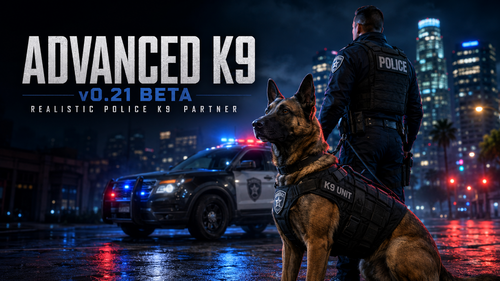
1 Screenshot

Most Complete K9 mod out there - more features to come.

Could contain: text, vehicle, land vehicle, person, dog

Edited by Mten Nekten
Added Additional Features

What's New in Version 0.22.1

Released

Pasted content

Features

  • Deploy/dismiss and follow/heel

  • Sit, lie down, pet, feed, physical rope leash with handler-follow movement, and dog-mounted camera

  • Persistent food and water care HUD, low-need warnings, separate feed/drink interactions and working-dog consumption

  • Kneeling handler petting interaction with a synchronized K9 response

  • Automatic operational leash release when search, tracking, fetch or apprehension is deployed

  • Pedestrian and full-perimeter vehicle odor searches; silent sit means clear, sit plus repeated bark means positive

  • Track a nearby suspect or missing person for up to two minutes

  • Non-lethal apprehension with automatic recall, a configurable health floor and hands-up surrender

  • Fetch minigame

  • Dedicated off-street K9 training ground with five persistent gated levels; every level must reach 100% before the next unlocks

  • Certification-specific OB, AGI, DET, TRK and APP courses with five scored exercises per level

  • Independent optional narcotics (NAR), explosives/bomb (BOMB), and weapons/firearm (WPN) detection specialties, each with its own 0–100 progress and five-station academy setup

  • Separate field and voice commands for narcotics, explosives and weapons searches; a dog may hold any combination or all specialty certifications

  • Weapon-aim target identification before apprehension, with officer rejection and automatic non-lethal recall

  • Push-to-talk voice recognition using OpenAI or Groq transcription; the microphone opens only while V is held

  • Persistent command and profile menus that remain open until explicitly closed

  • Runtime command registry shared by menu and voice recognition, with multiple natural verbal alternatives for every action

  • Movable, scalable compact/expanded K9 status HUD

  • Per-dog XP, certifications, health, injuries, stamina, trust and statistics

  • Optional runtime bridge to Policing Redefined/Common Data Framework search records

  • Persistent 0–100 handler trust with obedience, response-time, detection and deployment effects

  • Handler-safety interlock: friendly relationship group, attack prevention and automatic emergency recall

  • Persistent kennel profile for breed, coat variation, vest style/color and custom K9 name

  • Rear-door kennel staging and remote door-pop deployment from a stopped patrol vehicle

  • Heat, rain, fatigue, injury/limp, rest and veterinary-care simulation

  • Bagged scent articles with age, rain, distance and vehicle-travel degradation

  • Surrender, freeze, flee or fight suspect reactions plus whistle and silent hand-signal recall

  • Persistent duty equipment, patrol-vehicle restocking and CSV incident records in Plugins/LSPDFR/AdvancedK9/K9IncidentLog.csv

  • GPS K9-camera overlay with heading, handler distance, state and live condition telemetry

Changelog

Fixed issue with Dalmation Vest not showing
Remove Handler scene Trail
Fix Issue with Dog opening one door and going into the other.
Fix issue with vehicle set config kept resetting when dog re-enters vehicle

Added ability to track/ apprehend specific person rather then closes ped - point your taser or gun (works from range as well)

Added ability to pick up scent mark from vehicle to track suspect.

Made it so if your dog isnt trained in a certain specialty they wont be able to detect during search.

Changelog

0.22-beta

  • Replaces the one-Boolean Policing Redefined probe with automatic PolicingRedefined, StopThePed, and Standalone compatibility modes.

  • Detects PR, CommonDataFramework and STP versions at runtime without adding hard DLL dependencies; logs the selected integration mode, API member used, search source and fallback reason.

  • Prioritizes the active PR/STP traffic-stop vehicle and interaction pedestrian instead of accidentally selecting a nearby unrelated entity.

  • Reads compatible PR/CDF/STP record, inventory and search results through a guarded adapter and classifies narcotics, explosives and weapons separately.

  • Applies the deployed dog's certifications to integrated odor results and retains standalone fallback searches when an external API is absent or changes.

  • Shares positive/negative K9 indications, located suspects and apprehensions back to compatible public PR/STP writer APIs when exposed.

  • Recognizes PR/STP arrested, cuffed, handcuffed, surrendering, kneeling and transported states and blocks unsafe K9 contact.

  • Keeps tracking and apprehension independent of PR/STP stops: an aimed target up to 250 meters or assigned pursuit suspect remains valid without detention or close approach.

  • Adds automatic PR/STP pursuit-suspect recognition and assigns vehicle-bailout scent plus the recorded foot trail without initiating a stop.

  • Records non-officer pedestrian trail points for up to ten minutes and follows five-minute route segments instead of continuously steering toward the suspect's live coordinates.

  • Adds realistic scent-trail loss and an interactive Reacquire Trail command with a three-point casting pattern.

  • Adds a six-sector Building Search command; located subjects receive an alert bark and hold only, while clear structures finish silently.

  • Adds a separate tactical K9 Warning command with surrender, flee, freeze and fight outcomes. Surrendered suspects are protected from later bite deployment.

  • Removes randomized surrender/freeze delays from a valid aimed Apprehend command so deployment remains immediate after the handler makes the decision.

  • Adds K9DeploymentReports.csv with scent source, warning status, track distance/time, bite duration, suspect outcome, K9 injury and disposition.

  • Adds compatibility settings for mode selection, active-target use, result sharing and restrained-ped protection.

  • Updates the menu and voice registry with Search Building, Reacquire Trail and K9 Warning commands and their natural verbal alternatives.

  • Adds best-effort PR/STP arrest handoff plus perimeter, prisoner transport, EMS and bomb-squad service requests, with safe fallback instructions when a compatible public action is unavailable.


Changelog 0.22.1 Minor update.

  1. Automatic bathroom behavior; no verbal/menu command or relief HUD stats

  2. Quiet voice text and action notifications by default - can be toggled on thru menu

  3. Errors, warnings, and K9 detection/action results remain visible

  4. Corrected petting interaction without gardening tool

  5. Food/water bowl placed in front of the dog without handler bending

  6. Five HUD designs, icon sets, color themes, and text styles

  7. Individual HUD data toggles

    any issues or suggestions leave comments


Short Description

Most Advance K9 script for LSPDFR - Now compatible with Stop the Ped

AI disclosure

The author has disclosed that AI tools were used in creating the following aspects of this file:

  • Description
  • Images
  • Mod and Mod Content (Substantial)

Ai was used to bring my ideas to life. Not a coder.

User Feedback

Recommended Comments

Moee

Members

YOOO GOD IS GREAT i was literally just looking for a new sick k9 mod. broooo ty i got tired of the basic policing redefined one. pls keep updates coming!!

I have one question, "track a missing person or a suspect for up to two minutes" when can we actually do this? how does it know who to track is it for specified callouts that this mod can detect where it knows who the suspect is or? jus so i know how to utilize this feature properly.

nova2727

Members

I love you can use voice commands to tell the dog things like attack search etc

Mten Nekten

Members Author

44 minutes ago, Moee said:

YOOO GOD IS GREAT i was literally just looking for a new sick k9 mod. broooo ty i got tired of the basic policing redefined one. pls keep updates coming!!

I have one question, "track a missing person or a suspect for up to two minutes" when can we actually do this? how does it know who to track is it for specified callouts that this mod can detect where it knows who the suspect is or? jus so i know how to utilize this feature properly.

I just fix that in the updated i just posted waiting for approval. You now have to point your taser or gun at the ped or vehicle for it to began tracking

22 minutes ago, nova2727 said:

I love you can use voice commands to tell the dog things like attack search etc

You can use voice for everything. check out the read as it should list the voice commands

Moee

Members

just wanted to put an update incase people have second thoughts after reading it was made by AI. the mod is perfectly responsive, almost, if not, no delay at all between my voice command and the dog following the action i prompted it. the only thing i wish was the ui change. i feel it would be more immersive if text wasn't constantly popping up whenever i hold the talk button unless an error occurred or if it didn't hear my right / invalid command. if we can manually customize the Hud too of the dog where the hunger is and etc. through the in game menu it would be perfect to adjust everything accordingly. thank u again bro had sm fun.

Mten Nekten

Members Author

The hud can be move and resized. I will remove the text and notification to optional for user to be able to have them if they want or not. I put add these in next build

Thank you for the feedback.

beasy51

Members

I was super excited for this. The ini file for me is blank and there isn’t anything there.

Mten Nekten

Members Author

That would be on your side as i tested before uploading it. Please redownload or use a different browser

I also just downloaded the file and the ini file is populated with all the correct infomation

Mten Nekten

Members Author

@beasy51 see above. If you still cant get it let me know

GoD5p33d666

Members

Can not get the voice to work for me, keeps saying AI voice unavailable. iv added both groq and open ai, configured, over and over again, changing to only open ai and the model as well to test

Couldn't get it to workl in the last version and this, is there something im missing?

GoD5p33d666

Members

17 minutes ago, Mten Nekten said:

@GoD5p33d666 join my cord https://discord.gg/8VNb8wAv7 and send me your rph log

All good, i finally got it to work, groq wasn't working kept saying invalid api key, added a new one didn't work then another haha, the open ai one required coins to use so switched back to groq

then all of a sudden startyed working. finally!!!! did some training and now hes trusting me! now works brilliantly! my apologies

Mten Nekten

Members Author

7 minutes ago, GoD5p33d666 said:

All good, i finally got it to work, groq wasn't working kept saying invalid api key, added a new one didn't work then another haha, the open ai one required coins to use so switched back to groq

then all of a sudden startyed working. finally!!!! did some training and now hes trusting me! now works brilliantly! my apologies

@GoD5p33d666 glad to hear. hop you enjoy it

how do i deploy the K9 im new to lspdfr and i dont know much of the controls.

Create an account or sign in to comment

Account

Navigation

Search

Search

Configure browser push notifications

Chrome (Android)
  1. Tap the lock icon next to the address bar.
  2. Tap Permissions → Notifications.
  3. Adjust your preference.
Chrome (Desktop)
  1. Click the padlock icon in the address bar.
  2. Select Site settings.
  3. Find Notifications and adjust your preference.