Skip to content
View in the app

A better way to browse. Learn more.

LCPDFR.com

A full-screen app on your home screen with push notifications, badges and more.

To install this app on iOS and iPadOS
  1. Tap the Share icon in Safari
  2. Scroll the menu and tap Add to Home Screen.
  3. Tap Add in the top-right corner.
To install this app on Android
  1. Tap the 3-dot menu (⋮) in the top-right corner of the browser.
  2. Tap Add to Home screen or Install app.
  3. Confirm by tapping Install.
Due to overzealous filtering on Microsoft’s side, some emails to Outlook and Hotmail addresses may not be delivered. If you’re affected, please use a different email address or try again later.

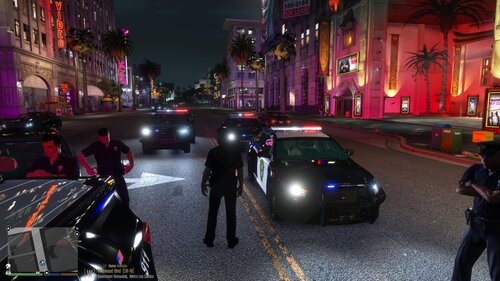
4 Screenshots

Tired of your police radio being nothing more than a keybind? Want an actual in-car control head and handheld radio that you can see, operate, and customize? Well, look no further!

APXRadio is an immersive, interactive radio-interface plugin. It adds fully functional in-car and handheld radio overlays with dynamic displays, clickable controls, animated knobs, status indicators, configurable layouts, and optional integration with other popular LSPDFR plugins.

Whether you prefer a traditional mobile radio mounted inside your patrol vehicle or a handheld unit while working on foot, APXRadio gives you multiple hardware styles to choose from.

For any questions, inquiries, suggestions, bug reports, etc. feel free to join my discord --> https://discord.gg/3fPrr9UQT8

Included Radio Models

In-Car Radios

  • APX 1500

  • APX 7500

Handheld Radios

  • APX 8000

  • APX NEXT

Each model has its own texture, control layout, screen design, animations, and configuration settings.

Requires

Optional

In order to achieve the full functionality of the radios, you must have

Edited by StankMan420

What's New in Version 3.5

Released

  • Updated (Hopefully) nexus dispatch compatibility


Short Description

This mod provides handheld and mobile radios

AI disclosure

The author has disclosed that AI tools were used in creating the following aspects of this file:

  • Images
  • Mod and Mod Content (Substantial)

AI was used to diagnose and fix any errors I got while coding this, it also generated the thumbnail and upscaled the screenshots. The overlays are entirely AI, author did not disclose this.

User Feedback

Recommended Comments

Ickthy

Members

No way he finally released it here after nearly 24 hours of it being publicly released on Discord omg 😭

StankMan420

Members Author

1 hour ago, Ickthy said:

No way he finally released it here after nearly 24 hours of it being publicly released on Discord omg 😭

LISTEN, I just decided to pull the trigger on it. Ain’t gonna gain traction sitting on my sever

leo111143

Members

bro it look good and it look lik fivem

Vondale13

Members

How do you switch between top and full view?

Fire Guy Gaming

Insiders

it does not seem to work with nexus and just keeps going away everytime i get in and of car

RougePOV

Members

10 hours ago, Ickthy said:

No way he finally released it here after nearly 24 hours of it being publicly released on Discord omg 😭

i was like thinking why it was not on lspdfr lmao

StankMan420

Members Author

8 hours ago, impliedstone said:

it does not seem to work with nexus and just keeps going away everytime i get in and of car

I can definitely look into the incompatibility with nexus, I thought I got that working but something must’ve broke it. And as for it disappearing when you’re in and out of the car, thats already on the list of things to fix as well

9 hours ago, Vondale13 said:

How do you switch between top and full view?

Hold the handheld radio keybind

9 hours ago, JoshTheGamer55 said:

Yessssss i even put in my department alpha tags from here https://www.radioreference.com/db/sid/2 is it possible to have it so when i change the channel we get channel announcement like the real Motorola radio and it can be synced to broadcastify calls for people who have a broadcastify calls account https://www.broadcastify.com/calls/tg/2/2403

like here

I can 100% look into this

Lepoisson

Members

Hello, I just wanted to point out that the assembly version of your plugin is: 1.0.0.0 instead of: 3.4.0.0

StankMan420

Members Author

13 hours ago, Lepoisson said:

Hello, I just wanted to point out that the assembly version of your plugin is: 1.0.0.0 instead of: 3.4.0.0

Interesting, Its supposed to be 3.4. I’ll change it again

Vause

Members

if you make it work with nexus dispatch, I'll download it immediately !

Great job tho, looks good !

StankMan420

Members Author

1 minute ago, CrownVicLover2000 said:

Can you make it work with BLR Blue Line Realism? since Grammar Police is not gonna be compatible with

On 7/31/2026 at 11:59 AM, Vause said:

if you make it work with nexus dispatch, I'll download it immediately !

Great job tho, looks good !

update is out that should fix nexus compatibility

xDuvii

Members

so everytime you press c to toggle the radio it opens the edit mode? same as the radio in-car.

StankMan420

Members Author

18 hours ago, xDuvii said:

so everytime you press c to toggle the radio it opens the edit mode? same as the radio in-car.

You can change the keybind in the .ini

5 hours ago, CrownVicLover2000 said:

Can Nexus Dispatch work with this?

yes

Gupj

Members

Every time i press the key to open the radio, edit mode opens what do i change inside the .ini to fix??

On 8/6/2026 at 11:50 PM, xDuvii said:

so everytime you press c to toggle the radio it opens the edit mode? same as the radio in-car.

what did you change so it doesnt keep happening???

xDuvii

Members

(edited)

9 hours ago, Gupj said:

Every time i press the key to open the radio, edit mode opens what do i change inside the .ini to fix??

what did you change so it doesnt keep happening???

Never said I fixed it

14 hours ago, StankMan420 said:

You can change the keybind in the .ini

yes

I think you didn’t understand what I said

Edited by xDuvii

StankMan420

Members Author

5 hours ago, xDuvii said:

Never said I fixed it

I think you didn’t understand what I said

idk what to tell you, the keybind for the edit mode and the keybind to pull up the radio should be different and can be changed in the .ini

if what you meant to ask was "Is the handheld radio keybind the same as the in-car radio keybind?" then the answer is no its not. and that can also be changed in the .ini

xDuvii

Members

4 minutes ago, StankMan420 said:

idk what to tell you, the keybind for the edit mode and the keybind to pull up the radio should be different and can be changed in the .ini

if what you meant to ask was "Is the handheld radio keybind the same as the in-car radio keybind?" then the answer is no its not. and that can also be changed in the .ini

so this is what i meant to say. When you press the keybind to open and close the radio-car/handheld radio the edit mode activates at the same time.

StankMan420

Members Author

2 minutes ago, xDuvii said:

so this is what i meant to say. When you press the keybind to open and close the radio-car/handheld radio the edit mode activates at the same time.

I'll look into it

amus

Members

I'm having problems with the cursor its not moving at all is there a fix for this.

StankMan420

Members Author

20 hours ago, amus said:

I'm having problems with the cursor its not moving at all is there a fix for this.

Join the discord and open a ticket, I can't really help with the information you've given

mrnoonei

Members

does it work white BLR?

Create an account or sign in to comment

Latest Mods

Account

Navigation

Search

Search

Configure browser push notifications

Chrome (Android)
  1. Tap the lock icon next to the address bar.
  2. Tap Permissions → Notifications.
  3. Adjust your preference.
Chrome (Desktop)
  1. Click the padlock icon in the address bar.
  2. Select Site settings.
  3. Find Notifications and adjust your preference.