Skip to content
View in the app

A better way to browse. Learn more.

LCPDFR.com

A full-screen app on your home screen with push notifications, badges and more.

To install this app on iOS and iPadOS
  1. Tap the Share icon in Safari
  2. Scroll the menu and tap Add to Home Screen.
  3. Tap Add in the top-right corner.
To install this app on Android
  1. Tap the 3-dot menu (⋮) in the top-right corner of the browser.
  2. Tap Add to Home screen or Install app.
  3. Confirm by tapping Install.

StankMan420

Members
  • Joined

  • Last visited

Files posted by StankMan420

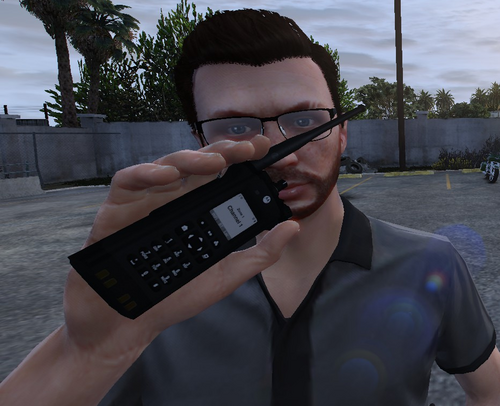
  1. Tired of it looking like you're on your phone when you use the radio? Wish it actually looked like you were holding your chest mic? Well look no further! Now you'll be able to bring that pesky radio straight up to your face and hold your mic like a normal person would!


    NOTICE:
    This WILL crash your game if you open the in-game cellphone and scroll, you can open and close it, but DO NOT SCROLL. I'm not sure how to fix this but if I can figure it out I will fix it as soon as possible. (Realistically speaking, who's using the cellphone in LSPDFR anyway?)


    REQUIRED PLUGIN:
    • 659 Downloads
    • 16 Comments
    Updated

Account

Navigation

Search

Search

Configure browser push notifications

Chrome (Android)
  1. Tap the lock icon next to the address bar.
  2. Tap Permissions → Notifications.
  3. Adjust your preference.
Chrome (Desktop)
  1. Click the padlock icon in the address bar.
  2. Select Site settings.
  3. Find Notifications and adjust your preference.