Skip to content
View in the app

A better way to browse. Learn more.

LCPDFR.com

A full-screen app on your home screen with push notifications, badges and more.

To install this app on iOS and iPadOS
  1. Tap the Share icon in Safari
  2. Scroll the menu and tap Add to Home Screen.
  3. Tap Add in the top-right corner.
To install this app on Android
  1. Tap the 3-dot menu (⋮) in the top-right corner of the browser.
  2. Tap Add to Home screen or Install app.
  3. Confirm by tapping Install.

1 Screenshot

Join the Discord support server for help and updates on future projects.

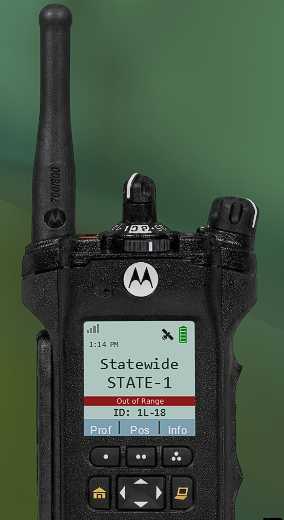
ApxRadio UI is a functional Apx-style radio UI for LSPDFR. It includes handheld and in-car radio skins for a clean visual display in dispatch plugins like GrammarPolice, NexusDispatch, etc. It CAN be used with any dispatch plugin.

more radio skins coming soon; join the server to leave suggestions 👀

v1.3.4

Features include:

  • Interactive handheld and in-car radio controls

  • Options for different radio types. 6 radio skins: three for handheld and three for the car

    • APX8000

    • APX7000

    • APX4000

    • E5 Control Head

    • O2 Control Head

    • Viking VM7000

  • Up to 16 customizable zones with 16 channels per zone

  • Resize, reposition, and save both radios independently

  • Wi-Fi Smart Connect, Bluetooth, and GPS controls

  • 3-4 pages of working menus that serve a purpose

  • Time-synchronized day and night displays

  • Animated signal, connection, and transmission indicators

  • Customizable callsign, keybinds, sounds, and voice prompts

  • Partial controller support

  • Extensive configuration through apxconfig.ini or the in-game menu.

radio_body_night.png

out-of-range photo example

Press "F8" to open the in-game configuration menu. Keybinds can optionally be changed in the INI.

ApxRadio is a visual and immersion-focused plugin and does not replace your existing dispatch plugin.

Tutorial & YouTube Preview

(The last video is a tutorial. The other one is an example of the radio in action!)

Check the Instructions.txt file for more information on setting this plugin up. After installation, you MUST match ApxRadio’s transmit keybind to the transmit keybind used by your primary dispatch plugin if you want the "transmitting" text to appear on your radio.

What's to Come for ApxRadioUI

Current Radio Skins

  • APX8000

  • APX7000

  • APX4000

  • E5 Control Head

  • O2 Control Head

  • Viking VM7000

Planned Additions

  • More Handheld Radios

    • XTS5000

    • APX 6000

    • APX 6000XE

  • More In-Car Radios

    • XL200M (maybe)

    • O9 Control Head

    • O7 Control Head

    • O2 Control Head (FD/EMS Version for the 6000XE)

    • O3 Control Head

  • Helicopter Radios

    • TDFM-7300

    • RT-7000

  • Boat Radios

  • Overhead Radio Perspectives

    • Only if I can find photos of it online; I found a couple so far.

  • Different sound effects for each radio

The list will be expanded as suggestions come in.

Requirements:

  1. GTA V Legacy

  2. RAGE Plugin Hook

  3. RAGENativeUI

  4. LSPDFR

Edited by OwenAb
added stuff in the desc

What's New in Version 1.3.4

Released

What's new in V1.3.4?

  • Options for different radio types. 4 new radio skins: two for handheld and two for the car.

    • APX8000

    • APX4000

    • E5 Control Head

    • Viking VM7000

  • Minor bug fixes.

I'll be adding LAPD's radio soon, as I'm sure most people who play LSPDFR larp that department. If you have suggestions for new radios, feel free to send them in the comments or private messages.


Short Description

Fully functional Motorola APX-style handheld and in-car radio UIs, compatible with any dispatch plugin.

AI disclosure

The author has disclosed that AI tools were used in creating the following aspects of this file:

  • Mod and Mod Content (Moderate)

Fixing broken code/debugging.

User Feedback

Recommended Comments

OwenAb

Members Author

1 hour ago, nellyb said:

Great mod and easy to use! I had to uninstall because the controller support though sadly.

I'll put a rush on the next update and get that fix in. I appreciate the nice words.

DionyDeveloper

Members

(edited)

In this new version were not able to disable the controller funsion that move the curso ... as previous vesion.... i am tried to put none in controller keys, but not works this still open up the curso while we press DPadUp to get out or enter a police vehicles.. that mod is so great - but in my end i prefer to open up the curso only with keyboard and not having an conflict with my enter/ or out the vehicle ... can we have that back please ?

Edited by Troll96

OwenAb

Members Author

On 9/7/2026 at 7:41 PM, Troll96 said:

In this new version were not able to disable the controller funsion that move the curso ... as previous vesion.... i am tried to put none in controller keys, but not works this still open up the curso while we press DPadUp to get out or enter a police vehicles.. that mod is so great - but in my end i prefer to open up the curso only with keyboard and not having an conflict with my enter/ or out the vehicle ... can we have that back please ?

Tomorrow I'll be putting out the newest version. It includes all the fixes, plus some extra QoL features I added. It's midnight for me now, so it'll be about 15 hours from now.

DionyDeveloper

Members

9 hours ago, OwenAb said:

Tomorrow I'll be putting out the newest version. It includes all the fixes, plus some extra QoL features I added. It's midnight for me now, so it'll be about 15 hours from now.

Thanks man, love it mod' keep up the great job...

mrnoonei

Members

does it work white dlr

On 7/22/2026 at 7:37 AM, nova2727 said:

You need to disable the lspdfr radio in settings scroll down until you see radio where it says c change to None

in the game or plugin setting or lspdfr settings

DEJFNEBR

Members

can you use it to call backup or set status with keyboard? i cant use my voice since i havent got a mic but i know that grammar police works well on setting status

Owen1422

Members

I feel the handheld radio could be made more realistic by adjusting the font style and proportions. By the way, could you make a model of the APX2000? I really like this project.

Enrico Meyer

Members

can you make AIDispatch 1.1 (For Policing Redefined) kompatible ?

Create an account or sign in to comment

Account

Navigation

Search

Search

Configure browser push notifications

Chrome (Android)
  1. Tap the lock icon next to the address bar.
  2. Tap Permissions → Notifications.
  3. Adjust your preference.
Chrome (Desktop)
  1. Click the padlock icon in the address bar.
  2. Select Site settings.
  3. Find Notifications and adjust your preference.