Skip to content
View in the app

A better way to browse. Learn more.

LCPDFR.com

A full-screen app on your home screen with push notifications, badges and more.

To install this app on iOS and iPadOS
  1. Tap the Share icon in Safari
  2. Scroll the menu and tap Add to Home Screen.
  3. Tap Add in the top-right corner.
To install this app on Android
  1. Tap the 3-dot menu (⋮) in the top-right corner of the browser.
  2. Tap Add to Home screen or Install app.
  3. Confirm by tapping Install.
Due to overzealous filtering on Microsoft’s side, some emails to Outlook and Hotmail addresses may not be delivered. If you’re affected, please use a different email address or try again later.

4 Screenshots

ApxRadio is a functional Motorola APX7000 style radio UI for LSPDFR. It includes a handheld and in-car radio for a nice visual display for dispatch plugins like, GrammarPolice, NexusDispatch, etc. It CAN be used with any dispatch plugin.

v1.3.1

Features include:

  • Interactive handheld and in-car radio controls

  • Up to 16 customizable zones with 16 channels per zone

  • Resize, reposition, and save both radios independently

  • Wi-Fi Smart Connect, Bluetooth, and GPS controls

  • GPS-based Nearest Location display

  • Zone, channel, clock, profile, information, and TMS menus

  • Time synchronized day and night displays

  • Animated signal, connection, and transmission indicators

  • Tunnel signal loss and water radio failure

  • Customizable callsign, keybinds, sounds, and voice prompts

  • Partial controller support

  • Extensive configuration through apxconfig.ini
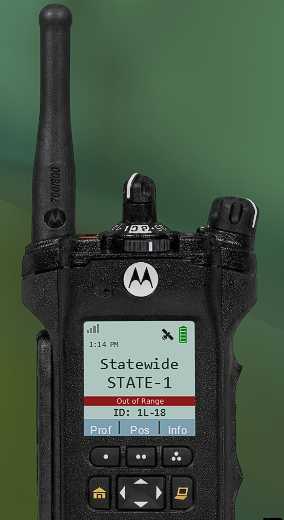
radio_body_night.png

out of range photo example

Press "Left Shift" and "=", then left click to drag the radios and move them. Scroll to increase or decrease their size.

ApxRadio is a visual and immersion focused plugin and does not replace your existing dispatch plugin.

Video Demo & YouTube Previews

(Last video is a demo. Other two are examples of the radio in action!)

Check the Instructions.txt file for more information on setting this plugin up. After installation, you MUST match ApxRadio’s transmit keybind to the transmit keybind used by your primary dispatch plugin if you want the "transmitting" text to appear on your radio.

Requirements:

  1. GTA V Legacy

  2. RAGE Plugin Hook

  3. LSPDFR

I tried to make it as "spec" as possible, I do intend on giving the in-car radio have better realism as right now it's just partial. Though if anyone has suggestions to improving please leave them in comments.

You may have noticed that I updated the plugin twice in one night. This second update includes a fix for the in-car radio bug affecting a small number of people. If the issue continues, you may be using an outdated version of LSPDFR or RagePluginHook and will need to update to the latest version.

Edited by OwenAb
v1.3.1 update

What's New in Version 1.3.1

Released

If you noticed that I updated the plugin twice in one night, this second update includes a fix for the in-car radio bug affecting a small number of people. If the issue continues, you may just be using an outdated version of LSPDFR or RagePluginHook and will need to update it to the newest version.

What's new in V1.3.1?

  • Overhauled audio and the ability to disable startup sound.

  • The minimum size for the in-car radio has been lowered slightly further. (75% to 55%)

  • Partial controller support added. (keybinds may need to be changed to something better I'm not to familiar with controllers)

  • The home button no longer resets to the primary channel when clicked, it's other functions still work. Only when it's now held for 2 seconds, will it return to Zone 1 Channel 1.

  • Added a 'Profiles' menu on the handheld radio allowing switching between day & night mode.

  • A new 'Position' button. Tells the players last known location. Requires the 2nd page gps/location toggle to be on for this to work.

  • Activiating Wifi allows for the Smart Connect feature to be activated, giving stronger connection and less dips in the signal.

  • Going into tunnels/certain covered areas will lead to the radio going Out of Range, and going into water will shut off the radio.

  • Plugin now labeled as recommended for newer versions. Most people having issues had older versions.

  • Patched the night time in-car radio and cursor bugs.


Short Description

A fully functional Motorola APX-style handheld and in-car radio UI compatible with any dispatch plugin.

AI disclosure

The author has disclosed that AI tools were used in creating the following aspects of this file:

  • Mod and Mod Content (Moderate)

Fixing broken code/debugging.

User Feedback

Recommended Comments

RiccRacc

Members

On 7/22/2026 at 11:47 PM, OwenAb said:

There is. You can add up to 16.

Maybe. I haven’t really thought about it yet, but for now my goal is improving this one. If it continues to do well, I’ll look into making different skins.

instructions on how to do this please?

OwenAb

Members Author

15 minutes ago, RiccRacc said:

instructions on how to do this please?

If you have the newest version, the config for it is inside apxconfig.ini towards the bottom.

; ADDING MORE CHANNELS:
; 1. Set ChannelCount to the total number you want. Minimum: 3. Maximum: 16.
; 2. Copy and paste the channel template below for every additional channel.
; 3. Increase the section number by 1 each time: [Channel4], [Channel5], etc.
; 4. Replace the example top and bottom text with your own names.

Lepoisson

Members

Hello, I just wanted to point out that the assembly version of your plugin is: 0.0.0.0 instead of: 1.2.0.0

RiccRacc

Members

14 hours ago, OwenAb said:

If you have the newest version, the config for it is inside apxconfig.ini towards the bottom.

; ADDING MORE CHANNELS:
; 1. Set ChannelCount to the total number you want. Minimum: 3. Maximum: 16.
; 2. Copy and paste the channel template below for every additional channel.
; 3. Increase the section number by 1 each time: [Channel4], [Channel5], etc.
; 4. Replace the example top and bottom text with your own names.

ah I didnt have the latest version thats why, thanks alot

BarnoldBarns

Members

Hi, I can't seem to move the radio UI. When I press F9, the cursor appears, but it seems to be locked in the center of the screen, so I can't move it or drag the radio.

Is there a way to fix this, or did I do something wrong during the installation process? Thanks!

OwenAb

Members Author

(edited)

1 hour ago, BarnoldBarns said:

Hi, I can't seem to move the radio UI. When I press F9, the cursor appears, but it seems to be locked in the center of the screen, so I can't move it or drag the radio.

Is there a way to fix this, or did I do something wrong during the installation process? Thanks!

The instructions.txt explains how to do it, but it's Left Shift and =. F9 only unlocks the mouse to click the buttons. If your still having issues feel free to dm me my acc is on my profile.

7 hours ago, dupa4598340958304958304958 said:

is it possible to make this compatibile with sonoran radio?

Isn't that for FiveM? This is a singleplayer plugin, though it's compatible with everything since it's just a UI display.

Edited by OwenAb

BarnoldBarns

Members

(edited)

Ill send you a DM

Edited by BarnoldBarns

Astro18

Members

I think a good thing to do is change it from a RPH plugin to a LSPDFR plugin, so it loads up when you go on duty and not when you load up RPH.

nova2727

Members

Roleplay to the next level

BRADPlays

Members

Really enjoying this plugin — it adds a nice visual touch while I play. Even though it doesn’t usually interact with other plugins, it’s still a great addition for the atmosphere. Big thanks to @OwenAb for creating it.

JoshTheGamer55

Members

Could you make a display for the apx next xe

CJ Tampir

Members

Is it possible to add controller keybinding please

kalakos

Members

ive got an issue, when i press my button to unlock the mouse, when i click my mouse it will start punching, and for the scroll wheel it will switch weapons. am i doing something wrong?

OwenAb

Members Author

On 7/27/2026 at 12:29 PM, CJ Tampir said:

Is it possible to add controller keybinding please

Yes I will implement this next update.

4 hours ago, kalakos said:

ive got an issue, when i press my button to unlock the mouse, when i click my mouse it will start punching, and for the scroll wheel it will switch weapons. am i doing something wrong?

Make sure you have Raw Input on, settings > keyboard/Mouse > Mouse Input Method > Raw Input

If that doesn’t fix the issue, you’ll need to change the plugin’s keybinds so they don’t conflict with your game controls.

D.png

how do you make vehicle_radio_body_night.png show at night, the template disappears at night only text shows. im on the new version

GTA5 2026-07-29 10-25-35_704.png

kalakos

Members

4 hours ago, OwenAb said:

Yes I will implement this next update.

Make sure you have Raw Input on, settings > keyboard/Mouse > Mouse Input Method > Raw Input

If that doesn’t fix the issue, you’ll need to change the plugin’s keybinds so they don’t conflict with your game controls.

Yeah, I've tried that out but it still doesnt make a difference, ive put my unlock cursor to OemQuestion since the default keybind would open an other menu, could that be the issue? but I cannot move when I press OemQuestion but the mouse still works. I also have Windowed Borderless if that could be the issue

OwenAb

Members Author

18 minutes ago, kalakos said:

Yeah, I've tried that out but it still doesnt make a difference, ive put my unlock cursor to OemQuestion since the default keybind would open an other menu, could that be the issue? but I cannot move when I press OemQuestion but the mouse still works. I also have Windowed Borderless if that could be the issue

If you want to shoot me a dm my user is on my profile I'll help you troubleshoot. Same with you @Joshua2Shmood808 .

kalakos

Members

43 minutes ago, OwenAb said:

If you want to shoot me a dm my user is on my profile I'll help you troubleshoot. Same with you @Joshua2Shmood808 .

I've sent you a friend request, my user is kal_akos

bigroy36

Insiders

On 7/29/2026 at 4:43 PM, Joshua2Shmood808 said:

D.png

how do you make vehicle_radio_body_night.png show at night, the template disappears at night only text shows. im on the new version

GTA5 2026-07-29 10-25-35_704.png

I have this same issue. How do I fix this? Sucks I have to keep unloading and loading my mods and plugins all the time.

BDillman

Members

What am I doing wrong when I add a 10th channel to a zone? I do it just like the other channels and put - channel10 and out wha I want the band of that channel to be but when I load the game it still says Channel 10. The channels before and after that are all right, it’s just that channel that I can’t get to put the name

OwenAb

Members Author

21 hours ago, bigroy36 said:

I have this same issue. How do I fix this? Sucks I have to keep unloading and loading my mods and plugins all the time.

Sorry you guys are having this issue, I'm hoping this next update will fix it. First time I'm seeing this bug.

18 hours ago, BDillman said:

What am I doing wrong when I add a 10th channel to a zone? I do it just like the other channels and put - channel10 and out wha I want the band of that channel to be but when I load the game it still says Channel 10. The channels before and after that are all right, it’s just that channel that I can’t get to put the name

image.png

I'm not 100% sure what you mean, here is an example of what having multiple channels should look like under a zone, except it would be up to 10 in your case. If your config looks exactly like this but you have problems dm me I'll try to help you out better.

BDillman

Members

5 hours ago, OwenAb said:

Sorry you guys are having this issue, I'm hoping this next update will fix it. First time I'm seeing this bug.

image.png

I'm not 100% sure what you mean, here is an example of what having multiple channels should look like under a zone, except it would be up to 10 in your case. If your config looks exactly like this but you have problems dm me I'll try to help you out better.

In one of my zones I have 11 channels assigned so I have it formatted like you show above with channel1-channel11 but channel10 does show the name I assigned to that channel on the radio in game. It just says Channel 10 on the radio but channels 1-9 and channel 11 all have the actual names I gave those channels on the radio in game.

Create an account or sign in to comment

Account

Navigation

Search

Search

Configure browser push notifications

Chrome (Android)
  1. Tap the lock icon next to the address bar.
  2. Tap Permissions → Notifications.
  3. Adjust your preference.
Chrome (Desktop)
  1. Click the padlock icon in the address bar.
  2. Select Site settings.
  3. Find Notifications and adjust your preference.