


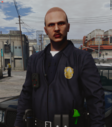


4x Code 4 Pose Pack
Add more variety and realism to your police roleplay with this pack of 4 Code 4 poses.
The poses are designed for police roleplay and are suitable for LSPDFR, FiveM, screenshots, patrol scenes, and videos.
Features
4 unique Code 4 poses
Realistic and natural positioning
Suitable for patrols, screenshots and videos
Designed for police roleplay
Easy to use
Credits
The belt and holster models used in these poses are created by CrunchyCat.
Belt & Holster: CrunchyCat
Pack Release: https://www.lcpdfr.com/downloads/gta5mods/character/51021-generic-patrol-belt-for-mp-character/
Full credit for the original belt and holster models goes to CrunchyCat.
Discord
For updates, future releases, support, or general questions, feel free to join my Discord:
Discord: https://discord.gg/ffzwaTWdm3
Thank you for checking out the pack. I hope you enjoy using these poses in your patrols and roleplay scenes.
Short Description
AI disclosure
The author has disclosed that AI tools were used in creating the following aspects of this file:
- Description

![[NON ELS / FiveM Ready / ULC] B/B 2022 Mach E GT Unmarked](http://s3-screenshots.int-cdn.lcpdfrusercontent.com/resize/500/-/monthly_2026_07/macgtfront(1).thumb.png.44ac47c4b79f0cf7415120a01dda413c.png)









.thumb.png.8cef6bf40847c87cdc7f2b84d14bb45d.png)
Recommended Comments
Create an account or sign in to comment