Skip to content
View in the app

A better way to browse. Learn more.

LCPDFR.com

A full-screen app on your home screen with push notifications, badges and more.

To install this app on iOS and iPadOS
  1. Tap the Share icon in Safari
  2. Scroll the menu and tap Add to Home Screen.
  3. Tap Add in the top-right corner.
To install this app on Android
  1. Tap the 3-dot menu (⋮) in the top-right corner of the browser.
  2. Tap Add to Home screen or Install app.
  3. Confirm by tapping Install.
Due to overzealous filtering on Microsoft’s side, some emails to Outlook and Hotmail addresses may not be delivered. If you’re affected, please use a different email address or try again later.

[FiveM Ready] Ko's Tactical Weapon Reanimations 1.2.0

(1 review)

20 Screenshots

Timeline1-ezgif.com-crop.gif.d88730ae7963b9f135b51fa646544815.gif

Original mod author Mr.KobraX Special thanks to him for letting me share the converted version.
This pack allows you to select animation styles within categories between normal movement, stealth movement & cover.

The previews are included inside each category to help you choose.
Timeline3-ezgif.com-optimize(4).gif.b1fdaae68c27d2d554a374d9abf0d90d.gif

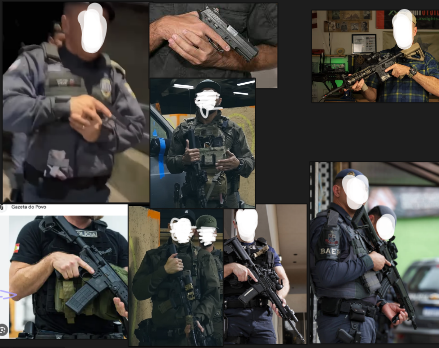
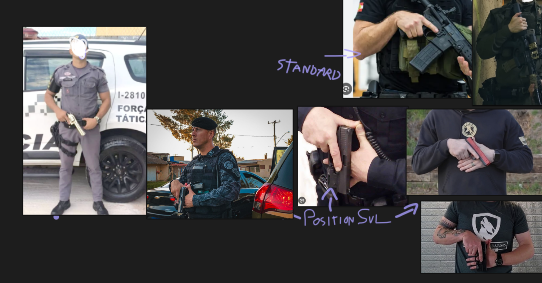
Making Off/Reference | This section taken by original mod page.
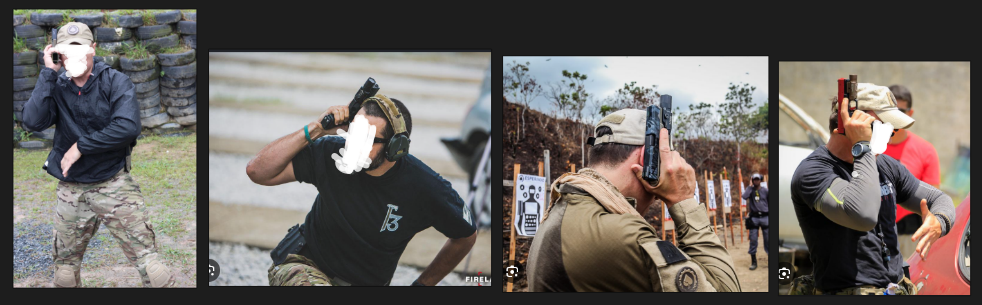
image.png.365f91b079c3eb199a850a7230da691a.pngimage.png.67c0f8907c191d5f25c715d72a937bdd.pngimage.png.e06d845f124de1e86b799a3886c0de13.png


- New Update 1.2.0 Preview:
image(6).png.3516ebe305a1f1f81a436ff3797e733c.png

Suggestion By "NsLziin"
(This section taken by original mod page)

Edited by T0NIC

What's New in Version 1.2.0

Released

  • New Animations

Pistol M (Compressed Low Ready)

Pistol M (Compressed Low Ready + 1 Hand Run)

Rifle M (Relaxed Cradle)

Rifle M (Relaxed Cradle + High Port Sprint)

Rifle M (Relaxed Cradle + Sling Sprint)


Short Description

With this mod, you'll be able to change your weapon handling visually and can be more tacticool!

User Feedback

Recommended Comments

T0NIC

Members Author

10 minutes ago, StinkyShadow said:

Hope it's possible to make a tutorial for this.

It's pretty basic; right click to your FiveM desktop shortcut -> go to the file location -> open your FiveM Application Data -> open your mods folder & put the files you want to use.

Crunching

Members

Cover animations don't seem to work, at least with add-on guns

JakeKindaSus

Members

7 hours ago, Crunching said:

Cover animations don't seem to work, at least with add-on guns

because addon weapon metas need to be edited

Crunching

Members

1 minute ago, JakeKindaSus said:

because addon weapon metas need to be edited

Do you happen to know what would need to be changed?

T0NIC

Members Author

2 hours ago, Crunching said:

Do you happen to know what would need to be changed?

Mod's devs should've make a addon meta for those mods just like they did for ThinLine's DDM4V7.

HabibiMan

Members

(edited)

Idk why but it seems that the stealth animations don't work. Nvm it works

Edited by HabibiMan

BJ USA

Members

Idea looks good

IServeTheBase

Members

(edited)

👍

Edited by IServeTheBase

Thuman

Members

Is there a way to covert this serversided?

armyenforcement

Members

Do you have the TLS DDM4 compatibility with this?

JakeKindaSus

Members

On 7/24/2026 at 6:21 PM, Thuman said:

Is there a way to covert this serversided?

someone will probably make it serversided but they would need to make a script since not everyone would want to use the same weapon animations

Sir Josh

Members

Is it possible to update this as the main mod has new animations?

T0NIC

Members Author

(edited)

On 7/30/2026 at 6:41 PM, Sir Josh said:

Is it possible to update this as the main mod has new animations?

I quit playing FiveM & GTA V for a while because I got bored from them, plus I was away from PC like a week and will be for 5-6 days more. When I came back home, I'll think about uploading update but CANNOT give you a firm word about it.

Edited by T0NIC

ToiletV1

Members

Is there anyway to have the KWTR_Pistol_M_LowReady for running with pistol and while normal walking and standing KWTR_Pistol_M_Chest Ready With 2 Hand


??

T0NIC

Members Author

On 8/6/2026 at 10:40 PM, ToiletV1 said:

Is there anyway to have the KWTR_Pistol_M_LowReady for running with pistol and while normal walking and standing KWTR_Pistol_M_Chest Ready With 2 Hand


??

Please ask it directly to the original author's mod page, I can't be helpful about that.

armyenforcement

Members

Is there a way to make the ddm4 compatibility FiveM ready

Nomadical

Members

Female based anims for the rifle do not currently work regardless of choice.

Humour

Members

female idle rifle dont seem to work.

T0NIC

Members Author

18 hours ago, Nomadical said:

Female based anims for the rifle do not currently work regardless of choice.

Sorry to hear but seems like can't be helpful with that kind of issue. I'm not an deep-in modding expert & I just do basic converts from files such as .oiv's and able to do sound packs.

3 hours ago, Humour said:

female idle rifle dont seem to work.

Hey, so I'll basically re-send an message I just send to other guy who asked same:

"Sorry to hear but seems like can't be helpful with that kind of issue. I'm not an deep-in modding expert & I just do basic converts from files such as .oiv's and able to do sound packs."

T0NIC

Members Author

On 8/15/2026 at 10:35 PM, armyenforcement said:

Is there a way to make the ddm4 compatibility FiveM ready

Sadly no, it's an add-on file modification for TLS's DDM4 mod's meta file. It most likely useful for server-side as far as I know.

Sean Duryee

Members

Can you convert the 1.2.0 version for SP to a FiveM version?

T0NIC

Members Author

39 minutes ago, Sean Duryee said:

Can you convert the 1.2.0 version for SP to a FiveM version?

I'll take a look at it.

Sean Duryee

Members

6 minutes ago, T0NIC said:

I'll take a look at it.

thanks

T0NIC

Members Author

43 minutes ago, Sean Duryee said:

thanks

Done, have fun

Create an account or sign in to comment

Account

Navigation

Search

Search

Configure browser push notifications

Chrome (Android)
  1. Tap the lock icon next to the address bar.
  2. Tap Permissions → Notifications.
  3. Adjust your preference.
Chrome (Desktop)
  1. Click the padlock icon in the address bar.
  2. Select Site settings.
  3. Find Notifications and adjust your preference.