Skip to content
View in the app

A better way to browse. Learn more.

LCPDFR.com

A full-screen app on your home screen with push notifications, badges and more.

To install this app on iOS and iPadOS
  1. Tap the Share icon in Safari
  2. Scroll the menu and tap Add to Home Screen.
  3. Tap Add in the top-right corner.
To install this app on Android
  1. Tap the 3-dot menu (⋮) in the top-right corner of the browser.
  2. Tap Add to Home screen or Install app.
  3. Confirm by tapping Install.

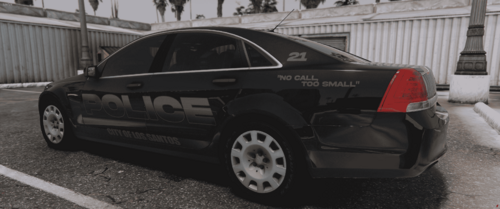
2013 Explorer LCPD Texture

(5 reviews)

4 Screenshots

Just made it, I only have made a few of them. Feel free to give me tips and all, remember that I am a beginner with this.

User Feedback

Recommended Comments

Jetski343

Members

Good job, the only tip I have is to be more creative with the "POLICE" lettering, I would spread the "POLICE" logo out among most of the vehicle.

Kode103

Members

I agree with Jetski, just add more design to the Police lettering, I do like that line you used for it, not bad

XxExoticCopxX

Members Author

I will take the advice. Thanks a bunch for the input.

Create an account or sign in to comment

Latest Mods

Account

Navigation

Search

Search

Configure browser push notifications

Chrome (Android)
  1. Tap the lock icon next to the address bar.
  2. Tap Permissions → Notifications.
  3. Adjust your preference.
Chrome (Desktop)
  1. Click the padlock icon in the address bar.
  2. Select Site settings.
  3. Find Notifications and adjust your preference.