
Skip to content
View in the app

A better way to browse. Learn more.

LCPDFR.com

A full-screen app on your home screen with push notifications, badges and more.

To install this app on iOS and iPadOS
  1. Tap the Share icon in Safari
  2. Scroll the menu and tap Add to Home Screen.
  3. Tap Add in the top-right corner.
To install this app on Android
  1. Tap the 3-dot menu (⋮) in the top-right corner of the browser.
  2. Tap Add to Home screen or Install app.
  3. Confirm by tapping Install.

Dynamic Lighting System 2.0.0.2

(20 reviews)

5 Screenshots

Dynamic Lighting System v2.0.0
 

Discord Server for pre-release versions, bug reporting, and other ways to talk with people interested in DLS!
GitHub Repository for access to DLS's source code.
Youtube Playlist to check some stuff that was done with DLS.
 

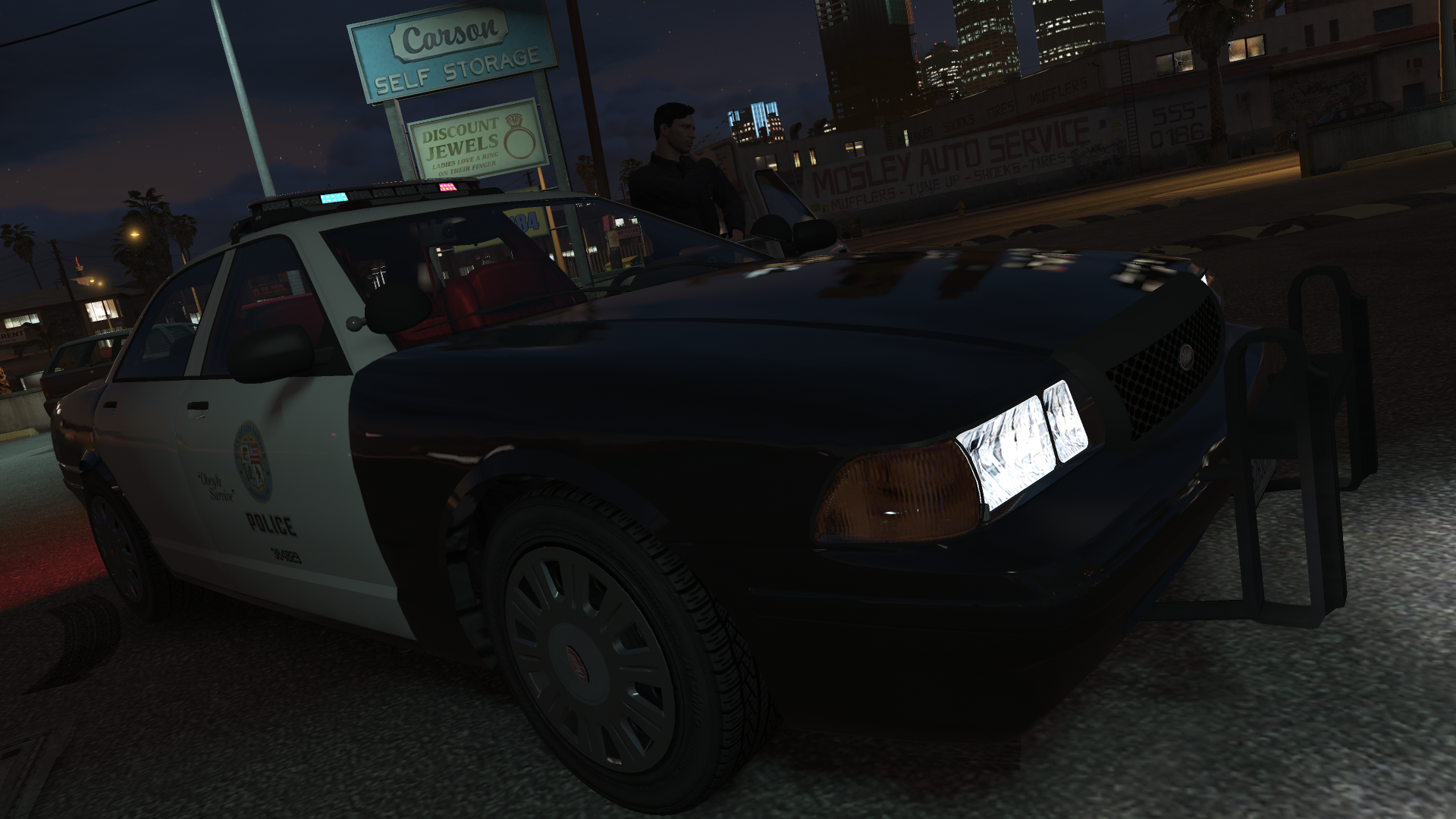
Welcome to Dynamic Lighting System, a full-fledged light control system that allows for in-depth control of the vehicle's lighting system.
 

REQUIREMENTS


OVERVIEW OF FEATURES

  • Multiple custom stages for non-ELS vehicles without taking up the vehicle's extras;
  • Fully setup and customizable siren control with configurable and add-on sirens;
  • Ability to create numerous additional features like SCAN, Blackout, Steady Burn...;
  • Easy to set up for new vehicles (without changes to the model itself or the default .meta files);
  • A lot more...


DO YOU HAVE PROBLEMS WITH DLS?

  • Read all documentation included with DLS and verify any custom XMLs you made to make sure you haven't made a mistake while editing/creating configurations.
  • If still giving errors, post it there or on my Discord Server or as an issue on the GitHub repository.

    
DLS IS OPEN-SOURCE!

  • DLS is and will always be an open-source project and nothing around it will be behind a paywall.
  • If you're someone with C# experience or programming experience in general and feel like contributing to DLS the help would be surely appreciated.

    
IMPORTANT INFORMATION

  • DLS is not compatible with ELS as of release and there are no plans to support them.
  • All vehicle configuration is set up in an external .xml file and allows for vehicle developers to still share the vehicle as functional non-ELS vehicles with all regular features.
  • DLS is still in active development and future features are already planned.
  • Do not post questions as Reviews as I'll not be able to answer it properly that way.

    
CREDITS

  • @PNWParksFan, w.. [w/#7263] and @Lieutenant Dan for helping immensely in the development process.
  • @cp702 for developing the amazing SirenSetting Limit Adjuster which will enable plenty of different carcols for numerous vehicles in GTA V.
  • AlexanderLB for designing a siren controller that inspired the one used in DLS.

Edited by TheMaybeast

What's New in Version 2.0.0.2

Released

Fixed various compatibility issues from the December 2024 GTA V update

For more information, check the included documentation.

THIS VERSION IS INCOMPATIBLE WITH DLSv1 CONFIGS


Short Description

Fully fledged light and siren control for non-ELS vehicles.

User Feedback

Recommended Comments

Bamxaniel2

Members

Hey, so I have specific sirens for certain vehicles, for example, the older, retro sounding sirens for the old LSPD Stanier and Alamo, while there are more modern sirens for the LSPD vehicles with newer, LED style light bars. The AI who utilize the older LSPD vehicles use the siren that I put on my lore Ambulance, and all of the add on lore friendly vehicles I use have the police yelp, instead of the yelp I want the vehicles to use. I was wondering if this is has to do with with the Audio/Config/REL file, or if this is something that I need to change in DLS itself. I really would like to hear the AI in my game use the Ambulance yelp I intended it to have, as well as have my older LSPD vehicles use the siren I created for them. Thank you!

FelixAB1988

Members

(edited)

I encountered a little issue regarding the UI:

Above the indicators for TA state (left, div, right, warn), there are 3, 4, 5 or 6 small bars. Checking the "Templates" folder I noticed there are two versions of any file, e.g. "4_l_off.png" and "4_l_on.png", "4_cl_off.png" and "4_cl_on.png" and so on. The off-files show a small grey bar while the on-files show a small yellow bar.


It seems to me the bars in the UI should flash as well in the rhyth of the TA ... but they don't. The TA indicators are working properly.

How can I get the small bars to work?


The above mentioned png-files aren't covered in the "UI-HOWTO.txt" or any other of the help files in "DOCUMENTATION".


EDIT: Currently I'm only testing with vanilla models and the included POLICE.xml

Edited by FelixAB1988

izmirli3d

Members

Is alley lights and scene lights working?

Capta1n0bv1ous

Members

IDK why but whenever I honk the horn or use the warning siren my game just starts to lag.

Berkuk

Members

(edited)

I cannot mute the siren sound in any light stages even with the DLS configured vehicles (tested with 11John11's and Lt.Caine EMS packs).

The vanilla horn key also doesnt not work with DLS configured vehicles I guess? I can only use the DLS's key for the horn.

I hope I can find some solutions to these issues (well, the 2nd is pretty easy on my end), so I can replace the ELS with this.


Edit: About the siren issue; the mod actually doesnt put the siren in every stage. When I change the siren mode with D1-D5, the mod runs its own siren on top of the already running siren which I don't know if another mod or game cauising it.


Edit2: Turns out I need to run the DLS after the LSPDFR in-game with the RPH's F4 console. So, do not load the DLS on start-up for anyone having the same issue.

Edited by Berkuk

CobaltZxHans

Members

How do I use the UI on DLS? It says to press Z and when I do that, nothing shows up. Also, how do I check my DLS button maps from keyboard to my controller?

JAMESHU

Members

When I get off the bus after turning on all the warning lights, some of the warning lights don't work. Can it be solved?

CobaltZxHans

Members

Is there a way to remove controller mapping for DLS? It's interfering with my ability to handle calls and I don't see anything that tells me how to disable it for controller, but keep it on keyboard

Officer Ash

Members

(edited)

i need help, so my game crashes at the third stage of DLS for some reason for instance, i press "J" two times and at the third time it crashes, even after i changed the toggle siren key in the keys.ini file to none and loading LSPDFR before DLS. any fix?


is it maybe because DLS doesn't support the car?

Edited by Officer Ash

Officer Ash

Members

1 hour ago, Officer Ash said:

i need help, so my game crashes at the third stage of DLS for some reason for instance, i press "J" two times and at the third time it crashes, even after i changed the toggle siren key in the keys.ini file to none and loading LSPDFR before DLS. any fix?


is it maybe because DLS doesn't support the car?

just realized siren limit adjuster was causing the issue not DLS... any fix?

Michael21107

Members

what are some advantages of ELS compared to DLS?

FelixAB1988

Members

On 8/3/2023 at 9:37 PM, Michael21107 said:

what are some advantages of ELS compared to DLS?

Shouldn't your question be the other way round? 😉


ELS: only available with specific cars (ELS enabled), probably allows more in-depth options for lightings, complicated mechanic

DLS: available for any car (including vanilla), simple and nice options for lights and sirens, "medium hard" to learn (if you're in the slightest bit into coding: easy)


It's up to you. Both of them have their pro's and con's.

Michael21107

Members

5 minutes ago, FelixAB1988 said:

Shouldn't your question be the other way round?

I dont think so


7 minutes ago, FelixAB1988 said:

ELS: only available with specific cars (ELS enabled), probably allows more in-depth options for lightings, complicated mechanic

I'm not sure about more in-depth options

249Xeno

Members

I like the DLS...


My question is.. how can I use a controller to use the lightbars instead of using the keyboard? I like to control my lightbar through my control for easy access when pursuit or traffic stops. 

Kare Suzuka

Members

On 7/31/2023 at 3:40 AM, Officer Ash said:

just realized siren limit adjuster was causing the issue not DLS... any fix?

Don't use Windows Compatibility mode

TheMaybeast

Members Author

DLSv2 is in active development.
 

With the new update, we are focusing on making Dynamic Lighting System truly dynamic. We have gone away with the hard-coded concept of light stages and predefined features, allowing vehicle developers and enthusiasts to freely develop a vehicle's feature set within DLSv2, while also making their setup easier.
 

One of the major features in DLSv2 is the use of triggers that can activate specific lighting modes automatically, with a negligible performance penalty. As a quick tease, here's a sample for @PNWParksFan's automatic TA using DLSv2's Road Position trigger.
 

Keep in mind DLSv2 is still under heavy development and a lot may still change between now and the release. No ETAs as of now, it will be done when its done.


bruma

Members

(edited)

On 4/6/2023 at 9:35 PM, Bamxaniel2 said:

Hey, so I have specific sirens for certain vehicles, for example, the older, retro sounding sirens for the old LSPD Stanier and Alamo, while there are more modern sirens for the LSPD vehicles with newer, LED style light bars. The AI who utilize the older LSPD vehicles use the siren that I put on my lore Ambulance, and all of the add on lore friendly vehicles I use have the police yelp, instead of the yelp I want the vehicles to use. I was wondering if this is has to do with with the Audio/Config/REL file, or if this is something that I need to change in DLS itself. I really would like to hear the AI in my game use the Ambulance yelp I intended it to have, as well as have my older LSPD vehicles use the siren I created for them. Thank you!


On 11/23/2023 at 10:22 AM, TheMaybeast said:

DLSv2 is in active development.
 

With the new update, we are focusing on making Dynamic Lighting System truly dynamic. We have gone away with the hard-coded concept of light stages and predefined features, allowing vehicle developers and enthusiasts to freely develop a vehicle's feature set within DLSv2, while also making their setup easier.
 

One of the major features in DLSv2 is the use of triggers that can activate specific lighting modes automatically, with a negligible performance penalty. As a quick tease, here's a sample for @PNWParksFan's automatic TA using DLSv2's Road Position trigger.
 

Keep in mind DLSv2 is still under heavy development and a lot may still change between now and the release. No ETAs as of now, it will be done when its done.


Wondering this too. I like to use different sirens for the different agencies I have in game. I don't see any good way to do this without messing with vehicles.meta audionamehashes, but changing those also changes the engine sounds for the vehicles. I wish DLS handled AI sirens similar to ELS by pulling from the configs. Could this be considered for DLS 2.0, or is there a way to do it now that I'm missing?

Edited by bruma

Mister Haskins

Members

First time seeing this. Today I found out that ELS with a couple changes to the vehicle VCFs you make a basic siren controller for non-ELS vehicles but this is cool! I may try my hand at this if I want more options in the future

opcfire

Members

If I wanted to change the horn keybind to a side button on my mouse, how exactly would I do that?

witchy

Members

(edited)

Does anyone know of a dls config for all of the lore motorcycles? The ones for EUPFR pack, the back motorcycle bottom lights glow all the time in DLS even thoough all of the other DLS lights on the bikes work just fine.

Edited by witchy

witchy

Members

(edited)

Better radiance works really good with this.

Edited by witchy

Neon Skye

Members

I don't see a fully descript changelog in the readme. Is it possible it was just left out? Or would i be able to find a more detailed changelog for v2 somewhere else?

Oscar499

Members

Is there anyway to convert DLS 1 configs to V2?

Create an account or sign in to comment

Account

Navigation

Search

Search

Configure browser push notifications

Chrome (Android)
  1. Tap the lock icon next to the address bar.
  2. Tap Permissions → Notifications.
  3. Adjust your preference.
Chrome (Desktop)
  1. Click the padlock icon in the address bar.
  2. Select Site settings.
  3. Find Notifications and adjust your preference.



