
Skip to content
View in the app

A better way to browse. Learn more.

LCPDFR.com

A full-screen app on your home screen with push notifications, badges and more.

To install this app on iOS and iPadOS
  1. Tap the Share icon in Safari
  2. Scroll the menu and tap Add to Home Screen.
  3. Tap Add in the top-right corner.
To install this app on Android
  1. Tap the 3-dot menu (⋮) in the top-right corner of the browser.
  2. Tap Add to Home screen or Install app.
  3. Confirm by tapping Install.

NewCustomQuestions 1.3.2.8

(7 reviews)

4 Screenshots

Credit to @LostBoyLazarus for the original Lore-Friendly PedAnswers  mod and @Transnapastain for the questions.

Of course, I have to give credit to @BejoIjo for the wonderful Stop The Ped mod.

Huge Update: There are now  two files: one is called LoreNCQ, the other is called RealisticNCQ. The difference between the two is that the latter has extra questions such as "Is this Title Two Weapon federally registered?" A title II weapon is a legally owned automatic firearm made before 1986. Those require an extra 200 dollars in taxes  Pair the second file with the real weapons file of Lore-Friendly Search Items.

Ever  since Lore-Friendly Ped Answers got removed, there hasn't been any Custom Questions mod that is expansive. I decided that had to change.

To confirm LEO status, use CompuLite or default LSPDFR radio check to see if the suspect is an agent or officer when finding a police badge.

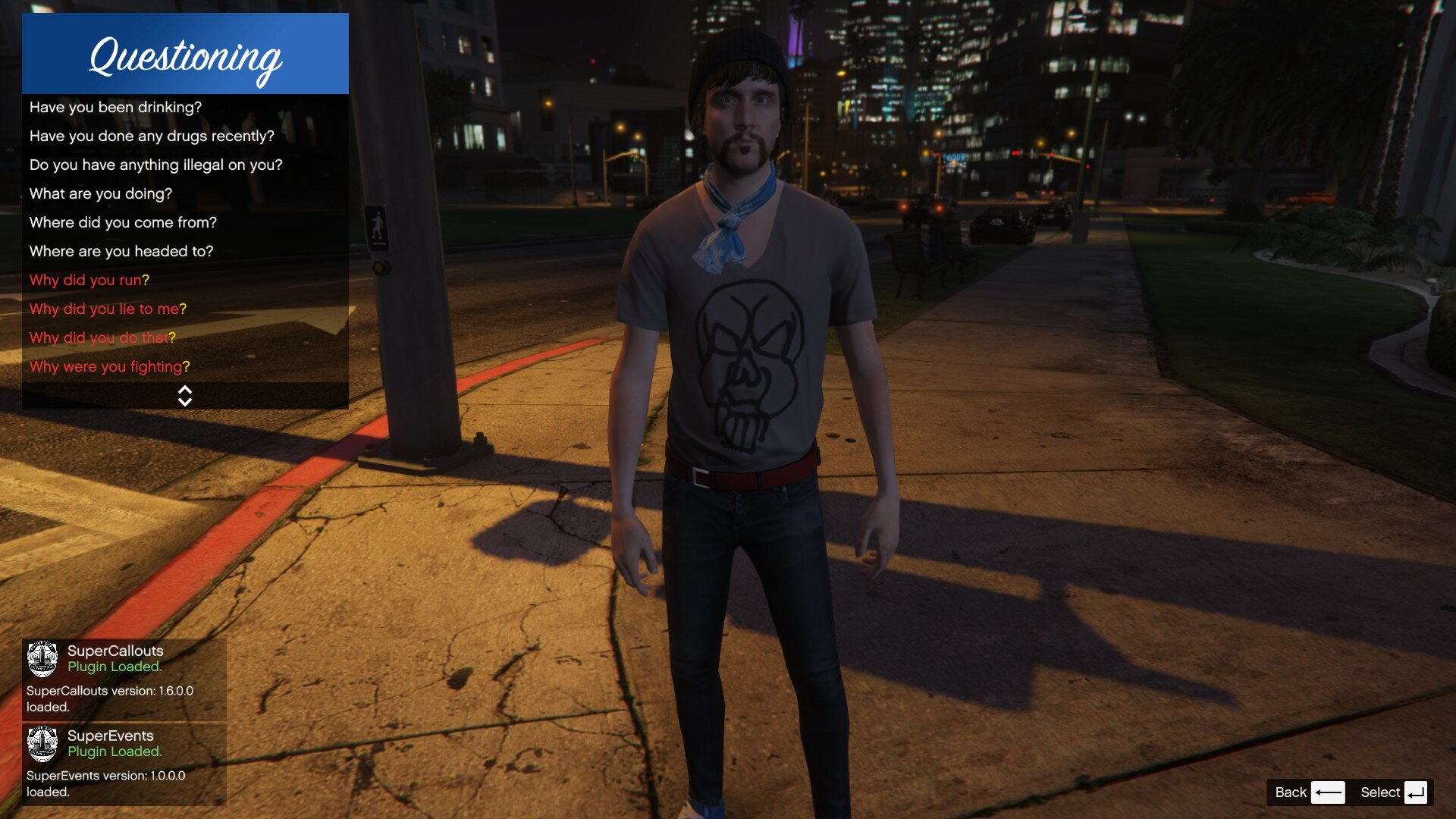
An example of a question being asked

Some examples of new questions include:

"Does this gun belong to you?"

"Why did you do that?"

"Why did you lie to me?"

"Why were you fighting?"

"Is this your vehicle?"

"I see you have a concealed carry permit.  Do you have your weapon?"

Instructions: 1. Download the file

                        2. Go to the plugins/LSPDFR/StopThePed folder in your main directory

                        3. Drag and drop the CustomQuestions.xml into the folder

                         4.   Drag and drop the PedAnswers.xml

                       5. Drag and drop the TrafficStopQuestions.xml

                       6. Replace when prompted

What's New in Version 1.3.2.8

Released

Added Citation refusals

User Feedback

Recommended Comments

manu450

Members

i get this answer almost all the time...you know who my mom is? you know who you messing with.. would be nice to have it cycle. 

Westcoaster

Members Author

(edited)

37 minutes ago, manu450 said:

i get this answer almost all the time...you know who my mom is? you know who you messing with.. would be nice to have it cycle. 

Unfortunately, that's not in my control. RNG just decides that answer a lot for some reason. I think the only way to stop it entirely is to remove it.

Edited by Westcoaster

cooltheme

Members

This is really good. Feel like a real investigation.

FrizeeY

Members

Hello can anyone help? when i ask a ped a question there answers show up for a split second and then fade away fast. How to fix?


FrizeeY

Members

Could you help?, When I ask peds questions they answer but I can't see the answer for more than 000,1 second so I can't really traffic stop 

Devin Plays

Members Contributor

On 2/15/2020 at 2:13 PM, FrizeeY said:

Could you help?, When I ask peds questions they answer but I can't see the answer for more than 000,1 second so I can't really traffic stop 


If you're using the speedometer from Enhanced Vehicle Actions, that will cause the answer to only display briefly. You'll need to disable that speedometer. In addition, if you're using CarHUD, while in the car, its speedometer will have the same effect.


I changed to using the speedometer from manual vehicle transmissions, and just disabled everything else it does, and now it works fine
https://www.gta5-mods.com/scripts/manual-transmission-ikt

Hey @Westcoaster I really enjoy the work that was put into this plugin.


I was wondering if there was any way we could add questions regarding ownership of the vehicle. I see that you have do you own this vehicle? 

but what if it is showing up under someone elses registration? 

I'd like to ask stuff related to that! 

I would add it myself but I was unable to find the questions in regards to this. 


Thank you!!

Westcoaster

Members Author

6 hours ago, Raptor Credentials said:

Hey @Westcoaster I really enjoy the work that was put into this plugin.


I was wondering if there was any way we could add questions regarding ownership of the vehicle. I see that you have do you own this vehicle? 

but what if it is showing up under someone elses registration? 

I'd like to ask stuff related to that! 

I would add it myself but I was unable to find the questions in regards to this. 


Thank you!!

In the Vehicle section, there are some questions "Is this your vehicle," and "Is the owner of the vehicle aware that you're using it?"

ACxbAiLzA

Members

So currently using "Custom Questions" mod on this "Killer Clown" I arrested. After been given consent to search his person and patting him down, I found a screwdriver, so I simply asked him why he had tools on him which he replied:


"I'm.... I'm so sorry. You got me. He's in locker #12 at Vinewood Self Storage"


like wtf?? Can I like, follow up on that? or was that some kind of randomly generated response? Was quite an interesting response but now I'm not so sure as I don't even know how to go about it, if its even possible to do so.

bjackson1991

Members

On 9/27/2019 at 6:36 PM, Westcoaster said:

I actually put in a question "Do you understand your Miranda rights?"

perfect


Hobocharlie67

Members

I don't know why this is happening, but whenever I go on duty my game crashes. I know it's caused by this because it started as soon as I installed this. Please help!

Hadyfaik

Members

Nice ! happy to try them out thanks for writing the questions

Create an account or sign in to comment

Latest Mods

Account

Navigation

Search

Search

Configure browser push notifications

Chrome (Android)
  1. Tap the lock icon next to the address bar.
  2. Tap Permissions → Notifications.
  3. Adjust your preference.
Chrome (Desktop)
  1. Click the padlock icon in the address bar.
  2. Select Site settings.
  3. Find Notifications and adjust your preference.



