Skip to content
View in the app

A better way to browse. Learn more.

LCPDFR.com

A full-screen app on your home screen with push notifications, badges and more.

To install this app on iOS and iPadOS
  1. Tap the Share icon in Safari
  2. Scroll the menu and tap Add to Home Screen.
  3. Tap Add in the top-right corner.
To install this app on Android
  1. Tap the 3-dot menu (⋮) in the top-right corner of the browser.
  2. Tap Add to Home screen or Install app.
  3. Confirm by tapping Install.

ELS reflections "reworked" 1.0.6

(4 reviews)

17 Screenshots

for 1.0.6 - may the settings for the extralights in the visualsetttings.dat is a bit high. you can change them with substitue this, or better type in those values. So the busses and trucks dont have to bright "roundabout lights".

car.extralight.day.emissive.on        2.00  
car.extralight.night.emissive.on    1.00 


... reworked the emergency reflections:

- decreased ELS Ranges

- increased corona values

- increased takedowns, better sight now


installation:

... unzip the archive and replace the ELS file you choose with the ELS.Ini in your GTA V main folder( -or in the folder where  the EMS files located, may a mod folder, i only use my main folder). May you took a backup, but you get the vanilla settings by the orginal ELS download.


May important  for "sheriffs" ? : in version 1.0.5, the AI and Player ELS reflection Range massively decreased to "only" 100m, or 0,1mile(?), dont know what they use, metric or us system?  Thats realistic, for city patrols, so the light dont shine through 10 buildings ... i dont know, how its in the wilderness/landscape. if the effects are not ok there, change the

AI and Player ELS Range in the ELS.ini  "may to 250-500 ?!"


actual settings: 

[ GENERAL ]
MaxActiveVehs = 40
ElsMaxRangePl = 100      (250-500)   "may be better for wilderness reflections" - its funny, at the ElS release time,

                                                                     the advice were: "set Els Range to 10000? 10km reflections 😉
ElsMaxRangeAi = 100     (250-500)   
ElsActiveOnAi = true
ElsTrafCtrlOn = true

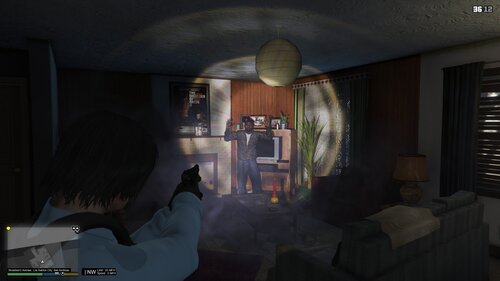
20190916113801_3.thumb.jpg.3bf655570a5ae53c04f8fde19ca31fa8.jpg

20190916113802_1.thumb.jpg.9cc39c16587731f2f5dd848f078f6147.jpg


(these pics are older with much higher Values, if you like it more coloured, you can change all ElS.ini setings to 3-4 (size,range,intensity ; expect of takedown lights) ... but for me its a little to much 😉 

20190824190956_2.jpg

20190824190936_2.jpg

What's New in Version 1.0.6

Released

1.0.6

balanced some settings:

- increased mirror reflections in the visualsettings. so blank materials like windows or metal reflecting more than walls or wood.

- "stolen" 😉 some hopefully nice settings from ECED and Radiance, (thx to devs),  to get better balanced visuals

- little balancings on ELS.ini


20190916122405_2.thumb.jpg.e7ac38208551b7302d8f900f0d63b717.jpg


20190916122228_2.thumb.jpg.517b47842a55e485758d1c82d45cb8a8.jpg20190916122228_1.thumb.jpg.ca80c880330cc8528b93e6444f3fbcfd.jpg20190916122227_3.thumb.jpg.3247a426d3cd4fc5eb5aeec6da256069.jpg20190916122227_2.thumb.jpg.becd1534ecd8f4e5d3ba928eec7f0a0a.jpg20190916122227_1.thumb.jpg.cf630a94dc717244c6a562332ec83753.jpg20190916122226_1.thumb.jpg.c76966433fe94eb37e39bfb623857175.jpg


1.0.5

... changed settings a bit


installation: unpack the archive - replace your ELS.ini from your main folder with this one. Have fun.


-  visualsettings.dat is in the download, but you can keep your own one

20190911152553_2.jpg

20190911152551_1.jpg

User Feedback

Recommended Comments

ALEX 1 ADAM 20

Members

this is very realistic this is a definite download for anyone that wants to be more realistic.

Can this be used with radiance or any visual effects?


Largo1975

Members Author

yes, sure ... radiance, etc. are "only" personal reworked visualsettings.dat files. By the next update i put my visualsettings in the download. The diference to the other files is the: misc.corona size and misc.corona intense, thats a trick to  give a power boost to the emerge lights. The side effect is, that all other coronas inc. Heradlights, Buslights, Commercials, etc. may override and the whole lightning is not balanced well, while the emerges are very good, no question!  With my own Visuals, i tryed to find the middle of that.

Simulator Liam

Members

Now thats what i call realistic. Thank You!

Pazzi

Members

Hi, will it also enhance the ELS lights corona from distance?

Largo1975

Members Author

hi, ELS is only for the reflection "colour" ... it will enhance the corona of the reflection !! The car coronas that generates your "light-output" are controlled by the visualsettings. 

These ELS setting doing a bit the "opposit" you asked for, inside the setted radius of 75 meters, the effects are balanced.

 greetings

medicbobs

Members

I've been looking for something that will fix the issue with the police lights shining through 10 buildings haha. Will this fix that?

ALEX 1 ADAM 20

Members

is this a bug where if u get too far from your patrol car or a ai patrol car where your police lights turn off?

medicbobs

Members

On 9/24/2019 at 12:19 PM, FHPDPOLICEDEPT5 said:

is this a bug where if u get too far from your patrol car or a ai patrol car where your police lights turn off?

No, it's not a lighting issue. It's basically just if you're blocks away from a scene and the lights flash on buildings when there is no way there could be reflections lol. 

ALEX 1 ADAM 20

Members

43 minutes ago, medicbobs said:

No, it's not a lighting issue. It's basically just if you're blocks away from a scene and the lights flash on buildings when there is no way there could be reflections lol. 

i fixed it i turned up the corona distance to 3000 instead of 75.

medicbobs

Members

1 hour ago, FHPDPOLICEDEPT5 said:

i fixed it i turned up the corona distance to 3000 instead of 75.

Oh shit ok. I'll try it out. Thanks!

1 hour ago, FHPDPOLICEDEPT5 said:

i fixed it i turned up the corona distance to 3000 instead of 75.

Whats the actual setting that deals with that? Is it in the visualsettings or actual ELS?

ALEX 1 ADAM 20

Members

On 9/27/2019 at 5:57 PM, medicbobs said:

Oh shit ok. I'll try it out. Thanks!

Whats the actual setting that deals with that? Is it in the visualsettings or actual ELS?

els configuration setting in main directory

JBin818

Members

So from what I understand, if I'm correct the ElsMaxRangePl & AI is how far the light reflects off the walls/buildings?  I thought that was the visualsettings file.  After you install ELS you notice your emergency lights are very dim and users recommended radianceV to brighten and I thought RadV (Visualsettings file) changed the distance of how far the light reflected.  In 0.4 they created where there is a traffic stop that spawns and at night you can see the reflections off the walls/buildings.  So I would go look for the stop and after walking around 2-3 buildings in some areas and finally see the stop and think how could I see the lights off the walls from where this stop is?  Example is in Paleto Bay there is a traffic stop that spawns in the Ammunation parking lot.  I can see the reflections off the building of the Sheriff Station on the corner.  The Ammunation Parking Lot, which is on the East side of Ammunation, then another building and then across the street is the sheriff station and some how you can see the reflection.  I didn't know what the settings were in the ELS.ini except the traffic control which I had to set to false because it would cause the suspect to drive forward until it crashed.  From the ELS original download the ElsMaxRange for AI=500 and PL=800 so no wonder I could see the reflections through 3 buildings.  Also why is PL 300 more than AI?  In the wilderness maybe the light will bounce off trees and bushes.  Like you said maybe up that to 250.  I'll try this out.  I'll check out your visualsettings too.  I use RadV but would like to try someone else settings.  Thanks!


Largo1975

Members Author

hey, sry for the late response. youve understand almost right, i think normally a range about 250-500 meters would be realistic, but it seems theres no real ELS shadow script that works with walls and corners, so that ELS is just a radius reflection, sadly ignoring buildings, etc. For me to avoid, watching the reflections about kilometers, 75 is a good value in the city, that look not so heavy. But at least it would be nice if the shadows would react  to the enviroment. Greets.

medicbobs

Members

On 11/17/2019 at 5:21 AM, Largo1975 said:

hey, sry for the late response. youve understand almost right, i think normally a range about 250-500 meters would be realistic, but it seems theres no real ELS shadow script that works with walls and corners, so that ELS is just a radius reflection, sadly ignoring buildings, etc. For me to avoid, watching the reflections about kilometers, 75 is a good value in the city, that look not so heavy. But at least it would be nice if the shadows would react  to the enviroment. Greets.


Thanks for the explanation man!

OfficerKingsley

Members

I'm having issues with this ELS where the AI don't respond with lights and sirens.

medicbobs

Members

On 8/30/2020 at 3:21 PM, OfficerDaniel69 said:

I'm having issues with this ELS where the AI don't respond with lights and sirens.

Go to your ELS.ini and make sure ELSACTIVEONAI is true. Other than that, maybe check your ini settings if you're using other mods like ultimatebackup, some of those make the units respond non-emergent. 

medicbobs

Members

Need to update this topic. I was having issues with the 75 and 75 range. The AI were not responding with lights. I am using ElsMaxRangePl = 125
ElsMaxRangeAi = 450 and it's working fine again. 

Create an account or sign in to comment

Latest Mods

Account

Navigation

Search

Search

Configure browser push notifications

Chrome (Android)
  1. Tap the lock icon next to the address bar.
  2. Tap Permissions → Notifications.
  3. Adjust your preference.
Chrome (Desktop)
  1. Click the padlock icon in the address bar.
  2. Select Site settings.
  3. Find Notifications and adjust your preference.