Skip to content
View in the app

A better way to browse. Learn more.

LCPDFR.com

A full-screen app on your home screen with push notifications, badges and more.

To install this app on iOS and iPadOS
  1. Tap the Share icon in Safari
  2. Scroll the menu and tap Add to Home Screen.
  3. Tap Add in the top-right corner.
To install this app on Android
  1. Tap the 3-dot menu (⋮) in the top-right corner of the browser.
  2. Tap Add to Home screen or Install app.
  3. Confirm by tapping Install.

Liberty City Police - Traffic Safety Tahoe V.1.0

(1 review)

1 Screenshot

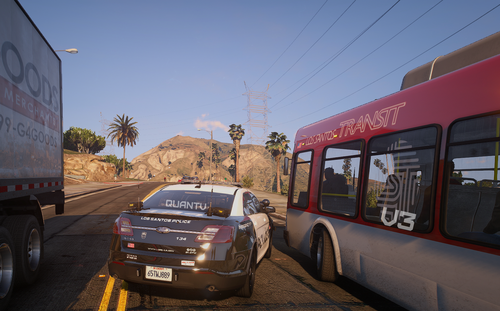
I recently made a tahoe skin, Liberty City police, and now I want to put it into the game so I can use it. Could someone help me transfer it so people can download it?

I want to be able to use SparkIV to put it into my game. I'm pretty proud of the skin, but if it's all screwed up, mind you it's only my first one.

It would also be great if someone could explain/teach me how to transfer a vehicle skin into the game, or as a download, for the future. I intend on making similar skins as a "series" of downloads.

*Download Attatched

I assure you this is VIRUS FREE.

I claim this skin, and would appreciate if nobody would copy/edit this without my permission.

Do not claim this skin as your own.

Anyone who helps me convert this may receive partial credit.

Thanks LCPDFR Community,

-Zelyth

User Feedback

Recommended Comments

MichaelV

Friends of LSPDFR

Cool font!

TheLocalKing

Members

did you draw the black? use a template next time if you did.

Zelyth

Members Author

Lol yeah. I'll be on the watch for a black and white template. But mind you, this IS my first skin. :)

Pengi

Members

Head over to GPM, they have a B&W template pack :)

Create an account or sign in to comment

Account

Navigation

Search

Search

Configure browser push notifications

Chrome (Android)
  1. Tap the lock icon next to the address bar.
  2. Tap Permissions → Notifications.
  3. Adjust your preference.
Chrome (Desktop)
  1. Click the padlock icon in the address bar.
  2. Select Site settings.
  3. Find Notifications and adjust your preference.